Revision History: Writing Process Visibility for Google Docs & Slides icon

Revision History Chrome Extension Analysis

Automation & Workflow Efficiency

Store listing title: Revision History: Writing Process Visibility for Google Docs & Slides

Chrome extension ID: dlepebghjlnddgihakmnpoiifjjpmomh

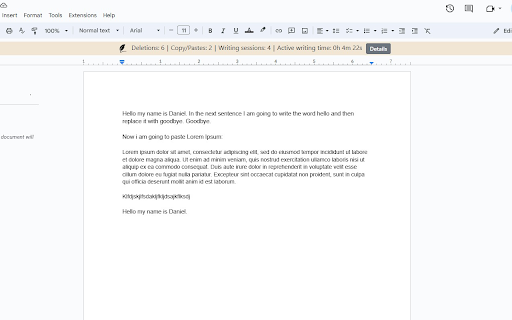
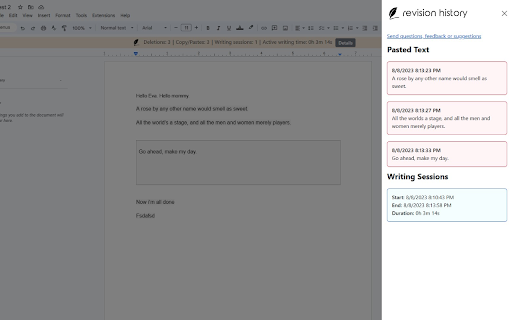
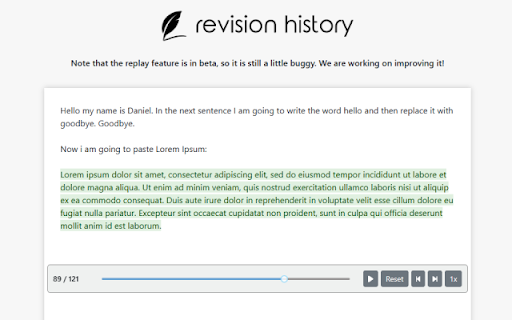
This extension records the editing lifecycle of Google Docs and Slides, providing teachers with a visual replay and data analytics of how an assignment was completed. It helps distinguish between authentic student effort and potential external copying or AI-generated text.

Version:1.11.3
Size:3.58MiB
Last updated:

Overview

Installs

200K+

Rating

3.7

230 reviews

Languages

19 locales

Includes Deutsch, English, Nederlands, dansk...

Market analysis

Review-backed positioning, friction, and market signals for this Chrome extension.

Backed by review samples

Macro category

Automation & Workflow Efficiency

Pricing friction

High review signal

Complaint intensity

Moderate review signal

Listing & review signals
Observed signals from store listing text and review samples.

Listing positioning

Revision History positions itself as an essential classroom tool for educators to monitor student writing processes, specifically to identify AI usage and plagiarism. It emphasizes local data processing for privacy and offers features like document replay, copy-paste detection, and writing pattern analysis to foster academic integrity.

Inferred product pattern

Specialized B2B/EdTech utility that provides forensic visibility into document creation to ensure academic honesty.

Review-backed pain points

Teachers express significant frustration regarding the document limit, citing that their own lesson planning and template creation consumes their limited 'free' quota, forcing unwanted subscription upgrades.

Observed feature gaps

Users desire better control over which documents are tracked, the ability to download reports or replay videos for administrative evidence, and cross-browser support beyond Chrome.

Tags
Teacher ToolsAcademic IntegrityWriting AnalyticsGoogle ClassroomAI Detection
Target users

- K-12 Teachers

- University Faculty

- School Administrators

Primary use cases

- Reviewing student writing history

- Detecting unauthorized copy-paste actions

- Analyzing writing time and patterns

- Conducting formative assessments

Positive themes

- Effective at identifying potential academic misconduct

- Valuable for productive conversations with students about writing processes

- Intuitive interface for viewing document history

- Highly useful alternative to standard AI detectors

Negative themes

- Frustration with usage limits on the free tier

- Inconsistent flag accuracy (false positives or negatives)

- Billing transparency and mid-year feature locking

- Inability to easily toggle analysis on/off for personal documents

Observed friction

- Payment required for meaningful usage

- Free-tier complaints detected

- Performance complaints detected

- Strong friction exists due to the 150-document monthly limit, which users feel is consumed too quickly, especially when it tracks teacher-created documents instead of just student submissions.

Evidence boundary: Data gathered from 233 user reviews, including both highly satisfied educators praising the tool's effectiveness and frustrated users highlighting restrictive free-tier limitations. Review sentiments are split between extreme utility for pedagogical purposes and dissatisfaction with the monetization strategy.
Complaint summaries
Review-backed complaint signals grouped by operational area.

Support

Complaints focus on the perceived lack of transparency regarding the transition from a free model to a restricted freemium model, with users feeling misled by prior developer promises.

Reliability

Occasional technical issues where analytics fail to generate, displaying 'unable to analyze' or 'too short for evaluation' errors for valid documents.

Privacy

No specific privacy violation complaints; the extension is generally praised for its local analysis model.

Access & pricing

- Free entry with paid features

- Account required for core usage

- Limited free usage observed

Store listing facts

Listing assets

- Screenshots: 3

- Videos: 1

- Languages: 19

Trust signals

- Privacy policy

- Developer contact

- Official website

Store metadata

- Version: 1.11.3

- Size: 3.58MiB

- Last updated:

Listing SEO keywords

Search intent keywords
Keyword signals for evaluating how users may discover, compare, or search for this extension category.

Core discovery

check student writing historyGoogle Docs plagiarism checker for teachersRevision History for Google Classroomdetect AI writing in student papers

Comparison

Draftback alternativeOriginality.ai reviewProcess Feedback comparison

Problem

student plagiarism detectionhow to tell if a student used AItrack Google Doc editing history

Alternative

best teacher tools for academic integrityGoogle Docs revision history tracker

Similar extensions

Jump to related discovery paths:

Screenshots

Revision History: Writing Process Visibility for Google Docs & Slides screenshot

Links

Recommended Chrome extensions

Related listings from the same category, trending peers, and the same publisher portfolio.

Browse education
TeacherTab icon

TeacherTab

Revision History

Transform every new tab into a digital breakroom for teachers. Access essential tools, daily tips, and community resources.

Installs

3K+

Rating

4.4

Reverso – Translation, dictionary icon

Reverso – Translation, dictionary

Reverso Technologies Inc.

Translate and learn languages while reading or watching movies online. It's free.

Installs

200K+

Rating

4.6

Rapid Journal Quality Check icon

Rapid Journal Quality Check

jrk.devgit

Displays rankings and h-index for academic journals next to Google Scholar search results.

Installs

200K+

Rating

4.2

Google Meet Breakout by Robert Hudek icon

Google Meet Breakout by Robert Hudek

Unknown developer

Only the teacher needs to install. Completely Free and your Data is Private. Google Classroom integration, Slider Control.

Installs

200K+

Rating

4.3

Toucan by Babbel - Language Learning icon

Toucan by Babbel - Language Learning

jointoucan.com

Learn a new language just by browsing the internet.

Installs

200K+

Rating

4.6

Certificate Enrollment for ChromeOS icon

Certificate Enrollment for ChromeOS

google.com

Request a certificate for your device.

Installs

200K+

Rating

4.4

Add to Google Classroom icon

Add to Google Classroom

Canopy

This extension adds the current site to Google Classroom

Installs

200K+

Rating

4.2

Knowt: Quizlet Import, AI Notes & Flashcards icon

Knowt: Quizlet Import, AI Notes & Flashcards

Knowt

Automatically import flashcards and notes from any video, PDF, article, or flashcard site. Knowt is the fastest way to study.

Installs

100K+

Rating

4.9

Padlet Mini icon

Padlet Mini

engine

Collect and bookmark the best of the web for yourself or with friends.

Installs

100K+

Rating

4.2

Readlang Web Reader icon

Readlang Web Reader

readlang

Read websites in the language you're learning, translate words you don't know, and we'll create flashcards to help you remember.

Installs

100K+

Rating

4.3