TeacherTab icon

TeacherTab Chrome Extension Analysis

Tab & Bookmark Productivity

Chrome extension ID: dmpmgmiphbffkpnejlnjmnpeppmdnhfk

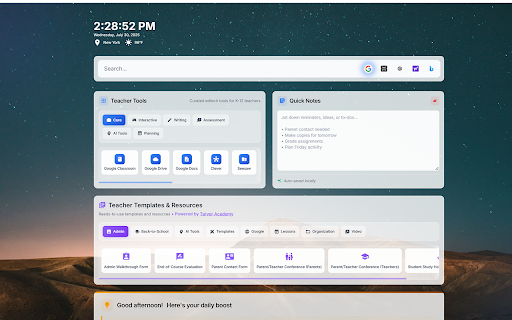
A Chrome extension that replaces the default new tab page with a customized dashboard for teachers. It features a multi-engine search bar, curated EdTech tool categories, quick notes, and access to various teaching templates.

Version:1.7
Size:5.33MiB
Last updated:

Overview

Installs

3K+

Rating

4.4

7 reviews

Languages

1 locales

Includes English

Market analysis

Review-backed positioning, friction, and market signals for this Chrome extension.

Backed by review samples

Macro category

Tab & Bookmark Productivity

Pricing friction

Low review signal

Complaint intensity

Low review signal

Listing & review signals
Observed signals from store listing text and review samples.

Listing positioning

TeacherTab positions itself as a digital breakroom and productivity hub tailored for K-12 educators. It aims to centralize essential teaching tools, daily inspiration, and community resources directly into the browser's new tab page.

Inferred product pattern

A niche-specific productivity dashboard that leverages the new tab interface to aggregate tools for a professional vertical.

Review-backed pain points

Users expressed a desire for more control over the dashboard, specifically the ability to edit or delete pre-set teacher tools and templates. Additionally, some users found the background images too visually distracting for ADHD-friendly use.

Observed feature gaps

Deep customization for the pre-populated resource sections and the ability to upload custom or solid-color backgrounds.

Tags
Teacher ProductivityEdTech DashboardEducation ToolsNew Tab Extension
Target users

- K-12 Educators

- School Districts

Primary use cases

- Centralizing access to EdTech platforms

- Quick lesson planning and resource retrieval

- Managing teaching tasks via integrated notes

- Accessing Google Workspace templates

Positive themes

- Faster access to educational resources

- Effective visual task reminders

- Helpful organization of bookmarks

Negative themes

- Limited customization for curated sections

- Difficulty adjusting background visibility

- Compatibility issues with school-managed accounts

Observed friction

- Account blocking complaints detected

- No pricing friction observed; the personal version is advertised as free.

Evidence boundary: Data extracted from the product listing and 7 user reviews. The sample size of reviews is small (7), which may not reflect the full user experience.
Complaint summaries
Review-backed complaint signals grouped by operational area.

Support

No direct support complaints, though users have asked for guidance on how to perform customization tasks.

Reliability

One report of the extension not working when using school-managed (.org) accounts.

Privacy

No privacy or security complaints observed.

Access & pricing

- Free entry with paid features

- Account required for core usage

- Free plan or free usage claimed

Store listing facts

Listing assets

- Screenshots: 1

- Videos: 0

- Languages: 1

Trust signals

- Privacy policy

- Developer contact

Store metadata

- Version: 1.7

- Size: 5.33MiB

- Last updated:

Listing SEO keywords

Search intent keywords
Keyword signals for evaluating how users may discover, compare, or search for this extension category.

Core discovery

Teacher New TabEdTech DashboardK-12 Educator ToolsTeacher Productivity Extension

Comparison

Teacher resource hubEducational dashboard

Problem

Organizing teaching toolsAccessing EdTech resources quickly

Alternative

Chrome extension for teachersTeacher bookmark manager

Similar extensions

Jump to related discovery paths:

Screenshots

TeacherTab screenshot

Links

Recommended Chrome extensions

Related listings from the same category, trending peers, and the same publisher portfolio.

Browse education
Revision History: Writing Process Visibility for Google Docs & Slides icon

Revision History: Writing Process Visibility for Google Docs & Slides

Revision History

Built for teachers: See how students write, not just what they wrote. View the writing process in Google Docs & Slides.

Installs

200K+

Rating

3.7

Trancy - AI Translator & Dual Subtitles icon

Trancy - AI Translator & Dual Subtitles

Trancy

Trancy provides bilingual subtitle for platforms like YouTube, Disney+, as well as AI translator for websites.

Installs

300K+

Rating

4.7

Google Meet Attendance List icon

Google Meet Attendance List

MeetList

Easiest way to save the attendance list for your meetings or lectures

Installs

300K+

Rating

4.7

edpuzzle icon

edpuzzle

Edpuzzle

Import your favorite educational YouTube video into Edpuzzle with a click!

Installs

300K+

Rating

4.2

rikaikun icon

rikaikun

Erek Speed

rikaikun shows the reading and English definition of Japanese words when you hover over Japanese text in the browser.

Installs

200K+

Rating

4.7

Mouse Tooltip Translator - PDF & Netflix YouTube dual subs icon

Mouse Tooltip Translator - PDF & Netflix YouTube dual subs

ttop324

Mouse Tooltip Translator translate mouseover text using google translate. Support OCR, TTS, manga translator & pdf translator.

Installs

200K+

Rating

4.6

Paperpile Extension icon

Paperpile Extension

Paperpile

Collect, organize, annotate and cite your research papers in Chrome.

Installs

200K+

Rating

4.6

ExCITATION – Journal Ranking & Impact Factor for Google Scholar™ icon

ExCITATION – Journal Ranking & Impact Factor for Google Scholar™

Excitation Journal

Show SJR, ABS & ABDC journal rankings in Google Scholar. Sort by citations, detect predatory journals & preview abstracts — free.

Installs

200K+

Rating

4.5

OpenDyslexic for Chrome icon

OpenDyslexic for Chrome

OpenDyslexic

Format pages using the OpenDyslexic font and low contrast help

Installs

200K+

Rating

4.1

Reverso – Translation, dictionary icon

Reverso – Translation, dictionary

Reverso Technologies Inc.

Translate and learn languages while reading or watching movies online. It's free.

Installs

200K+

Rating

4.6