オクリンクプラス Webページスクリーンショット機能 icon

オクリンクプラス Webページスクリーンショット機能 Chrome Extension Analysis

Automation & Workflow Efficiency

Chrome extension ID: impenancelenbicfndonhfnegiikfpec

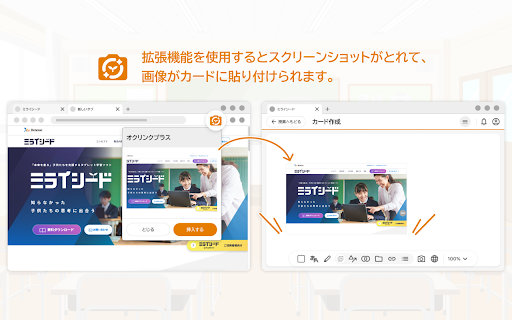
A specialized browser utility designed to capture active web page screenshots and seamlessly insert them into Okulink Plus digital learning cards. It automates the process of saving, uploading, and linking external web resources for classroom activities.

Version:2.1.0
Size:18.29KiB
Last updated:

Overview

Installs

100K+

Rating

3.0

2 reviews

Languages

1 locales

Includes 日本語

Market analysis

Review-backed positioning, friction, and market signals for this Chrome extension.

Backed by review samples

Macro category

Automation & Workflow Efficiency

Pricing friction

Low review signal

Complaint intensity

Moderate review signal

Listing & review signals
Observed signals from store listing text and review samples.

Listing positioning

Positions itself as a direct workflow helper for Benesse's Okulink Plus educational platform. It allows users to quickly capture screenshots of web pages and embed them alongside their URLs directly into Okulink Plus cards.

Inferred product pattern

An ecosystem-locked companion utility designed to improve digital asset creation inside a proprietary Japanese educational suite.

Review-backed pain points

Users experience initial setup friction where the extension does not function immediately after installation. To resolve this, they must completely close and reopen the Okulink Plus interface, an essential step missing from the official tutorial.

Observed feature gaps

The extension lacks automatic page-refresh triggers or script reinjection upon installation, which leads to initial failures on already-open Okulink Plus tabs. Additionally, the documentation/tutorial fails to instruct users on browser tab refreshing.

Tags
EducationScreenshotOkulink PlusEdTech
Target users

- Teachers using Okulink Plus

- Students using Okulink Plus

- Schools integrated with Benesse educational services

Primary use cases

- Inserting web screenshots as visual cards in Okulink Plus

- Embedding active web links directly alongside captured images for quick access

Positive themes

- Review-backed positive themes are not available due to limited high-rating review data.

Negative themes

- Initial startup failure

- Incorrect setup instructions in the official tutorial

Observed friction

- Performance complaints detected

- No pricing complaints or friction points are observed in the reviews; the tool is offered as a free companion extension.

Evidence boundary: Based on the official store listing from Benesse Corporation and a 1-star user review detailing an installation onboarding bug across Chrome and Edge browsers. The review-backed insights are limited by a very small sample size consisting of only one detailed bug report, which restricts broader analysis of long-term user sentiment.
Complaint summaries
Review-backed complaint signals grouped by operational area.

Support

There are requests for the developer (Benesse Corporation) to update the misleading onboarding tutorial, though no direct complaints about helpdesk support responsiveness are noted.

Reliability

The extension does not work immediately post-installation on active Chrome or Edge sessions, requiring a manual reload/restart of the target platform page.

Privacy

No privacy or security complaints have been reported.

Access & pricing

- Free usage observed

- Login needed for core features

- Free plan or free usage claimed

Store listing facts

Listing assets

- Screenshots: 1

- Videos: 0

- Languages: 1

Trust signals

- Privacy policy

- Developer contact

Store metadata

- Version: 2.1.0

- Size: 18.29KiB

- Last updated:

Listing SEO keywords

Search intent keywords
Keyword signals for evaluating how users may discover, compare, or search for this extension category.

Core discovery

Okulink Plus screenshotOkulink Chrome extensionBenesse Okulink card screenshoteducational screenshot tool

Problem

Okulink extension not workinghow to screenshot Okulink PlusOkulink screenshot tutorial error

Similar extensions

Jump to related discovery paths:

Screenshots

オクリンクプラス Webページスクリーンショット機能 screenshot

Links

Recommended Chrome extensions

Related listings from the same category, trending peers, and the same publisher portfolio.

Browse education
Add to Google Classroom icon

Add to Google Classroom

Canopy

This extension adds the current site to Google Classroom

Installs

200K+

Rating

4.2

Knowt: Quizlet Import, AI Notes & Flashcards icon

Knowt: Quizlet Import, AI Notes & Flashcards

Knowt

Automatically import flashcards and notes from any video, PDF, article, or flashcard site. Knowt is the fastest way to study.

Installs

100K+

Rating

4.9

Padlet Mini icon

Padlet Mini

engine

Collect and bookmark the best of the web for yourself or with friends.

Installs

100K+

Rating

4.2

Readlang Web Reader icon

Readlang Web Reader

readlang

Read websites in the language you're learning, translate words you don't know, and we'll create flashcards to help you remember.

Installs

100K+

Rating

4.3

Yomitan Popup Dictionary icon

Yomitan Popup Dictionary

yomidevs

Popup dictionary for language learning

Installs

100K+

Rating

4.8

Language Learning with Netflix & YouTube-AFL icon

Language Learning with Netflix & YouTube-AFL

App For Language

Language learning with Netflix: dual subtitles, YouTube support, AI mind maps & speaking coach for fast, fun progress.

Installs

100K+

Rating

3.9

Translate - Translator, Dictionary, TTS icon

Translate - Translator, Dictionary, TTS

uLanguage App

Accurate translate words, phrases and texts using Google Translate. Full page translator, dictionary and text to speech (TTS).

Installs

100K+

Rating

4.5

Dualsub - YouTube Subtitle Translator icon

Dualsub - YouTube Subtitle Translator

Dualsub Studio

Translate and display dual subtitles on YouTube and other video websites.

Installs

100K+

Rating

3.6

AnswerAI - Homework AI Tutor & Study Helper icon

AnswerAI - Homework AI Tutor & Study Helper

AnswerAI Team

Your AI assistant ChatGPT Plugin.Answer questions and get AI answers quickly,write emails,articles,chatbot,learning assistant.

Installs

100K+

Rating

4.9

Pix Companion icon

Pix Companion

web-extensions

Browser extension for Pix

Installs

100K+

Rating

1.4