Talk & Comment: Voice Feedback & Audio Comments for Teachers icon

Talk & Comment Chrome Extension Analysis

Automation & Workflow Efficiency

Store listing title: Talk & Comment: Voice Feedback & Audio Comments for Teachers

Chrome extension ID: djnhkfljnimcpelfndpcjcgngmefaobl

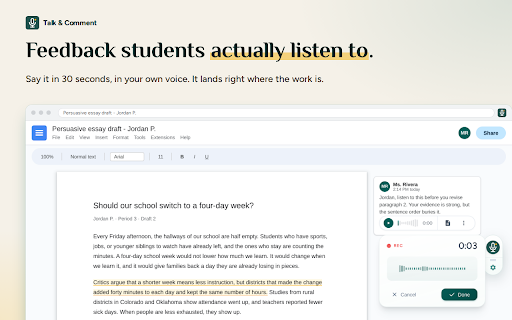
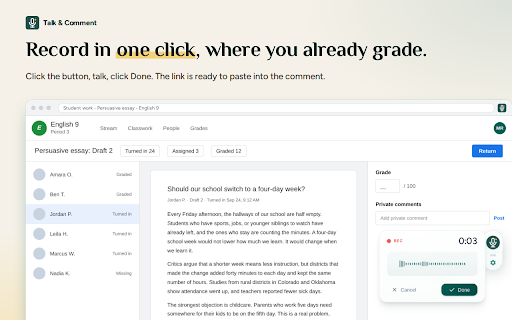
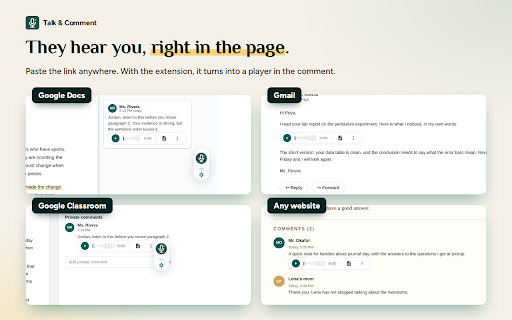
This extension allows users to record and embed audio clips directly into web forms, documents, and social media platforms. Recipients can listen to these recordings via a generated link without needing to install the extension themselves.

Version:4.8.1
Size:795KiB
Last updated:

Overview

Installs

200K+

Rating

★ 4.0

5,771 reviews

Languages

5 locales

Includes English, español, français, português (Brasil)...

Market analysis

Review-backed positioning, friction, and market signals for this Chrome extension.

Backed by review samples

Macro category

Automation & Workflow Efficiency

Pricing friction

Low review signal

Complaint intensity

Moderate review signal

Listing & review signals
Observed signals from store listing text and review samples.

Listing positioning

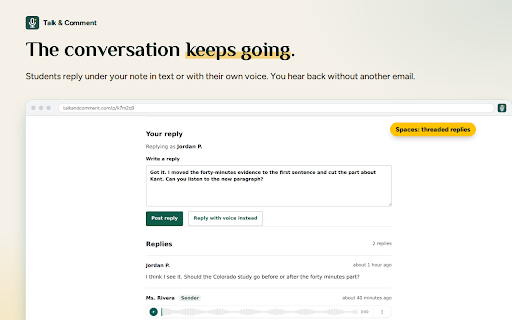
Talk & Comment is positioned as a productivity and education tool designed to streamline feedback by replacing text with voice notes. It emphasizes seamless integration with platforms like Google Docs, Classroom, and Canvas to enable faster grading and improved human connection.

Inferred product pattern

A legacy audio-embedding utility that facilitates browser-based voice recording and external link generation for audio sharing.

Review-backed pain points

Users frequently report that stored audio links expire after a period of time, leading to loss of critical data, and that the extension causes noticeable system lag and browser performance degradation.

Observed feature gaps

Lack of permanent, reliable cloud storage for voice notes, absence of offline recording capabilities, and inconsistent integration across various website interfaces.

Tags
Voice NotesEducation ToolFeedback AssistantCommunicationProductivity
Target users

- Teachers

- Students

- Educators

- Remote Teams

- Content Creators

Primary use cases

- Providing voice-based feedback in Google Classroom

- Recording voice notes for emails

- Adding audio comments to design reviews

- Sharing voice clips on social media

Positive themes

- Appreciated core functionality for providing voice feedback

- Value of hearing human tone in educational settings

- Convenience of sharing links for non-users to play audio

Negative themes

- Significant performance lag and system slowdown

- Expired or inaccessible past voice recordings

- Upload failures and technical instability

- Intrusive UI pop-ups on load

Observed friction

- Performance complaints detected

- Privacy complaints detected

- No direct payment complaints; the service claims to be free for teachers with essential features included.

Evidence boundary: The analysis is based on a wide range of user experiences highlighting both the utility of the voice-sharing feature and the technical challenges surrounding system performance and file persistence. The review data spans several years, and performance issues reported in older versions may or may not be reflective of current build stability.
Complaint summaries
Review-backed complaint signals grouped by operational area.

Support

Users express frustration over the lack of data recovery for expired links and technical failures during recording sessions.

Reliability

High incidence of reports regarding system lag, browser slowdowns, upload errors, and the expiration of recorded audio links.

Privacy

Some users raised concerns regarding the data storage practices, specifically questioning whether recordings are stored locally or on external servers.

Access & pricing

- Free entry with paid features

- No account requirement observed

- Free plan or free usage claimed

Store listing facts

Listing assets

- Screenshots: 5

- Videos: 1

- Languages: 5

Trust signals

- Privacy policy

- Developer contact

- Official website

Store metadata

- Version: 4.8.1

- Size: 795KiB

- Last updated:

Listing SEO keywords

Search intent keywords
Keyword signals for evaluating how users may discover, compare, or search for this extension category.

Core discovery

voice notes for google docsaudio feedback extensionclassroom voice recorderbrowser voice recorder

Comparison

Talk and Comment alternativevoice comment extension

Problem

Talk and Comment not workingextension lagvoice notes expired

Alternative

MoteKaizenavoice feedback tool

Similar extensions

Jump to related discovery paths:

Screenshots

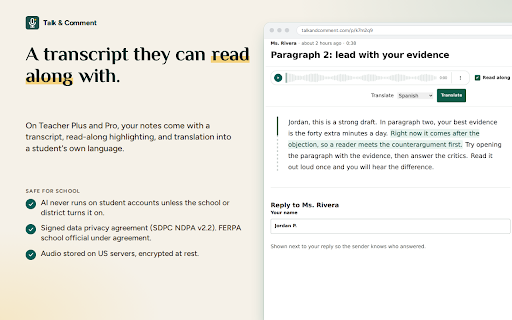
Talk & Comment: Voice Feedback & Audio Comments for Teachers screenshot

Links

Recommended Chrome extensions

Related listings from the same category, trending peers, and the same publisher portfolio.

Browse education
Aeterna: Cosmic Time Dashboard icon

Aeterna: Cosmic Time Dashboard

TalkandComment.com

Track your personal epochs, milestones, and planetary orbits every time you open a new tab.

Installs

0

Rating

★ —

Add to Google Classroom icon

Add to Google Classroom

Canopy

This extension adds the current site to Google Classroom

Installs

400K+

Rating

★ 4.2

Trancy - AI Translator & Dual Subtitles icon

Trancy - AI Translator & Dual Subtitles

Trancy

Trancy provides bilingual subtitle for platforms like YouTube, Netflix, as well as AI translator for websites.

Installs

300K+

Rating

★ 4.4

Revision History: Writing Process Visibility for Google Docs & Slides icon

Revision History: Writing Process Visibility for Google Docs & Slides

Revision History

Built for teachers: See how students write, not just what they wrote. View the writing process in Google Docs & Slides.

Installs

300K+

Rating

★ 4.1

Knowt: Quizlet Import, AI Notes & Flashcards icon

Knowt: Quizlet Import, AI Notes & Flashcards

Knowt

Automatically import flashcards and notes from any video, PDF, article, or flashcard site. Knowt is the fastest way to study.

Installs

200K+

Rating

★ 4.9

Mouse Tooltip Translator - PDF & Netflix YouTube dual subs icon

Mouse Tooltip Translator - PDF & Netflix YouTube dual subs

ttop324

Mouse Tooltip Translator translate mouseover text using google translate. Support OCR, TTS, manga translator & pdf translator.

Installs

200K+

Rating

★ 4.7

Paperpile Extension icon

Paperpile Extension

Paperpile

Collect, organize, annotate and cite your research papers in Chrome.

Installs

200K+

Rating

★ 4.1

Study Tools voor Magister icon

Study Tools voor Magister

QkeleQ10

Een extensie die verschillende aspecten van Magister verbetert en problemen ermee oplost.

Installs

200K+

Rating

★ 4.5

rikaikun icon

rikaikun

Erek Speed

rikaikun shows the reading and English definition of Japanese words when you hover over Japanese text in the browser.

Installs

200K+

Rating

★ 4.6

Reverso – Translation, dictionary icon

Reverso – Translation, dictionary

Reverso Technologies Inc.

Translate and learn languages while reading or watching movies online. It's free.

Installs

200K+

Rating

★ 4.0