Study Tools voor Magister icon

Study Tools voor Magister Chrome Extension Analysis

Tab & Bookmark Productivity

Chrome extension ID: hacjodpccmeoocakiahjfndppdeallak

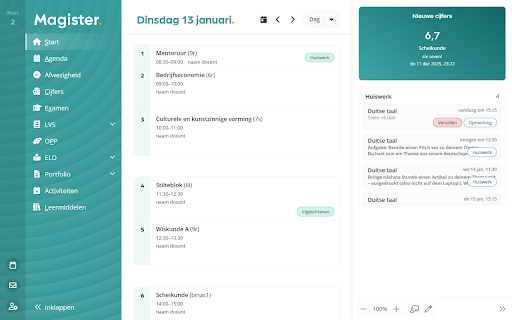
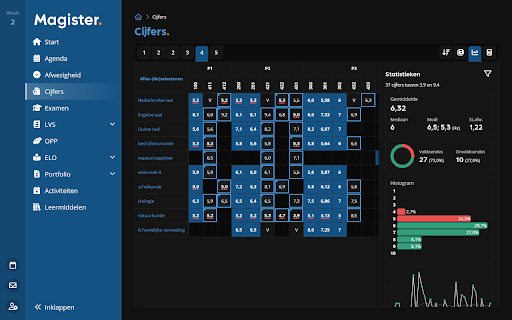
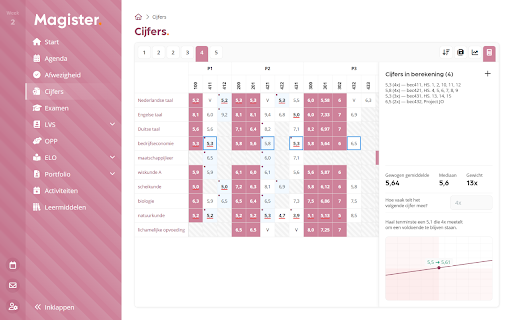
A browser extension for students using Magister that adds aesthetic and functional layers to the existing platform. Key features include a customizable dashboard, grade statistics, a grade calculator, and automated login capabilities.

Developer:QkeleQ10
Version:3.16.1
Size:382KiB
Last updated:

Overview

Installs

70K+

Rating

4.7

124 reviews

Languages

4 locales

Includes Deutsch, English, Nederlands, français

Market analysis

Review-backed positioning, friction, and market signals for this Chrome extension.

Backed by review samples

Macro category

Tab & Bookmark Productivity

Pricing friction

Low review signal

Complaint intensity

Moderate review signal

Listing & review signals
Observed signals from store listing text and review samples.

Listing positioning

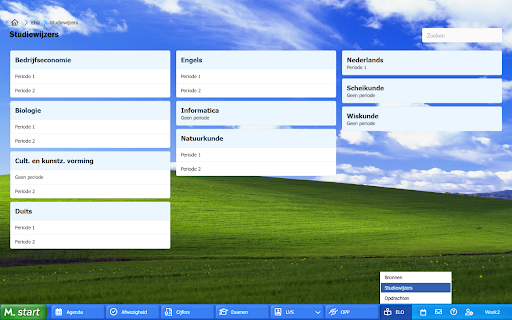
The product is positioned as a revolutionary enhancement tool for the Magister platform, designed to personalize and optimize the learning environment. It emphasizes user agency through extensive customization options for themes, dashboards, and widgets.

Inferred product pattern

A niche UI/UX augmentation tool for a specific educational web platform.

Review-backed pain points

Users report that the grade calculator is broken and cannot calculate averages or required scores. There are also complaints about themes reverting to unexpected settings (e.g., Halloween themes) and the extension occasionally failing to work or maintain selections.

Observed feature gaps

Lack of notifications for updates to homework or test information; limited selection of available background themes.

Tags
Educational UtilityUI CustomizationGrade TrackerStudent Productivity
Target users

- Students using Magister

- Dutch education users

Primary use cases

- Customizing Magister's visual interface

- Tracking academic progress and grades

- Managing school schedules through a personalized dashboard

Positive themes

- Improved visual appeal of Magister

- Helpful grade overview and statistics

- Increased ease of use

Negative themes

- Broken calculator functionality

- Unstable UI elements and theme regressions

- Software reliability issues

Observed friction

- Performance complaints detected

- No pricing friction observed in the provided data.

Evidence boundary: Analysis based on the store listing description and user reviews highlighting feature sets and specific functional bugs. Review data is primarily in Dutch and represents a subset of the total user base.
Complaint summaries
Review-backed complaint signals grouped by operational area.

Support

No direct support complaints, though one user noted difficulty finding updates.

Reliability

Users reported the extension stopping work, features like the grade calculator being broken, and settings/themes resetting unexpectedly.

Privacy

No privacy or security complaints observed.

Access & pricing

- No clear monetization signal

- Login needed for core features

- No clear pricing signal

Store listing facts

Listing assets

- Screenshots: 5

- Videos: 1

- Languages: 4

Trust signals

- Developer contact

Store metadata

- Version: 3.16.1

- Size: 382KiB

- Last updated:

Listing SEO keywords

Search intent keywords
Keyword signals for evaluating how users may discover, compare, or search for this extension category.

Core discovery

Magister extensionMagister study toolsMagister grade calculatorMagister customizationMagister dashboard

Comparison

Magister alternativesMagister tools

Problem

Magister calculator errorMagister extension not workingMagister theme issues

Alternative

Student dashboard extensionEducation productivity tools

Similar extensions

Jump to related discovery paths:

Screenshots

Study Tools voor Magister screenshot

Links

Videos: Watch

Recommended Chrome extensions

Related listings from the same category, trending peers, and the same publisher portfolio.

Browse education
EndNote Click icon

EndNote Click

EndNote Click

Fast, one-click access to millions of research papers.

Installs

5.0M+

Rating

4.0

Language Reactor icon

Language Reactor

Dioco

Learn languages effectively by watching films and series in your target language.

Installs

2.0M+

Rating

4.2

Brisk Teaching - AI that Works Where Teachers Work icon

Brisk Teaching - AI that Works Where Teachers Work

Brisk Teaching

AI for teachers, right inside Google Docs, Classroom, YouTube, and more. Tell Brisk what you need and save 10+ hours a week.

Installs

1.0M+

Rating

4.7

BetterCampus (prev. BetterCanvas) icon

BetterCampus (prev. BetterCanvas)

BetterCampus

Feature packed extension for Canvas.

Installs

1.0M+

Rating

4.7

LibKey Nomad icon

LibKey Nomad

Third Iron LLC

One-click access to millions of scholarly articles.

Installs

1.0M+

Rating

4.5

Promethean® Screen Share icon

Promethean® Screen Share

classflow

Promethean® Screen Share

Installs

1.0M+

Rating

3.0

MyBib: Free Citation Generator icon

MyBib: Free Citation Generator

MyBib

Automatically create APA style, MLA format, and Harvard referencing style citations with our citation generator add-on for Chrome.

Installs

1.0M+

Rating

4.8

Equatio - Math made digital icon

Equatio - Math made digital

Texthelp

Easily create mathematical equations, formulas and quizzes. Intuitively type or handwrite, with no tricky math code to learn.

Installs

1.0M+

Rating

3.9

Scribbr Citation Generator icon

Scribbr Citation Generator

Scribbr

Instantly get accurate citations for any webpage in APA, MLA, Chicago, Harvard and any other style with our Citation Generator.

Installs

1.0M+

Rating

3.9

Speechify — Text to Speech icon

Speechify — Text to Speech

Speechify

Read aloud any Google Doc, PDF, webpage, or book with text to speech (TTS). Natural sounding voices in 60+ languages & 1,000 voices.

Installs

900K+

Rating

4.6