TELL.WTF - text symbols & fancy fonts icon

TELL.WTF Chrome Extension Analysis

Niche Lifestyle & Gaming Hacks

Store listing title: TELL.WTF - text symbols & fancy fonts

Chrome extension ID: ageiikgnhpnpcnaifeaikpphhgealfia

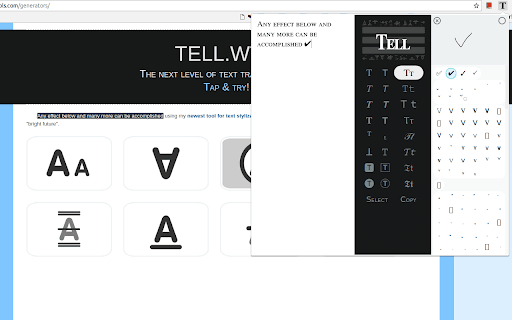
A text styling extension that allows users to apply fancy fonts and symbols to their text. Users can select existing text to edit or use a drawing interface to find specific emojis and symbols for copy-pasting into web-based applications.

Developer:Ihor Menshykov
Version:2.7
Size:3.31MiB
Last updated:

Overview

Installs

3K+

Rating

4.9

44 reviews

Languages

4 locales

Includes English, español, русский, українська

Market analysis

Review-backed positioning, friction, and market signals for this Chrome extension.

Backed by review samples

Macro category

Niche Lifestyle & Gaming Hacks

Pricing friction

Low review signal

Complaint intensity

Moderate review signal

Listing & review signals
Observed signals from store listing text and review samples.

Listing positioning

The product is positioned as a text transformation tool that converts plain text into decorative fonts and styles using various Unicode symbols. It highlights ease of use through shortcuts and a 'paint' feature for finding symbols, aiming for compatibility across instant messengers and social platforms.

Inferred product pattern

A specialized Unicode and text styling utility for social media and creative digital expression.

Review-backed pain points

Users have reported errors when typing in certain languages like Vietnamese, issues with the drawing tool not converting to images, and frustration regarding the extension being removed by Chrome for policy reasons.

Observed feature gaps

Lack of offline/PWA support and limited character support for specific non-Latin diacritics.

Tags
Fancy FontsText SymbolsUnicode GeneratorAesthetic Text
Target users

- Social media users

- Online roleplayers

- Digital communicators

Primary use cases

- Stylizing social media posts

- Decorative messaging in chat applications

- Creating aesthetic text for online forums

Positive themes

- Extensive Unicode symbol library

- Intuitive and creative user experience

- High utility for roleplaying and social media

Negative themes

- Character encoding issues with non-Latin languages

- Technical functionality breakage

- Browser compatibility and removal concerns

Observed friction

- No pricing information or friction observed in reviews or listing.

Evidence boundary: Evidence derived from user reviews highlighting Unicode variety, language-specific bugs (Vietnamese), and browser-level compatibility issues. The dataset is based on a limited number of reviews.
Complaint summaries
Review-backed complaint signals grouped by operational area.

Support

No support-specific complaints observed.

Reliability

Users mentioned technical breakage in the drawing feature and historical issues with Chrome removing the extension.

Privacy

No privacy or security complaints observed.

Access & pricing

- No clear monetization signal

- No account requirement observed

- No clear pricing signal

Store listing facts

Listing assets

- Screenshots: 1

- Videos: 0

- Languages: 4

Trust signals

- Privacy policy

- Developer contact

- Official website

Store metadata

- Version: 2.7

- Size: 3.31MiB

- Last updated:

Listing SEO keywords

Search intent keywords
Keyword signals for evaluating how users may discover, compare, or search for this extension category.

Core discovery

fancy font generatortext symbolsunicode text styleraesthetic font text

Comparison

messletters

Problem

plain text stylingdecorative texttext decoration

Alternative

font changersymbol keyboardtext styler

Similar extensions

Jump to related discovery paths:

Screenshots

TELL.WTF - text symbols & fancy fonts screenshot

Links

Recommended Chrome extensions

Related listings from the same category, trending peers, and the same publisher portfolio.

Browse communication
Loom – Screen Recorder & Screen Capture icon

Loom – Screen Recorder & Screen Capture

Loom

Record your screen and camera with one click. Share that content in an instant with a link.

Installs

7.0M+

Rating

4.6

Quillbot: AI Writing Assistant to Grammar Check, Paraphrase & Translate icon

Quillbot: AI Writing Assistant to Grammar Check, Paraphrase & Translate

quillbot

Write better emails, essays and messages with Quillbot's Grammar Checker, Paraphrasing Tool, Generative AI, Summarizer and more!

Installs

5.0M+

Rating

4.7

DeepL: translate and write with AI icon

DeepL: translate and write with AI

team-browser-extensions

Translate while you read and write with DeepL Translate, the world’s most accurate translator.

Installs

4.0M+

Rating

4.7

Mailtrack® – Email Tracker for Gmail icon

Mailtrack® – Email Tracker for Gmail

Mailsuite

The original Mailtrack®: free, unlimited email tracking for Gmail. Trusted by millions, GDPR-compliant and Google-audited.

Installs

3.0M+

Rating

4.4

HubSpot Sales icon

HubSpot Sales

signals-extension-publishing

Email tracking, CRM for Gmail, and sales productivity tools in your inbox

Installs

1.0M+

Rating

4.4

Connecteur Antidote icon

Connecteur Antidote

Druide informatique

Intégrez Antidote à votre navigateur pour corriger vos textes en temps réel et consulter ses dictionnaires et guides linguistiques.

Installs

700K+

Rating

3.0

Fathom AI Note Taker for Google Meet icon

Fathom AI Note Taker for Google Meet

Fathom

Records, transcribes & summarizes meetings FREE

Installs

500K+

Rating

4.9

GMass: Powerful mail merge for Gmail icon

GMass: Powerful mail merge for Gmail

GMass, Inc.

A powerful mass email and mail merge system for Gmail.

Installs

400K+

Rating

4.8

L.O.C icon

L.O.C

Loc Mai

L.O.C is a collection of automation tools.

Installs

300K+

Rating

4.3

Magical: Text Expander & Autofill icon

Magical: Text Expander & Autofill

Magical

Magical is a text expander and autofill automation app used by over 100K companies. Expand text like magic and auto-fill forms.

Installs

300K+

Rating

4.4