
Web Signer for Barclays Chrome Extension Analysis
Privacy, Security & Ad BlockersChrome extension ID: akfldeakecjegioiiajhpjpekomdjnmh
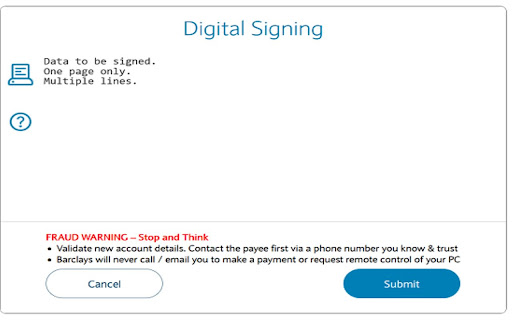
Gemalto Web Signer is a digital signature solution designed to secure online transactions by allowing users to sign documents and transaction data presented by web applications. It also provides functionality for verifying signatories' authenticity and encrypting/decrypting documents, leveraging cryptographic algorithms and hardware-based security for privacy and integrity.
Overview
Installs
100K+
Rating
★ 1.6
5 reviews
Languages
1 locales
Includes English (United Kingdom)
Market analysis
Review-backed positioning, friction, and market signals for this Chrome extension.
Macro category
Privacy, Security & Ad Blockers
Pricing friction
Low review signal
Complaint intensity
High review signal
Listing positioning
The extension is positioned as a digital signature-based software solution developed by Thales Group (Gemalto) to protect and secure Internet transactions. It emphasizes its capability to sign documents, verify authenticity, encrypt data, and provide hardware-based security for enhanced privacy and integrity.
Inferred product pattern
A legacy enterprise-grade digital signature client, likely deployed as a mandatory component for Barclays business customers to secure online transactions. While designed for security, it appears to suffer from significant reliability and usability issues, leading to user frustration due to its outdated processes and performance on modern browsers.
Review-backed pain points
Users consistently report significant pain points related to the extension's unreliability, frequently failing to work or requiring system reboots. The login process is described as overly complex and outdated, lacking modern authentication methods like mobile phone codes. Frustration is high due to the perceived lack of modernization and poor support, making the tool a source of significant operational friction for necessary banking activities.
Observed feature gaps
A key feature gap observed from reviews is the absence of modern, user-friendly authentication methods such as generating login codes via a mobile phone. There are also indications of poor cross-browser compatibility, with users reporting difficulty achieving reliable performance on Chrome and Edge.
- Barclays Bank business customers
- Users requiring secure digital signatures for online transactions
- Individuals or businesses using Barclays.net for banking
- Securely signing online documents or transaction data
- Verifying the authenticity of signatories in web applications
- Encrypting and decrypting documents for enhanced security
- Facilitating secure login and transaction authorization for Barclays online banking
- No clear positive themes emerged from the limited review data; even the single higher-rated review contains complaints.
- Unreliable performance and frequent failures to work (e.g., 'works 1 in 3-5 times')
- Complex and outdated login processes compared to modern banking methods (e.g., mobile phone codes)
- Frequent requirement for laptop reboots to achieve functionality
- Poor reliability and difficulty getting the extension to work on Chrome and Edge browsers
- Perceived lack of modernization and poor service from Barclays related to the tool
- Performance complaints detected
- Review-backed data on pricing friction is not available.
Support
One review explicitly mentions 'help is zero terrible service,' indicating dissatisfaction with support when issues arise.
Reliability
There are significant complaints regarding the extension's reliability, with users stating it only works intermittently (e.g., '1 in 3-5 times'), often requires system reboots, and performs poorly or unreliably on Chrome and Edge browsers.
Privacy
Review-backed data on privacy complaints is not available.
- No clear monetization signal
- Account required for core usage
- No clear pricing signal
Store listing facts
- Screenshots: 1
- Videos: 0
- Languages: 1
- Privacy policy
- Developer contact
- Version: 2.3.1.7
- Size: 360KiB
- Last updated:
Listing SEO keywords
Core discovery
Comparison
Problem
Alternative
Similar extensions
Jump to related discovery paths:
Screenshots
Links
Privacy policy: https://www.thalesgroup.com/en/personal-data-protection-policy