Mirror Mode for Google Meet™ icon

Mirror Mode for Google Meet™ Chrome Extension Analysis

Automation & Workflow Efficiency

Chrome extension ID: akmglodbcihkcgojpdmbocmlpkfjhfof

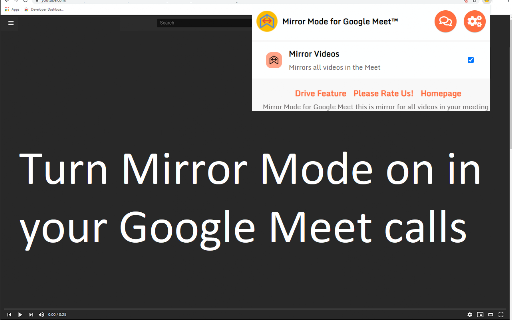
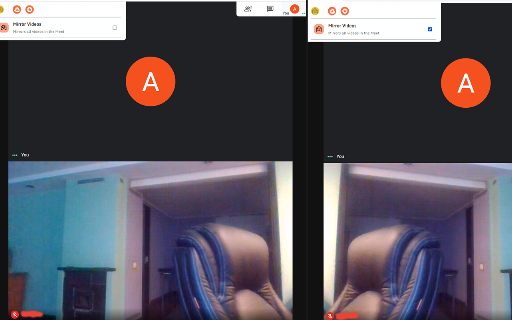
Mirror Mode for Google Meet is a free Chrome extension that allows users to mirror videos of participants in a Google Meet call. It can be accessed from the extension's popup or directly within the meeting interface, offering a way to flip video feeds.

Developer:Free Apps
Version:3.0.0
Size:522KiB
Last updated:

Overview

Installs

100K+

Rating

4.6

453 reviews

Languages

41 locales

Includes Deutsch, English, English (United States), Filipino...

Market analysis

Review-backed positioning, friction, and market signals for this Chrome extension.

Backed by review samples

Macro category

Automation & Workflow Efficiency

Pricing friction

Low review signal

Complaint intensity

High review signal

Listing & review signals
Observed signals from store listing text and review samples.

Listing positioning

This Chrome extension positions itself as a free tool to enable or disable mirror mode for all videos within a Google Meet call. It highlights usability directly within the meeting window or via the extension's popup, aiming to simplify video mirroring for participants.

Inferred product pattern

A free Chrome extension designed to add a specific video manipulation feature to Google Meet, but with significant reported issues in its core functionality.

Review-backed pain points

Multiple users report that the extension does not function as advertised, failing to mirror videos for other participants and sometimes only mirroring the user's own camera. There are also reports of inconsistent operation and general non-functionality.

Observed feature gaps

Users expect the extension to be integrated more intuitively within the Google Meet interface, with one review suggesting it should appear in the 'More options' menu. There are also claims that the mirroring is inconsistent, suggesting a potential gap in reliable functionality.

Tags
Google MeetMirror ModeVideo MirroringMeeting Productivity
Target users

- Google Meet users

- remote workers

- students

- educators

Primary use cases

- mirroring video feeds in Google Meet

- improving clarity for visual presentations

- facilitating better self-perception during calls

Positive themes

- useful for specific visual needs (e.g., children's drawings)

- generally good job

Negative themes

- does not work as expected

- only mirrors user's own camera

- does not mirror other participants' videos

- inconsistent functionality

- sketchy clicks

Observed friction

- The extension is advertised as free, with no pricing friction observed in the listing or reviews.

Evidence boundary: Evidence for this analysis is derived from the Chrome Web Store listing details, including the title, short and long descriptions, developer information, and user reviews. All provided reviews were considered. The analysis is limited to the information publicly available on the Chrome Web Store. The sentiment distribution may not be fully representative of all users, as only a sample of reviews was provided. The 'helpful' and 'low_rating' tags on reviews were used to prioritize signal extraction.
Complaint summaries
Review-backed complaint signals grouped by operational area.

Support

No specific complaints regarding support were found. However, multiple reviews indicate significant issues with the product's core functionality, suggesting a need for improved development or clearer instructions.

Reliability

Users report significant reliability issues, with the extension frequently not working, inconsistently mirroring videos, or failing to mirror other participants' feeds. Some users describe it as 'sketchy' or completely non-functional.

Privacy

No privacy complaints were observed in the provided reviews or listing information.

Access & pricing

- Free usage observed

- No clear access signal

- Free plan or free usage claimed

Store listing facts

Listing assets

- Screenshots: 2

- Videos: 0

- Languages: 41

Trust signals

- Developer contact

- Official website

Store metadata

- Version: 3.0.0

- Size: 522KiB

- Last updated:

Listing SEO keywords

Search intent keywords
Keyword signals for evaluating how users may discover, compare, or search for this extension category.

Core discovery

Google Meet mirror modeGoogle Meet video flipmirror video Google MeetGoogle Meet extensionmeeting productivity tool

Comparison

Google Meet featuresvideo conferencing tools

Problem

Google Meet video not mirroringGoogle Meet mirror issueGoogle Meet self-view mirror

Alternative

Google Meet display optionsvideo mirroring software

Similar extensions

Jump to related discovery paths:

Screenshots

Mirror Mode for Google Meet™ screenshot

Links

Recommended Chrome extensions

Related listings from the same category, trending peers, and the same publisher portfolio.

Browse workflow