taba11y - Tab order accessibility testing icon

taba11y Chrome Extension Analysis

Developer & Designer Tools

Store listing title: taba11y - Tab order accessibility testing

Chrome extension ID: aocppmckdocdjkphmofnklcjhdidgmga

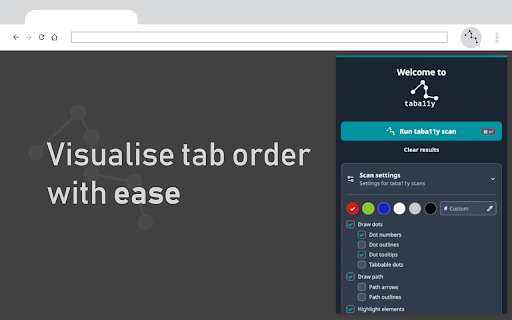
This extension calculates and displays the tab order of elements on a website. Users can visualize these paths directly on the page, helping to identify accessibility issues and ensure a better user experience for those relying on keyboard navigation.

Developer:Peter Gould
Version:2.0.14
Size:421KiB
Last updated:

Overview

Installs

10K+

Rating

5.0

16 reviews

Languages

1 locales

Includes English

Market analysis

Review-backed positioning, friction, and market signals for this Chrome extension.

Backed by review samples

Macro category

Developer & Designer Tools

Pricing friction

Low review signal

Complaint intensity

Low review signal

Listing & review signals
Observed signals from store listing text and review samples.

Listing positioning

taba11y positions itself as a specialized utility for web developers and accessibility auditors to visualize keyboard navigation paths. It emphasizes the importance of logical tab ordering for screen reader and keyboard-only users, providing a clear visual representation of how elements are traversed on a webpage.

Inferred product pattern

Single-purpose developer utility focused on visual debugging of accessibility standards.

Review-backed pain points

Minor limitations in accurately handling complex UI patterns such as floating menus.

Observed feature gaps

Occasional difficulty parsing or visualizing floating or highly dynamic menu components.

Tags
AccessibilityWeb DevelopmentTab OrderKeyboard NavigationTesting
Target users

- Web Developers

- Accessibility Testers

- UI/UX Designers

- QA Automation Engineers

Primary use cases

- Accessibility auditing

- Keyboard navigation testing

- Developing browser automation scripts

- Debugging UI tab indexing

Positive themes

- Clear visual representation of tab paths

- Essential utility for accessibility compliance

- Simplicity and ease of use

- Useful for non-accessibility tasks like automation scripting

Negative themes

- Limited support for complex dynamic elements like floating menus

Observed friction

- None identified; the tool is reported as a free contribution to inclusive technology.

Evidence boundary: The analysis is based on 10 positive user reviews and the product's official description, consistently highlighting its utility in accessibility auditing and browser automation. Review data is limited to a small sample size (16 total reviews), which may not represent all edge cases for complex web applications.
Complaint summaries
Review-backed complaint signals grouped by operational area.

Support

No support complaints found.

Reliability

No major reliability complaints found; minor feedback regarding specific UI component parsing.

Privacy

No privacy complaints found.

Access & pricing

- Free usage observed

- No account requirement observed

- Free plan or free usage claimed

Store listing facts

Listing assets

- Screenshots: 1

- Videos: 0

- Languages: 1

Trust signals

- Developer contact

Store metadata

- Version: 2.0.14

- Size: 421KiB

- Last updated:

Listing SEO keywords

Search intent keywords
Keyword signals for evaluating how users may discover, compare, or search for this extension category.

Core discovery

accessibility testing toolbrowser tab order visualizerkeyboard navigation testerweb accessibility checker

Comparison

alternative to screen reader testing toolsaccessibility audit extension

Problem

fix tab orderkeyboard navigation issuesaccessibility testing errors

Alternative

axe devtoolsaccessibility insightstab index visualizer

Similar extensions

Jump to related discovery paths:

Screenshots

taba11y - Tab order accessibility testing screenshot

Recommended Chrome extensions

Related listings from the same category, trending peers, and the same publisher portfolio.

Browse developer