Save ChatGPT to Obsidian markdown file icon

Save ChatGPT to Obsidian markdown file Chrome Extension Analysis

AI & Writing Assistants

Chrome extension ID: bdkpamdmcgamabdeaeehfmaiaejcdfko

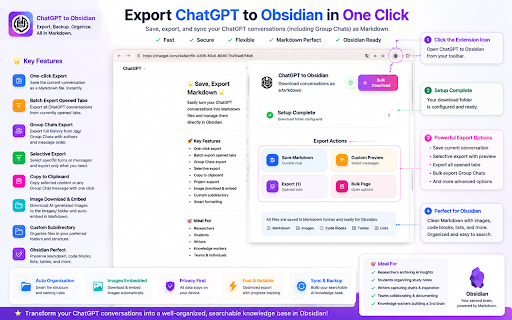
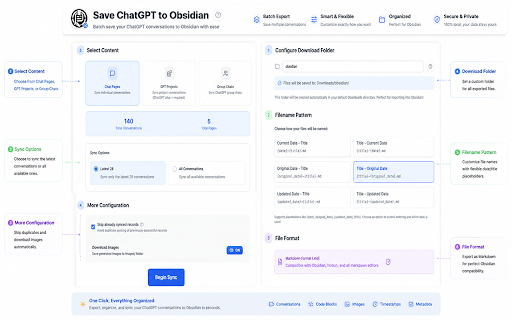
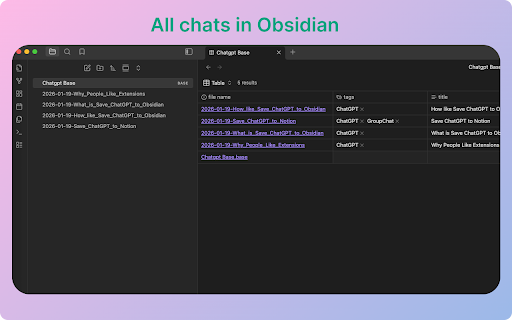
This browser companion allows users to capture their ChatGPT sessions, including group chats and generated images, and export them as formatted Markdown. It supports saving files with custom naming rules and automatically embeds locally downloaded images while preserving lists and code blocks. Users can easily integrate these files into Obsidian to maintain personal notes or structured databases.

Developer:Aluo
Version:8.3.0
Size:1.97MiB
Last updated:

Overview

Installs

4K+

Rating

4.4

53 reviews

Languages

13 locales

Includes Deutsch, English, français, italiano...

Market analysis

Review-backed positioning, friction, and market signals for this Chrome extension.

Backed by review samples

Macro category

AI & Writing Assistants

Pricing friction

Low review signal

Complaint intensity

Moderate review signal

Listing & review signals
Observed signals from store listing text and review samples.

Listing positioning

The store listing positions this extension as a seamless tool for saving, exporting, and syncing ChatGPT conversations directly to Obsidian as structured Markdown files. It highlights productivity-focused features like one-click exports, batch exports of open tabs, and custom subdirectory organization. The value proposition centers on helping users seamlessly build a clean, searchable knowledge base without manual copy-pasting.

Inferred product pattern

A client-side content parser that scrapes active ChatGPT dialogue DOM structures and uses browser download APIs to compile clean local Markdown files.

Review-backed pain points

Users express frustration when browser security policies restrict them from downloading files directly to their Obsidian vault directory, requiring an extra manual moving step. Some technical users are also bothered when export icons fail to persist on the page during specific ChatGPT interface updates.

Observed feature gaps

Reviewers note a strong desire for native Obsidian vault path destination support (circumventing default browser download folder limits), better preservation of code languages in code blocks for markdown highlighting, and clearer onboarding instructions.

Tags
ChatGPT ExportObsidian IntegrationMarkdown ExporterKnowledge ManagementBatch Export
Target users

- Researchers archiving AI conversations

- Writers capturing drafts and parallel dialogue lines

- Knowledge workers integrating AI outputs into a second brain

- Students organizing study materials and lecture drafts

Primary use cases

- Exporting individual or batch ChatGPT conversations to local Markdown files

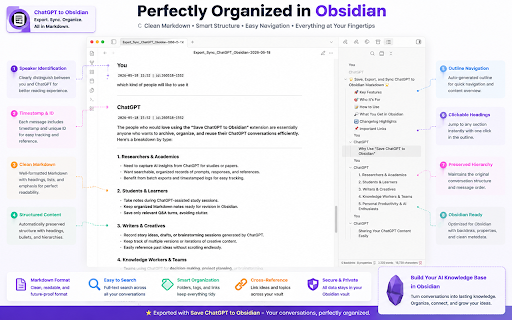
- Syncing ChatGPT Group Chats into structured Obsidian notes with author headers

- Downloading and auto-embedding AI-generated images within notes

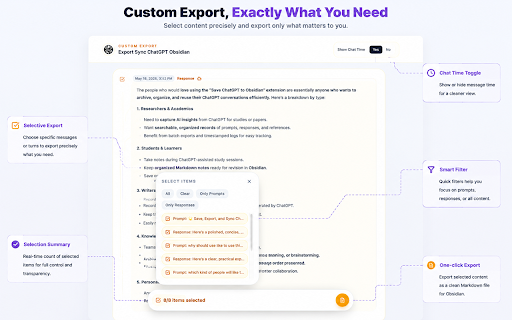
- Selectively exporting specific Q&A segments from long chats

Positive themes

- Excellent markdown formatting preservation of lists, code blocks, and images

- Significant workflow improvements that remove the friction of manual copying

- High developer responsiveness in adding requested features, such as batch-exporting open tabs

- Granular selection options for exporting targeted chat segments

Negative themes

- UI and export icons failing to load or disappearing on the ChatGPT page

- Inability to save files directly to local directories outside the browser's default Downloads folder

- Loss of specific syntax highlighting tags inside markdown code blocks

- Unusable states where extension interactions are unresponsive inside active chats

Observed friction

- Performance complaints detected

- No payment screens or premium limitations are highlighted in the listing or reviews, suggesting the extension operates as a fully free utility.

Evidence boundary: The analysis is drawn from the official Chrome Web Store listing metadata, developer changelogs outlining feature rollouts (e.g., rate limiting and open-tab exporting), and user review samples showcasing positive workflows and technical limitations. Findings are based on a limited pool of 10 helpful reviews, which might not reflect experiences across all operating systems or edge cases of ChatGPT system updates.
Complaint summaries
Review-backed complaint signals grouped by operational area.

Support

No support or refund complaints are reported. Reviews indicate the developer actively responds to feature requests and promptly delivers updates.

Reliability

Some users reported performance issues where the export icon briefly flashes on refresh but disappears entirely, rendering the tool unusable in certain browser sessions.

Privacy

No privacy, security, or data handling complaints are present in user reviews.

Access & pricing

- Free usage observed

- No account requirement observed

- Free plan or free usage claimed

Store listing facts

Listing assets

- Screenshots: 5

- Videos: 1

- Languages: 13

Trust signals

- Privacy policy

- Developer contact

- Official website

- Support link

Store metadata

- Version: 8.3.0

- Size: 1.97MiB

- Last updated:

Listing SEO keywords

Search intent keywords
Keyword signals for evaluating how users may discover, compare, or search for this extension category.

Core discovery

export chatgpt to obsidianchatgpt to markdown convertersave chatgpt conversationschatgpt obsidian sync

Comparison

chatgpt to notion vs obsidianchatgpt export markdown vs pdf

Problem

how to backup chatgpt historysave chatgpt images locallycopy long chatgpt chats

Alternative

chatgpt to notionchatgpt markdown exporterperplexity to obsidian

Similar extensions

Jump to related discovery paths:

Screenshots

Save ChatGPT to Obsidian markdown file screenshot

Links

Recommended Chrome extensions

Related listings from the same category, trending peers, and the same publisher portfolio.

Browse tools
Export Gemini Chats to Obsidian icon

Export Gemini Chats to Obsidian

Aluo

Easily bulk export your Gemini AI chats directly into Obsidian as Markdown files. Perfect for fast bulk processing.

Installs

3K+

Rating

4.6

Transpose ▲▼ pitch ▹ speed ▹ loop icon

Transpose ▲▼ pitch ▹ speed ▹ loop

Transpose Studio

Change the pitch and speed of music and loop sections directly on YouTube, Spotify and many other streaming platforms.

Installs

1.0M+

Rating

4.5

NopeCHA: CAPTCHA Solver icon

NopeCHA: CAPTCHA Solver

NopeCHA, LLC

AI Solver for reCAPTCHA, hCAPTCHA, and all CAPTCHA.

Installs

1.0M+

Rating

4.3

Ecosia - The search engine that plants trees icon

Ecosia - The search engine that plants trees

Ecosia GmbH

This extension sets your search engine to Ecosia and customizes your new tab page so you can plant trees with every search.

Installs

1.0M+

Rating

4.7

Video Downloader Plus icon

Video Downloader Plus

Video Downloader Plus

Download and save videos from any website instantly. A fast, simple video downloader that just works.

Installs

1.0M+

Rating

4.5

Wordtune: AI Paraphrasing and Grammar Tool icon

Wordtune: AI Paraphrasing and Grammar Tool

Wordtune

Unlock your potential with Wordtune's free AI writer – paraphrase, rewrite, translate, fix grammar, and more.

Installs

1.0M+

Rating

4.6

Keep Awake your System or Display icon

Keep Awake your System or Display

Dorian Hiller

Keep your system or display from going to sleep with just one click!

Installs

1.0M+

Rating

5.0

Поиск Яндексa icon

Поиск Яндексa

Yandex

Вводите запросы в адресную строку и получайте ответы от Яндекса

Installs

1.0M+

Rating

3.2

Bing Search and Homepage icon

Bing Search and Homepage

Microsoft Corporation

Set Microsoft Bing as your default homepage and default search engine

Installs

1.0M+

Rating

2.3

uberAgent icon

uberAgent

Cloud Software Group, Inc.

Enables uberAgent to collect web app usage and performance data (e.g., foreground tab, page load duration) from Chrome.

Installs

1.0M+

Rating

3.0