BoxGrow — Textarea Auto-Grow & Pop-Out Editor icon

BoxGrow Chrome Extension Analysis

Automation & Workflow Efficiency

Store listing title: BoxGrow — Textarea Auto-Grow & Pop-Out Editor

Chrome extension ID: bdnbnejafjhapblhggjhogfahnpifcak

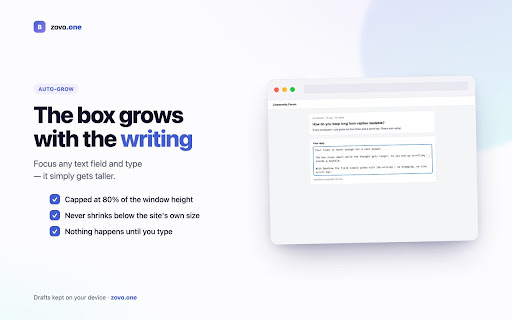
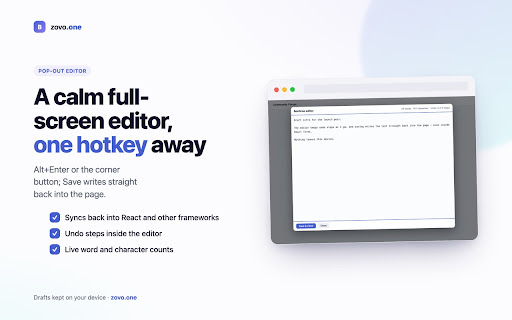
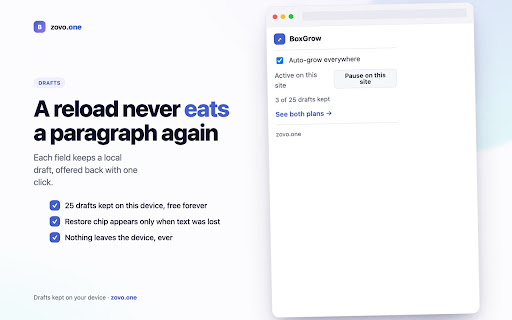
A utility that automatically expands text areas as the user types and offers a full-screen pop-out editor for better focus. It includes a local draft recovery system to restore text lost during page reloads or mis-clicks.

Version:1.0.2
Size:252KiB
Last updated:

Overview

Installs

12

Rating

★ —

0 reviews

Languages

52 locales

Includes Deutsch, English, Filipino, Indonesia...

Market analysis

Review-backed positioning, friction, and market signals for this Chrome extension.

No review samples found

Macro category

Automation & Workflow Efficiency

Pricing friction

Low review signal

Complaint intensity

Low review signal

Listing & review signals
Observed signals from store listing text and review samples.

Listing positioning

Positions the product as a solution for cramped web text boxes and accidental data loss. It emphasizes a privacy-first, local-only approach and targets users who perform heavy writing within web browsers.

Inferred product pattern

Local-first productivity utility for web form enhancement.

Review-backed pain points

Review-backed data is not available.

Observed feature gaps

No review data available to identify functional gaps; product focuses on a narrow utility scope.

Tags
Text EditorProductivityWriting ToolForm HelperAuto-Grow
Target users

- Heavy web writers

- Content creators

- Power users of web forms

- Privacy-conscious users

Primary use cases

- Writing long comments or emails in restricted text fields

- Preventing data loss during unexpected page reloads

- Editing long-form web content in a distraction-free environment

Positive themes

No positive theme data.

Negative themes

No negative theme data.

Observed friction

- No review-backed pricing friction observed.

Evidence boundary: Data extracted solely from the Chrome Web Store listing. No user reviews were available to validate claims or identify real-world pain points.
Complaint summaries
Review-backed complaint signals grouped by operational area.

Support

No review-backed support complaints observed.

Reliability

No review-backed reliability complaints observed.

Privacy

No review-backed privacy complaints observed.

Access & pricing

- Free entry with paid features

- No account requirement observed

- Limited free usage observed

Store listing facts

Listing assets

- Screenshots: 5

- Videos: 0

- Languages: 52

Trust signals

- Privacy policy

- Developer contact

Store metadata

- Version: 1.0.2

- Size: 252KiB

- Last updated:

Listing SEO keywords

Search intent keywords
Keyword signals for evaluating how users may discover, compare, or search for this extension category.

Core discovery

textarea auto-growpop-out text editorweb form draft recoveryexpandable text box extension

Comparison

BoxGrow vs standard text areasbest textarea expander

Problem

cramped text boxeslose text on page reloadsmall comment fields

Alternative

textarea expandertext box auto-growweb writing utility

Similar extensions

Jump to related discovery paths:

Screenshots

BoxGrow — Textarea Auto-Grow & Pop-Out Editor screenshot

Links

Recommended Chrome extensions

Related listings from the same category, trending peers, and the same publisher portfolio.

Browse tools
Auto Admit Pro for Google Meet icon

Auto Admit Pro for Google Meet

Unknown developer

Automatically admit waiting-room guests in Google Meet — no hovering, no click-babysitting. Not affiliated with Google.

Installs

75

Rating

★ —

MarkGrab — Copy Page as Markdown icon

MarkGrab — Copy Page as Markdown

Unknown developer

Copy any page or selection as clean GitHub-flavored Markdown in one click, with an AI-ready paste mode for ChatGPT and Claude.

Installs

56

Rating

★ —

Screen Recorder & Screenshot App for Chrome | Scrnli icon

Screen Recorder & Screenshot App for Chrome | Scrnli

scrnli

Screen recorder for Chrome: capture, edit, share screenshots and videos instantly

Installs

1.0M+

Rating

★ 4.8

AIPRM for ChatGPT icon

AIPRM for ChatGPT

AIPRM

AIPRM is your cheat code for ChatGPT. Adds a list of curated prompt templates and advanced features. Try today.

Installs

1.0M+

Rating

★ 4.4

Britannica School Insights icon

Britannica School Insights

Encyclopædia Britannica

Are you a Britannica School subscriber?

Installs

1.0M+

Rating

★ 3.1

Transpose: pitch ▸ speed ▸ loop icon

Transpose: pitch ▸ speed ▸ loop

Transpose

Change pitch and speed, loop sections and practice music directly on YouTube, Spotify and other supported sites.

Installs

1.0M+

Rating

★ 4.2

Keywords Everywhere - Keyword Tool icon

Keywords Everywhere - Keyword Tool

Axeman Technology Solutions LLP

Keyword search volume, cpc and competition for 15+ websites like Google™ Search Console, YouTube™, Amazon™ & more

Installs

1.0M+

Rating

★ 3.3

CSFloat Market Checker icon

CSFloat Market Checker

CSFloat Inc.

Shows the float value, paint seed, and more of Counter-Strike (CS:GO & CS2) items on the Steam Market or Inventories

Installs

1.0M+

Rating

★ 4.1

Citrix Experience Insights icon

Citrix Experience Insights

Cloud Software Group, Inc.

Enables Citrix Experience Insights to collect web app usage and performance data (e.g., foreground tab) from Chrome.

Installs

1.0M+

Rating

★ 3.0

Ecosia - The search engine that plants trees icon

Ecosia - The search engine that plants trees

Ecosia GmbH

This extension sets your search engine to Ecosia and customizes your new tab page so you can plant trees with every search.

Installs

1.0M+

Rating

★ 4.4