Dualless icon

Dualless Chrome Extension Analysis

Tab & Bookmark Productivity

Chrome extension ID: bgdpkilkheacbboffppjgceiplijhfpd

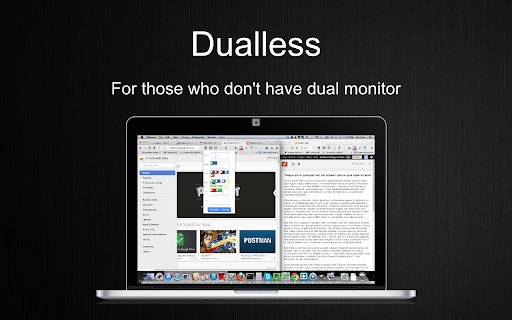
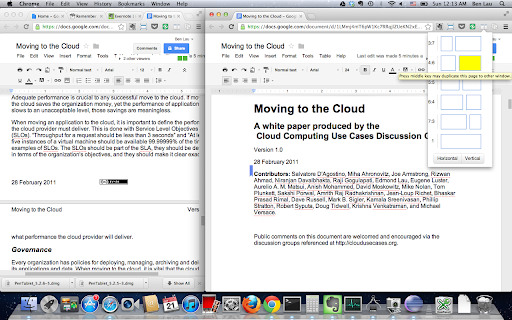
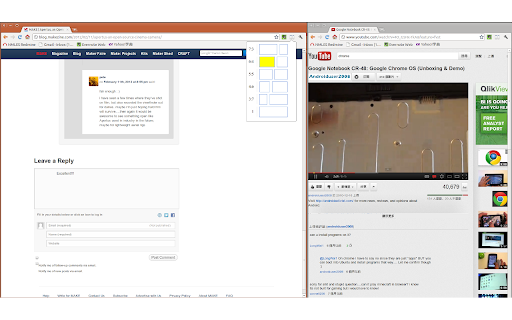
Dualless is a utility that splits a single browser window into two side-by-side windows with user-defined size ratios. It includes features for merging windows, duplicating pages, and saving specific split layouts via bookmarks.

Developer:Ben Lau
Version:0.4.1
Size:266KiB
Last updated:

Overview

Installs

800K+

Rating

4.0

273 reviews

Languages

1 locales

Includes English (United Kingdom)

Market analysis

Review-backed positioning, friction, and market signals for this Chrome extension.

Backed by review samples

Macro category

Tab & Bookmark Productivity

Pricing friction

Low review signal

Complaint intensity

Moderate review signal

Listing & review signals
Observed signals from store listing text and review samples.

Listing positioning

The product positions itself as a 'poor man's dual monitor solution' for users who lack a second screen. It emphasizes the ability to split browser windows into customizable ratios to optimize 16:9 monitor space.

Inferred product pattern

Browser-based window tiling utility aimed at users wanting a split-screen experience without multiple physical monitors.

Review-backed pain points

Users report frustration with the tool's inability to let them choose which specific tabs are split or merged, and critical reports of pinned tabs disappearing after crashes.

Observed feature gaps

Lack of an 'undo' function for window merging, poor integration with browser tab groups, and inability to define split boundaries for screen-sharing software.

Tags
Window SplitterDual Monitor SimulationProductivity ToolBrowser Management
Target users

- Single monitor users

- Laptop users

- Multitaskers

- Research-heavy web users

Primary use cases

- Side-by-side web browsing

- Referencing documents while typing

- Simulating a dual-head setup on a single display

Positive themes

No positive theme data.

Negative themes

- Lack of control over window selection

- Redundancy with native OS window snapping

- Severe tab loss and crashes

- Misleading claims regarding dual monitor simulation

Observed friction

- Performance complaints detected

- No pricing friction observed as the product is released under an open-source GPL 2.0 license.

Evidence boundary: Data extracted from the official store listing and 12 provided user review samples. The provided review samples are predominantly low-rating and do not reflect the overall 3.99 star rating distribution.
Complaint summaries
Review-backed complaint signals grouped by operational area.

Support

No direct support interaction complaints, but users express frustration over unresolved bugs causing tab loss.

Reliability

Reports of browser crashes (specifically on Microsoft Edge), glitching that closes all open tabs, and issues with Chromebook taskbar overlap.

Privacy

No privacy or security complaints observed in the samples.

Access & pricing

- Free usage observed

- No account requirement observed

- Free plan or free usage claimed

Store listing facts

Listing assets

- Screenshots: 3

- Videos: 0

- Languages: 1

Trust signals

- Developer contact

Store metadata

- Version: 0.4.1

- Size: 266KiB

- Last updated:

Listing SEO keywords

Search intent keywords
Keyword signals for evaluating how users may discover, compare, or search for this extension category.

Core discovery

split screen browserdual monitor simulationchrome window splitterside by side tabs

Comparison

Dualless vs NiftySplitDualless vs Windows Snapbrowser window splitting tools

Problem

how to split chrome windowsingle monitor productivityview two tabs at once

Alternative

Dualless alternativebrowser tiling extensionsplit screen for chrome

Similar extensions

Jump to related discovery paths:

Screenshots

Dualless screenshot
Dualless screenshot
Dualless screenshot

Recommended Chrome extensions

Related listings from the same category, trending peers, and the same publisher portfolio.

Browse tools
Content Farm Blocker icon

Content Farm Blocker

Ben Lau

Preventing to open content farm by mistake

Installs

40K+

Rating

4.8

WebChatGPT: Prompt library with web access icon

WebChatGPT: Prompt library with web access

WebChatGPT

Augment your ChatGPT prompts with relevant web search results through web browsing.

Installs

1.0M+

Rating

4.2

Transpose ▲▼ pitch ▹ speed ▹ loop icon

Transpose ▲▼ pitch ▹ speed ▹ loop

Transpose Studio

Change the pitch and speed of music and loop sections directly on YouTube, Spotify and many other streaming platforms.

Installs

1.0M+

Rating

4.5

NopeCHA: CAPTCHA Solver icon

NopeCHA: CAPTCHA Solver

NopeCHA, LLC

AI Solver for reCAPTCHA, hCAPTCHA, and all CAPTCHA.

Installs

1.0M+

Rating

4.3

Ecosia - The search engine that plants trees icon

Ecosia - The search engine that plants trees

Ecosia GmbH

This extension sets your search engine to Ecosia and customizes your new tab page so you can plant trees with every search.

Installs

1.0M+

Rating

4.7

Video Downloader Plus icon

Video Downloader Plus

Video Downloader Plus

Download and save videos from any website instantly. A fast, simple video downloader that just works.

Installs

1.0M+

Rating

4.5

Wordtune: AI Paraphrasing and Grammar Tool icon

Wordtune: AI Paraphrasing and Grammar Tool

Wordtune

Unlock your potential with Wordtune's free AI writer – paraphrase, rewrite, translate, fix grammar, and more.

Installs

1.0M+

Rating

4.6

Keep Awake your System or Display icon

Keep Awake your System or Display

Dorian Hiller

Keep your system or display from going to sleep with just one click!

Installs

1.0M+

Rating

5.0

Поиск Яндексa icon

Поиск Яндексa

Yandex

Вводите запросы в адресную строку и получайте ответы от Яндекса

Installs

1.0M+

Rating

3.2

Bing Search and Homepage icon

Bing Search and Homepage

Microsoft Corporation

Set Microsoft Bing as your default homepage and default search engine

Installs

1.0M+

Rating

2.3