Page Load Timer icon

Page Load Timer Chrome Extension Analysis

Developer & Designer Tools

Chrome extension ID: bhklhaccecniahpolfcfjlhhnhogkfio

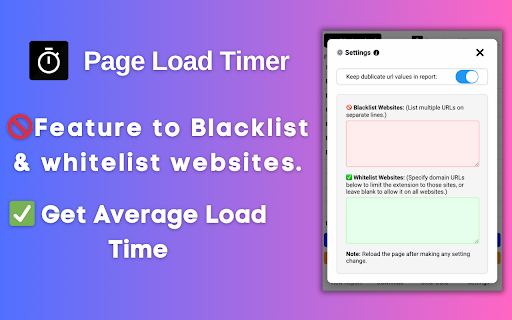
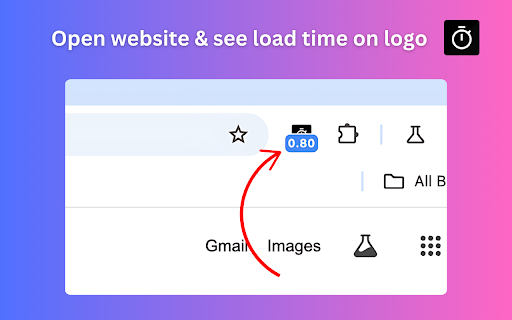
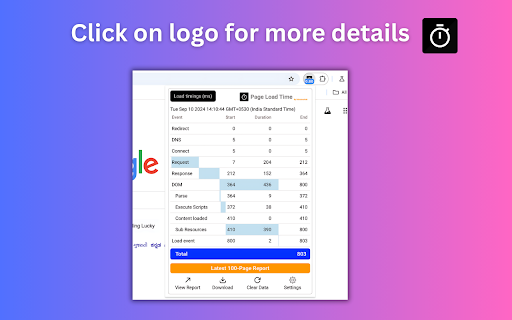
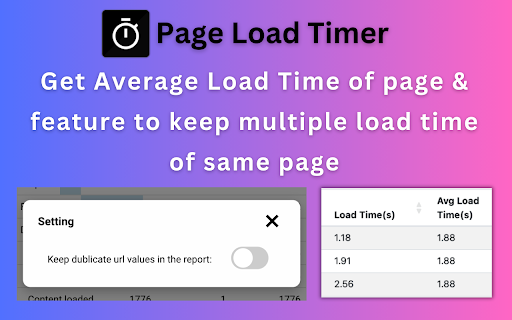
This extension utilizes the Navigation Timing API to provide real-time browser-based load speed monitoring. Users can view detailed metrics, export performance logs for the last 100 pages, and configure site-specific blacklists or whitelists.

Developer:SelectorsHub
Version:1.1.5
Size:1.31MiB
Last updated:

Overview

Installs

10K+

Rating

4.8

25 reviews

Languages

1 locales

Includes English (United States)

Market analysis

Review-backed positioning, friction, and market signals for this Chrome extension.

Backed by review samples

Macro category

Developer & Designer Tools

Pricing friction

Low review signal

Complaint intensity

High review signal

Listing & review signals
Observed signals from store listing text and review samples.

Listing positioning

Page Load Timer is positioned as a lightweight, essential diagnostic tool for developers, testers, and SEO professionals. It emphasizes ease of use through instant toolbar-based performance metrics and the ability to set custom alert thresholds for load times.

Inferred product pattern

Free developer utility tool that relies on standard browser APIs, recently facing accusations of adware integration.

Review-backed pain points

Recent user reports suggest the inclusion of unauthorized promotional or advertising behavior within the extension.

Observed feature gaps

No major functional gaps reported for its core purpose, though users concerned about privacy/adware may view current behavior as a significant defect.

Tags
Performance MonitoringWeb DebuggingDeveloper ToolPage SpeedTesting Utility
Target users

- Web Developers

- QA Testers

- SEO Professionals

- UAT Managers

Primary use cases

- Frontend performance monitoring

- Quick UAT/smoke testing

- Identifying web page bottlenecks

- Monitoring load time thresholds

Positive themes

- Accurate performance metrics

- Lightweight design

- Convenient toolbar access

- Helpful for rapid debugging

Negative themes

- Allegations of adware/unwanted behavior

Observed friction

- Privacy complaints detected

- No pricing friction identified; the tool appears to be free with no clear paywall constraints mentioned.

Evidence boundary: Evidence is derived from 10 user reviews and the product's official store description. The majority of feedback is positive regarding utility, with one significant outlier regarding adware. The sample size is small and reflects a mix of long-term satisfaction and a single recent, critical complaint regarding business practices.
Complaint summaries
Review-backed complaint signals grouped by operational area.

Support

No direct support complaints, though the developer provides a clear contact email for troubleshooting.

Reliability

General performance is rated highly by the majority of users, excluding the specific allegation of adware interference.

Privacy

A significant report claims the tool has transitioned into adware, raising concerns about injected behaviors.

Access & pricing

- No clear monetization signal

- No account requirement observed

- Free plan or free usage claimed

Store listing facts

Listing assets

- Screenshots: 4

- Videos: 1

- Languages: 1

Trust signals

- Privacy policy

- Developer contact

- Official website

- Support link

Store metadata

- Version: 1.1.5

- Size: 1.31MiB

- Last updated:

Listing SEO keywords

Search intent keywords
Keyword signals for evaluating how users may discover, compare, or search for this extension category.

Core discovery

page load time extensionbrowser performance monitorweb speed testerload time tracker

Comparison

JMeter alternativewebsite speed checker

Problem

webpage laggingslow load timeidentify bottlenecks

Alternative

chrome devtools performancelighthouse

Similar extensions

Jump to related discovery paths:

Screenshots

Page Load Timer screenshot

Links

Recommended Chrome extensions

Related listings from the same category, trending peers, and the same publisher portfolio.

Browse developer
Check My Links icon

Check My Links

SelectorsHub

Check My Links is a link checker that crawls through your webpage and looks for broken links.

Installs

90K+

Rating

4.4

Screenshot with URL - Full Page Screenshot icon

Screenshot with URL - Full Page Screenshot

SelectorsHub

Capture full page, visible & selected area screenshots with URL bar & hidden Bookmarks, record screen with inbuilt editor.

Installs

10K+

Rating

4.7

TouchEn PC보안 확장 icon

TouchEn PC보안 확장

라온시큐어

브라우저에서 라온시큐어의 PC보안 기능을 사용하기 위한 확장 프로그램입니다.

Installs

8.0M+

Rating

1.3

React Developer Tools icon

React Developer Tools

Meta

Adds React debugging tools to the Chrome Developer Tools. Created from revision 3cde211b0c on 10/20/2025.

Installs

5.0M+

Rating

3.9

ColorZilla icon

ColorZilla

colorzilla.com

Advanced Eyedropper, Color Picker, Gradient Generator and other colorful goodies

Installs

4.0M+

Rating

4.6

Tag Assistant icon

Tag Assistant

Google

The Tag Assistant extension works with Tag Assistant to help troubleshoot installation of gtag.js and Google Tag Manager.

Installs

3.0M+

Rating

3.9

Wappalyzer - Technology profiler icon

Wappalyzer - Technology profiler

Wappalyzer

Identify web technologies

Installs

3.0M+

Rating

4.6

Meta Ads Data Advisor icon

Meta Ads Data Advisor

Meta

Meta Ads Data Advisor automates connecting your website and marketing data to Meta for better ad performance. No developers needed.

Installs

3.0M+

Rating

3.9

Take Webpage Screenshots Entirely - FireShot icon

Take Webpage Screenshots Entirely - FireShot

Evgeny Vokilsus

Take FULL webpage screenshots. Capture, edit and save them to PDF/JPEG/GIF/PNG, upload, print, send to OneNote, clipboard or email.

Installs

3.0M+

Rating

4.8

JSON Formatter icon

JSON Formatter

Code Formatter

Makes JSON easy to read

Installs

2.0M+

Rating

4.3