Take Webpage Screenshots Entirely - FireShot icon

Take Webpage Screenshots Entirely Chrome Extension Analysis

Automation & Workflow Efficiency

Store listing title: Take Webpage Screenshots Entirely - FireShot

Chrome extension ID: mcbpblocgmgfnpjjppndjkmgjaogfceg

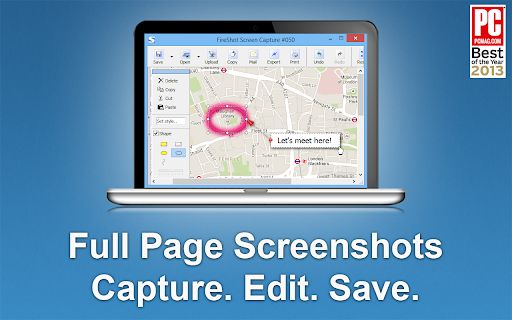
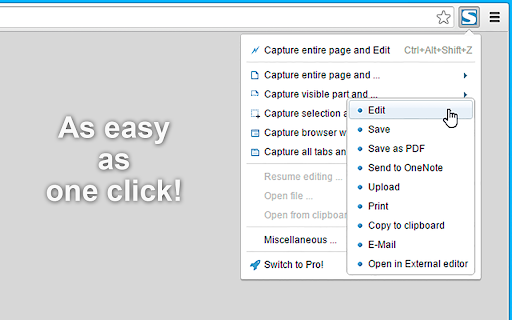
FireShot is a browser extension that allows users to capture entire webpages, visible areas, or specific selections. It supports saving captures to PDF, JPEG, PNG, and GIF, with Pro features including annotations, batch capturing, and direct OneNote integration.

Developer:Evgeny Vokilsus
Version:2.1.4.18
Size:12.0MiB
Last updated:

Overview

Installs

3.0M+

Rating

4.8

51,638 reviews

Languages

41 locales

Includes Deutsch, English, Filipino, Indonesia...

Market analysis

Review-backed positioning, friction, and market signals for this Chrome extension.

Backed by review samples

Macro category

Automation & Workflow Efficiency

Pricing friction

Low review signal

Complaint intensity

High review signal

Listing & review signals
Observed signals from store listing text and review samples.

Listing positioning

The product positions itself as a professional-grade tool for capturing complete webpages, receipts, and AI conversations. It emphasizes local storage for security, offline capabilities, and versatility in export formats.

Inferred product pattern

High-utility freemium tool transitioning from a perpetual license model to a recurring subscription model.

Review-backed pain points

Users report frustration with a new 1250px minimum width that adds white borders to captures, the shift from lifetime licenses to subscription models, and technical glitches in coordinate tracking on scrolling sites.

Observed feature gaps

Lack of native OCR/searchable text in all PDF exports, inconsistent rendering of dynamic AI interfaces, and layout flexibility for narrow pages.

Tags
Full Page ScreenshotWeb CapturePDF ExportAI Content SaverProductivity
Target users

- Researchers

- Developers

- Online Shoppers

- AI Power Users

- QA Testers

Primary use cases

- Saving receipts and order confirmations

- Archiving AI chat sessions

- Creating bug reports and design reviews

- Saving long research articles as PDF

Positive themes

- High utility for daily digital organization

- Ease of saving AI sessions

- Versatile capture options (full page vs selection)

Negative themes

- Forced minimum image width causing layout issues

- Disputes over lifetime license validity

- Compatibility issues with specific web UIs like Facebook and Copilot

- Lack of searchable text in some PDF exports

Observed friction

- Refund complaints detected

- Performance complaints detected

- Privacy complaints detected

- Significant anger regarding the transition from lifetime licenses to a subscription model, with some users claiming lifetime licenses expired prematurely.

Evidence boundary: Analysis based on store listing descriptions and a sample of high-rating and low-rating reviews covering technical performance and billing. Technical complaints may be tied to specific Chrome versions or third-party extension conflicts.
Complaint summaries
Review-backed complaint signals grouped by operational area.

Support

Users report difficulties updating the extension to resolve known issues and failures in resolving license disputes via PayPal.

Reliability

Reports of the extension causing 400 errors on specific sites and failing to accurately capture selected areas on Facebook.

Privacy

Some users noted receiving Chrome safety warnings stating the extension's origin could not be verified.

Access & pricing

- Free entry with paid features

- No account requirement observed

- Limited free usage observed

Store listing facts

Listing assets

- Screenshots: 3

- Videos: 1

- Languages: 41

Trust signals

- Privacy policy

- Developer contact

- Official website

Store metadata

- Version: 2.1.4.18

- Size: 12.0MiB

- Last updated:

Listing SEO keywords

Search intent keywords
Keyword signals for evaluating how users may discover, compare, or search for this extension category.

Core discovery

full page screenshot chromecapture webpage to pdfwebpage screen capture extension

Comparison

FireShot vs GoFullPagebest full page screenshot extension

Problem

how to save full webpage as pdfscreenshot long page chrome

Alternative

FireShot alternativesfull page capture tool

Similar extensions

Jump to related discovery paths:

Screenshots

Take Webpage Screenshots Entirely - FireShot screenshot

Links

Recommended Chrome extensions

Related listings from the same category, trending peers, and the same publisher portfolio.

Browse developer