External Application Launcher icon

External Application Launcher Chrome Extension Analysis

Automation & Workflow Efficiency

Chrome extension ID: bifmfjgpgndemajpeeoiopbeilbaifdo

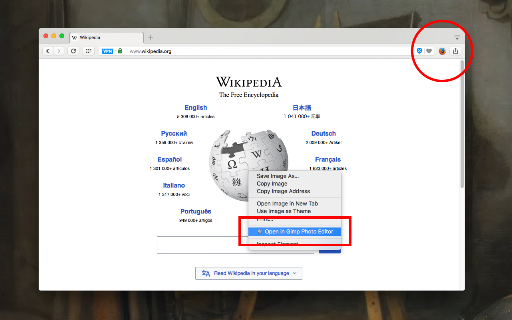
External Application Launcher enables users to execute local programs directly from the browser's toolbar or context menu. It requires a separate native client installation to interface with the operating system's command line.

Developer:yokris.dev
Version:0.6.2
Size:164KiB
Last updated:

Overview

Installs

10K+

Rating

4.3

44 reviews

Languages

1 locales

Includes English

Market analysis

Review-backed positioning, friction, and market signals for this Chrome extension.

Backed by review samples

Macro category

Automation & Workflow Efficiency

Pricing friction

Low review signal

Complaint intensity

Moderate review signal

Listing & review signals
Observed signals from store listing text and review samples.

Listing positioning

The extension positions itself as a technical utility for bridging browser tasks with local desktop applications. It emphasizes flexibility, allowing users to pass page URLs, text, or image links as command-line arguments to external software.

Inferred product pattern

Technical Bridge Utility requiring a native host component.

Review-backed pain points

The installation of the required native client is frequently cited as user-unfriendly, with vague documentation forcing users to navigate multiple external pages instead of a streamlined setup.

Observed feature gaps

Users noted limitations in managing multiple concurrent program configurations, as the extension reportedly 'forgets' previous settings when adding new ones, and some UI configurations are considered cumbersome.

Tags
Workflow AutomationBrowser IntegrationCommand LineDesktop Utility
Target users

- Power users

- Developers

- Technical enthusiasts

- Workflow automators

Primary use cases

- Opening browser links in external media players

- Sending text snippets to local editors

- Passing download URLs to external managers

- Triggering custom batch or shell scripts

Positive themes

- High flexibility for power users

- Useful for automating repetitive tasks

- Direct link between web content and local PC environment

- Effective alternative to manual copy-pasting into terminal

Negative themes

- Difficult and non-intuitive native client installation

- Poorly documented setup process

- UI/UX concerns regarding menu grouping

- Requirement of PNG icons for custom runners

Observed friction

- No pricing friction; the extension is free, though it has technical configuration friction.

Evidence boundary: Analysis based on 10 provided reviews, identifying a clear divide between high-satisfaction power users and frustration regarding the native client setup process. Review data is limited to a small sample size; technical setup hurdles are well-represented, but long-term stability data is sparse.
Complaint summaries
Review-backed complaint signals grouped by operational area.

Support

Complaints focus on the lack of clear, centralized installation instructions rather than direct developer support failures.

Reliability

Minor complaints regarding menu grouping and state management when switching between multiple configured applications.

Privacy

None observed.

Access & pricing

- Free usage observed

- No account requirement observed

- Free plan or free usage claimed

Store listing facts

Listing assets

- Screenshots: 1

- Videos: 1

- Languages: 1

Trust signals

- Privacy policy

- Developer contact

- Official website

Store metadata

- Version: 0.6.2

- Size: 164KiB

- Last updated:

Listing SEO keywords

Search intent keywords
Keyword signals for evaluating how users may discover, compare, or search for this extension category.

Core discovery

launch external app from chromebrowser to command line bridgechrome extension execute local filecustom browser context menu actions

Comparison

chrome external link openerbrowser integration utility

Problem

how to open browser link in local appchrome extension native messaging issues

Alternative

native messaging host extensioncommand line launcher browser

Similar extensions

Jump to related discovery paths:

Screenshots

External Application Launcher screenshot

Links

Recommended Chrome extensions

Related listings from the same category, trending peers, and the same publisher portfolio.

Browse workflow