Input Tab in Google Keep icon

Input Tab in Google Keep Chrome Extension Analysis

Tab & Bookmark Productivity

Chrome extension ID: bmfmbanhkhjhfeckobkcecohknhlnamb

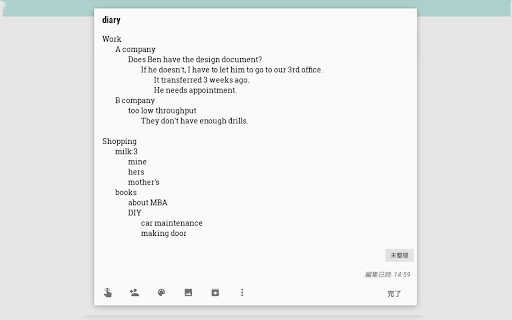
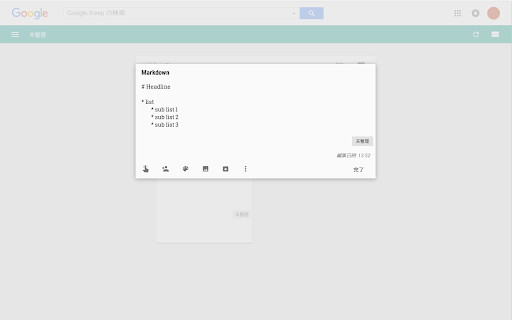
This Chrome extension allows users to use the Tab key within Google Keep notes to create indented, structured text. It aims to provide a Markdown-like formatting experience for note-takers using the Google Keep platform.

Developer:BrowseCraft
Version:26.9.6
Size:14.68KiB
Last updated:

Overview

Installs

10K+

Rating

★ 3.6

75 reviews

Languages

8 locales

Includes Deutsch, English, English (United Kingdom), español...

Market analysis

Review-backed positioning, friction, and market signals for this Chrome extension.

Backed by review samples

Macro category

Tab & Bookmark Productivity

Pricing friction

Low review signal

Complaint intensity

High review signal

Listing & review signals
Observed signals from store listing text and review samples.

Listing positioning

The extension is positioned as a utility to bring structure to Google Keep memos by enabling the 'Tab' key for indentation. The listing explicitly states that situational ads for other extensions are included to keep the product free.

Inferred product pattern

A low-cost productivity utility that utilizes aggressive, intrusive ad-injection via new tabs as its primary revenue stream.

Review-backed pain points

Users report the extension frequently fails to indent text (instead moving cursor focus) and forcibly opens unsolicited advertisement tabs, specifically for 'Manganum'.

Observed feature gaps

Lack of clear user instructions or documentation on how to trigger the feature.

Tags
Google Keep UtilityText FormattingNote Taking
Target users

- Google Keep users

- Note-takers

- Students

- Organizers

Primary use cases

- Structuring text in Google Keep

- Creating indented lists in notes

Positive themes

- Functional when working

Negative themes

- Intrusive advertising

- Broken functionality

- Spammy behavior

Observed friction

- Performance complaints detected

- Privacy complaints detected

- The product is free, but users express extreme dissatisfaction with the ad-supported monetization method.

Evidence boundary: Analysis based on the official store listing and several high-information low-rating reviews. The review sample is heavily weighted toward negative experiences and specific complaints about advertising.
Complaint summaries
Review-backed complaint signals grouped by operational area.

Support

No direct support complaints, though users found developer responses regarding ads to be dismissive of the perceived spam behavior.

Reliability

Users report the extension frequently breaks, becomes defunct, or fails to execute the primary indentation function.

Privacy

Significant complaints regarding the extension automatically opening new tabs and spam links without user intent.

Access & pricing

- Ad-supported model observed

- No account requirement observed

- Free plan or free usage claimed

Store listing facts

Listing assets

- Screenshots: 2

- Videos: 0

- Languages: 8

Trust signals

- Privacy policy

- Developer contact

- Official website

- Support link

Store metadata

- Version: 26.9.6

- Size: 14.68KiB

- Last updated:

Listing SEO keywords

Search intent keywords
Keyword signals for evaluating how users may discover, compare, or search for this extension category.

Core discovery

Google Keep tabsindent Google KeepGoogle Keep formattingGoogle Keep markdown

Comparison

Google Keep vs MarkdownGoogle Keep structure

Problem

Google Keep no tab keyGoogle Keep indentation issue

Alternative

Google Keep note utility

Similar extensions

Jump to related discovery paths:

Screenshots

Input Tab in Google Keep screenshot

Links

Recommended Chrome extensions

Related listings from the same category, trending peers, and the same publisher portfolio.

Browse tools
Button for Google Calendar icon

Button for Google Calendar

BrowseCraft

Check Google Calendar schedule and join meetings with one click. It fully integrates with Zoom, Google Meet, Microsoft Teams, etc.

Installs

100K+

Rating

★ 4.1

Notes: Keep Sticky Thoughts in Google Drive icon

Notes: Keep Sticky Thoughts in Google Drive

BrowseCraft

Simple and useful notes that sync with Google Drive. Keep sticky thoughts in notes. Keep notes in Google Drive. Keep your mind calm.

Installs

50K+

Rating

★ 4.6

Lightshot (screenshot tool) icon

Lightshot (screenshot tool)

Skillbrains

Simple and convenient screenshot tool. Select an area, edit your screenshot and upload it to the server.

Installs

2.0M+

Rating

★ 4.4

CSFloat Market Checker icon

CSFloat Market Checker

CSFloat Inc.

Shows the float value, paint seed, and more of Counter-Strike (CS:GO & CS2) items on the Steam Market or Inventories

Installs

1.0M+

Rating

★ 3.9

PrintFriendly: Print, PDF Editor & Full Page Screenshot icon

PrintFriendly: Print, PDF Editor & Full Page Screenshot

PrintFriendly

Print clean web pages, save as PDF, edit PDFs, and capture full-page screenshots. Integrates with ChatGPT, Claude, and Gemini.

Installs

1.0M+

Rating

★ 4.6

Ecosia - The search engine that plants trees icon

Ecosia - The search engine that plants trees

Ecosia GmbH

This extension sets your search engine to Ecosia and customizes your new tab page so you can plant trees with every search.

Installs

1.0M+

Rating

★ 4.7

Chat with all AI models (Gemini, Claude, DeepSeek…) & AI Agents | AITOPIA icon

Chat with all AI models (Gemini, Claude, DeepSeek…) & AI Agents | AITOPIA

AITOPIA AI Sidebar

AI Agent Marketplace & AI Sidebar with all AI models (Gemini, Claude, DeepSeek & more) and hundreds of AI Agents

Installs

1.0M+

Rating

★ 4.9

Mobile simulator - responsive testing tool icon

Mobile simulator - responsive testing tool

François Duprat

Phone Simulator — Free Chrome Extension to test and preview your site on 80+ devices.

Installs

1.0M+

Rating

★ 4.9

NaturalReader - AI Text to Speech icon

NaturalReader - AI Text to Speech

NaturalSoft Limited

Read aloud any text with realistic AI voices, compatible with webpages, kindle Ebooks, Google Docs, PDF, Emails, and more.

Installs

1.0M+

Rating

★ 4.2

Transpose: pitch ▸ speed ▸ loop icon

Transpose: pitch ▸ speed ▸ loop

Transpose

Change pitch and speed, loop sections and practice music directly on YouTube, Spotify and other supported sites.

Installs

1.0M+

Rating

★ 4.5