Crazy Compare For Salesforce icon

Crazy Compare For Salesforce Chrome Extension Analysis

Developer & Designer Tools

Chrome extension ID: bncmdklijpjfpmpdmobeafcegnnkkjff

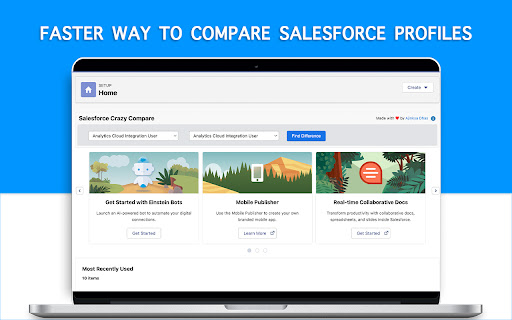
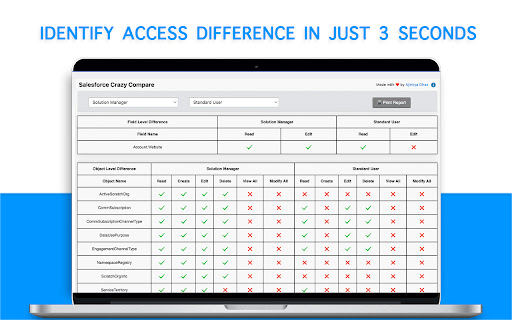
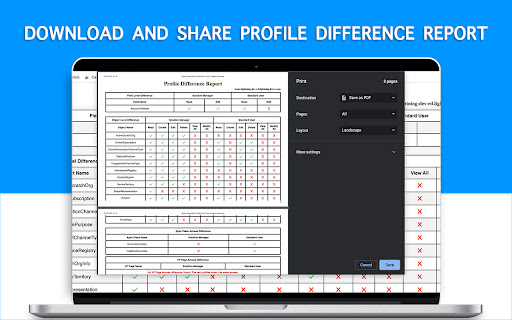
A Chrome extension that compares two Salesforce profiles to identify differences in field-level, object-level, Apex class, and Visualforce page access. It includes a feature to download these differences as a PDF report for team sharing.

Developer:Ajinkya Dhas
Version:1.1.7
Size:83.38KiB
Last updated:

Overview

Installs

5K+

Rating

3.6

25 reviews

Languages

1 locales

Includes English

Market analysis

Review-backed positioning, friction, and market signals for this Chrome extension.

Backed by review samples

Macro category

Developer & Designer Tools

Pricing friction

Low review signal

Complaint intensity

Moderate review signal

Listing & review signals
Observed signals from store listing text and review samples.

Listing positioning

The product is positioned as a time-saving utility for Salesforce Administrators, Developers, and Consultants. It emphasizes a 'plug and play' experience that allows users to identify access differences between profiles in just a few clicks across both Classic and Lightning interfaces.

Inferred product pattern

Niche productivity utility for enterprise platform admins focusing on a specific manual task automation.

Review-backed pain points

Users report the extension frequently fails to load on the Salesforce Setup page, stops working after updates, and produces inaccurate results that miss standard object and field permissions.

Observed feature gaps

Lack of 'System Permissions' comparison and inconsistent detection of standard objects/fields.

Tags
Salesforce AdminProfile ComparisonPermissions AuditSalesforce Utility
Target users

- Salesforce Administrators

- Salesforce Developers

- Salesforce Consultants

Primary use cases

- Comparing user profiles for permission audits

- Identifying access differences during migration projects

- Generating profile difference reports

Positive themes

- Ease of use

- General usefulness

Negative themes

- Tool failure/not loading

- Data inaccuracy

- Missing standard object comparisons

Observed friction

- Performance complaints detected

- No pricing friction observed as the tool appears to be free.

Evidence boundary: Analysis based on the store listing and 10 sampled user reviews. Review sample size is small relative to the total user base.
Complaint summaries
Review-backed complaint signals grouped by operational area.

Support

Users have expressed frustration in reviews that the tool is no longer working and have requested help, though no formal support channel is mentioned.

Reliability

High reliability issues; multiple reviews state the extension does not appear on screen or fails to execute its core function in both Lightning and Classic versions.

Privacy

No privacy complaints found; developer claims not to store personal information.

Access & pricing

- Free usage observed

- No account requirement observed

- Free plan or free usage claimed

Store listing facts

Listing assets

- Screenshots: 4

- Videos: 1

- Languages: 1

Trust signals

- Developer contact

Store metadata

- Version: 1.1.7

- Size: 83.38KiB

- Last updated:

Listing SEO keywords

Search intent keywords
Keyword signals for evaluating how users may discover, compare, or search for this extension category.

Core discovery

Salesforce profile comparisonSalesforce permission auditorcompare Salesforce profiles

Comparison

Salesforce profile comparison toolSalesforce profile differ

Problem

Salesforce profile differencefind difference between salesforce profiles

Alternative

Salesforce profile comparison extension

Similar extensions

Jump to related discovery paths:

Screenshots

Crazy Compare For Salesforce screenshot

Links

Videos: Watch

Recommended Chrome extensions

Related listings from the same category, trending peers, and the same publisher portfolio.

Browse developer
Automation Hunter For Salesforce icon

Automation Hunter For Salesforce

Ajinkya Dhas

Quickly find all automation written on any salesforce object

Installs

1K+

Rating

3.7

CRXLauncher icon

CRXLauncher

CRXLauncher

Effortlessly Launch Chrome Extensions with CRXLauncher

Installs

1.0M+

Rating

4.6

Stylus icon

Stylus

stylus.openstyles

Redesign the web with Stylus, a user styles manager. Stylus allows you to easily install themes and skins for many popular sites.

Installs

1.0M+

Rating

4.5

SEOquake: On-Page SEO Checker icon

SEOquake: On-Page SEO Checker

SEOquake

Run page-level SEO audits, check technical issues, analyze links and keyword density, and view Semrush metrics.

Installs

1.0M+

Rating

4.5

Similarweb - Website Traffic, AI Traffic & SEO Checker icon

Similarweb - Website Traffic, AI Traffic & SEO Checker

Similarweb

Instant website analysis, AI traffic insights, and SEO metrics at your fingertips.

Installs

1.0M+

Rating

4.6

Eye Dropper icon

Eye Dropper

Eye Dropper

Pick colors from any website.

Installs

1.0M+

Rating

4.3

Lighthouse icon

Lighthouse

lighthouse-extension-owners

Lighthouse is an open-source, automated tool for improving the performance, quality, and correctness of your web apps.

Installs

1.0M+

Rating

4.4

Topaz SigPlusExtLite Extension icon

Topaz SigPlusExtLite Extension

Topaz Systems Inc

The Topaz SigPlusExtLite Chrome Extension enables users to capture signatures on a wide variety of Topaz signature pads.

Installs

1.0M+

Rating

4.0

Контур.Плагин icon

Контур.Плагин

kontur.extension

Расширение браузера, выполняющее криптографические операции в сервисах СКБ Контур

Installs

1.0M+

Rating

3.3

User-Agent Switcher for Chrome icon

User-Agent Switcher for Chrome

Chrome Enterprise Team

Spoofs & Mimics User-Agent strings.

Installs

1.0M+

Rating

3.9