YouTube Control Center icon

YouTube Control Center Chrome Extension Analysis

Niche Lifestyle & Gaming Hacks

Chrome extension ID: boplfaeblpnpahldaijlikpgdbgdmhko

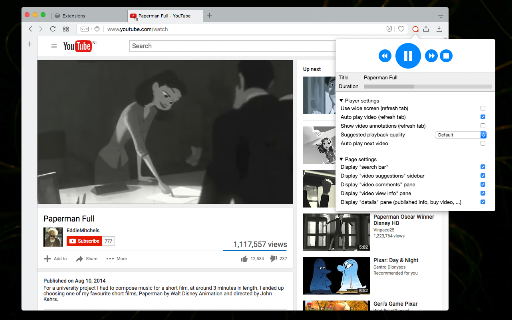
YouTube Control Center is a utility designed to provide persistent control over YouTube playback, including stop/pause/resume functionality, video quality management, and behavior modifications like disabling annotations or managing buffer behavior.

Developer:InBasic
Version:0.7.0
Size:107KiB
Last updated:

Overview

Installs

9K+

Rating

3.2

73 reviews

Languages

1 locales

Includes English

Market analysis

Review-backed positioning, friction, and market signals for this Chrome extension.

Backed by review samples

Macro category

Niche Lifestyle & Gaming Hacks

Pricing friction

Low review signal

Complaint intensity

High review signal

Listing & review signals
Observed signals from store listing text and review samples.

Listing positioning

The extension positions itself as a remote control center for YouTube, enabling users to manage playback and interface settings directly from a browser toolbar popup. It highlights capabilities to force HD playback, prevent auto-playing next tracks, and block video buffering.

Inferred product pattern

Utility extension suffering from abandonment and lack of compatibility with current YouTube architecture.

Review-backed pain points

Users frequently report that advertised features—specifically video buffering—do not work as intended, with many claiming the tool is defunct or broken.

Observed feature gaps

The extension lacks ongoing maintenance to support YouTube's evolving platform, leading to broken UI elements and failed core functionalities like advanced buffering and quality settings.

Tags
YouTube ControllerVideo BufferingMedia Playback Control
Target users

- Power users

- YouTube viewers

- Users with limited bandwidth

Primary use cases

- Controlling video playback without changing tabs

- Forcing specific HD video quality

- Blocking YouTube video auto-buffering

- Disabling video annotations

Positive themes

- Clean interface compared to alternatives

- Functionality when working correctly

Negative themes

- Feature decay (non-functioning features)

- UI/UX layout breakage

- Browser instability/crashing

- Failure to buffer full videos

Observed friction

- Performance complaints detected

- None; the extension is free, but users feel misled by its failure to perform advertised tasks.

Evidence boundary: Evidence based on a cluster of negative reviews citing significant performance issues, broken features, and general incompatibility with the current YouTube site version. The sample consists primarily of negative feedback and older reviews, potentially reflecting a mismatch between recent YouTube updates and older codebases.
Complaint summaries
Review-backed complaint signals grouped by operational area.

Support

Reviewers express frustration with persistent, unresolved bugs and the perception that the product is abandoned.

Reliability

High; users report browser crashes, visual glitches on the YouTube interface, and complete failure of core features.

Privacy

No specific privacy concerns reported in the sample.

Access & pricing

- Free usage observed

- No account requirement observed

- Free plan or free usage claimed

Store listing facts

Listing assets

- Screenshots: 1

- Videos: 1

- Languages: 1

Trust signals

- Privacy policy

- Developer contact

- Official website

Store metadata

- Version: 0.7.0

- Size: 107KiB

- Last updated:

Listing SEO keywords

Search intent keywords
Keyword signals for evaluating how users may discover, compare, or search for this extension category.

Core discovery

YouTube control extensionYouTube buffer blockerYouTube HD quality forcebrowser extension for YouTube management

Comparison

YouTube playback controllerbest YouTube popup controller

Problem

YouTube buffering not workingextension breaks YouTubeYouTube auto-play disable

Alternative

YouTube enhancerYouTube speed controller

Similar extensions

Jump to related discovery paths:

Screenshots

YouTube Control Center screenshot

Links

Recommended Chrome extensions

Related listings from the same category, trending peers, and the same publisher portfolio.

Browse fun
Notifier for Gmail™ icon

Notifier for Gmail™

InBasic

Multiple label and account notifier for Google Mail (Gmail™)

Installs

200K+

Rating

4.4

Download with JDownloader icon

Download with JDownloader

InBasic

Integrates the browser with JDownloader either by interrupting the built-in download manager or from right-click context menu

Installs

100K+

Rating

3.8

РуТрекер - официальный плагин (доступ и пр.) icon

РуТрекер - официальный плагин (доступ и пр.)

RuTracker.org

Доступ к RuTracker.org, поиск и пр.

Installs

2.0M+

Rating

4.0

FrankerFaceZ icon

FrankerFaceZ

FrankerFaceZ

The Twitch enhancement suite. Get custom emotes and tons of new features you'll never want to go without.

Installs

1.0M+

Rating

4.2

My Doodle icon

My Doodle

Lovenish Goyal

Change Google Logo

Installs

1.0M+

Rating

4.1

Shimeji Browser Extension icon

Shimeji Browser Extension

Jarno Le Conté

Play with little shimejis while browsing the web.

Installs

1.0M+

Rating

4.0

Cute Cursors - Custom Cursor for Chrome™ icon

Cute Cursors - Custom Cursor for Chrome™

Cute Cursors

Funny custom cursors for Chrome™. Replace the default mouse cursor with a custom one from collections of cool and cute cursors.

Installs

800K+

Rating

4.6

Custom Cursor for Chrome icon

Custom Cursor for Chrome

Cursors

Enhance your Chrome experience with custom cursor. Give your mouse cursor a unique touch by replacing it with a custom cursor.

Installs

800K+

Rating

4.4

Google Meet Enhanced Experience icon

Google Meet Enhanced Experience

niritshlif

Virtual Green Screens, Blur, Pixelate, 3D Filters and More!

Installs

800K+

Rating

3.4

Magic Actions for YouTube™ icon

Magic Actions for YouTube™

www.hotcleaner.com

Enhance your YouTube watching experience! Cinema Mode, Mouse Wheel Volume Control, AutoHD, Expand, Snapshots …

Installs

600K+

Rating

4.7