Auto Write icon

Auto Write Chrome Extension Analysis

Automation & Workflow Efficiency

Chrome extension ID: bpingmbcimfnmggbbbjpoajmgpjkeikj

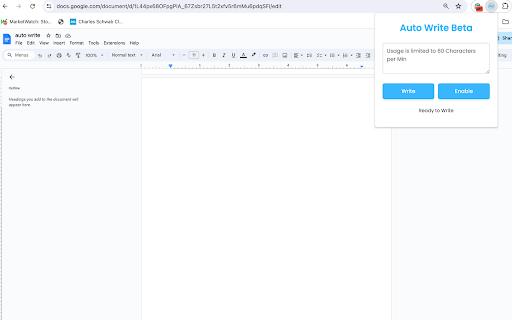
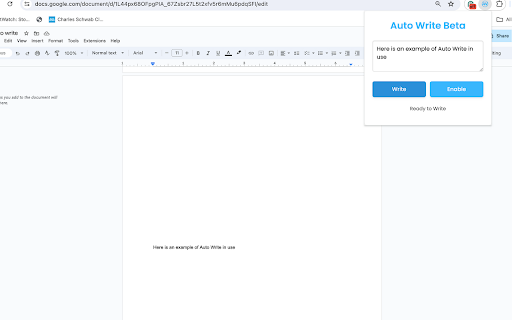
Auto Write is a Chrome extension that allows users to input text into a sidebar, which is then automatically typed into an active Google Doc. It is marketed primarily as a study aid to help users visualize and retain information better through the live writing process.

Developer:wcglorieux
Version:3.0
Size:22.9KiB
Last updated:

Overview

Installs

695

Rating

1.0

1 reviews

Languages

1 locales

Includes English (United States)

Market analysis

Review-backed positioning, friction, and market signals for this Chrome extension.

Backed by review samples

Macro category

Automation & Workflow Efficiency

Pricing friction

Low review signal

Complaint intensity

Moderate review signal

Listing & review signals
Observed signals from store listing text and review samples.

Listing positioning

The extension positions itself as an educational tool that enhances memory retention by simulating real-time text input into Google Docs. It targets students and professionals by offering a dynamic, automated writing experience to streamline note-taking and document drafting.

Inferred product pattern

Single-function utility extension for Google Docs automation.

Review-backed pain points

The tool is reported to be ineffective for longer texts, limited to approximately two sentences.

Observed feature gaps

The core functionality appears to fail for standard document lengths, suggesting an inability to handle meaningful data volumes.

Tags
Google DocsStudy AidText AutomationWriting Tool
Target users

- Students

- Researchers

- Professionals

Primary use cases

- Automated note-taking in Google Docs

- Enhanced memory retention study techniques

Positive themes

- none

Negative themes

- Severe functional limitations regarding character or length capacity

Observed friction

- Performance complaints detected

- No explicit pricing friction reported, but functional utility is questioned.

Evidence boundary: Data is based on the store listing features and a single user report confirming significant length constraints during operation. The sample size of reviews is extremely limited (one review), providing a very narrow view of the product's performance.
Complaint summaries
Review-backed complaint signals grouped by operational area.

Support

Not available.

Reliability

The extension is reported to be severely limited in output capacity, restricting it to very short text segments.

Privacy

None reported.

Access & pricing

- No clear monetization signal

- Login needed for core features

- No clear pricing signal

Store listing facts

Listing assets

- Screenshots: 2

- Videos: 0

- Languages: 1

Trust signals

- Privacy policy

- Developer contact

- Official website

Store metadata

- Version: 3.0

- Size: 22.9KiB

- Last updated:

Listing SEO keywords

Search intent keywords
Keyword signals for evaluating how users may discover, compare, or search for this extension category.

Core discovery

Google Docs automationreal-time writing extensionstudy note-taking tool

Comparison

Google Docs extensionswriting productivity tools

Problem

Google Docs writing limitextension not working

Alternative

note taking chrome extension

Similar extensions

Jump to related discovery paths:

Screenshots

Auto Write screenshot

Links

Recommended Chrome extensions

Related listings from the same category, trending peers, and the same publisher portfolio.

Browse education
Trancy - AI Translator & Dual Subtitles icon

Trancy - AI Translator & Dual Subtitles

Trancy

Trancy provides bilingual subtitle for platforms like YouTube, Disney+, as well as AI translator for websites.

Installs

300K+

Rating

4.7

Google Meet Attendance List icon

Google Meet Attendance List

MeetList

Easiest way to save the attendance list for your meetings or lectures

Installs

300K+

Rating

4.7

edpuzzle icon

edpuzzle

Edpuzzle

Import your favorite educational YouTube video into Edpuzzle with a click!

Installs

300K+

Rating

4.2

Revision History: Writing Process Visibility for Google Docs & Slides icon

Revision History: Writing Process Visibility for Google Docs & Slides

Revision History

Built for teachers: See how students write, not just what they wrote. View the writing process in Google Docs & Slides.

Installs

200K+

Rating

3.7

rikaikun icon

rikaikun

Erek Speed

rikaikun shows the reading and English definition of Japanese words when you hover over Japanese text in the browser.

Installs

200K+

Rating

4.7

Mouse Tooltip Translator - PDF & Netflix YouTube dual subs icon

Mouse Tooltip Translator - PDF & Netflix YouTube dual subs

ttop324

Mouse Tooltip Translator translate mouseover text using google translate. Support OCR, TTS, manga translator & pdf translator.

Installs

200K+

Rating

4.6

Paperpile Extension icon

Paperpile Extension

Paperpile

Collect, organize, annotate and cite your research papers in Chrome.

Installs

200K+

Rating

4.6

ExCITATION – Journal Ranking & Impact Factor for Google Scholar™ icon

ExCITATION – Journal Ranking & Impact Factor for Google Scholar™

Excitation Journal

Show SJR, ABS & ABDC journal rankings in Google Scholar. Sort by citations, detect predatory journals & preview abstracts — free.

Installs

200K+

Rating

4.5

OpenDyslexic for Chrome icon

OpenDyslexic for Chrome

OpenDyslexic

Format pages using the OpenDyslexic font and low contrast help

Installs

200K+

Rating

4.1

Reverso – Translation, dictionary icon

Reverso – Translation, dictionary

Reverso Technologies Inc.

Translate and learn languages while reading or watching movies online. It's free.

Installs

200K+

Rating

4.6