Request X icon

Request X Chrome Extension Analysis

Developer & Designer Tools

Chrome extension ID: cblonkdlnemhdeefhmaoiijjaedcphbf

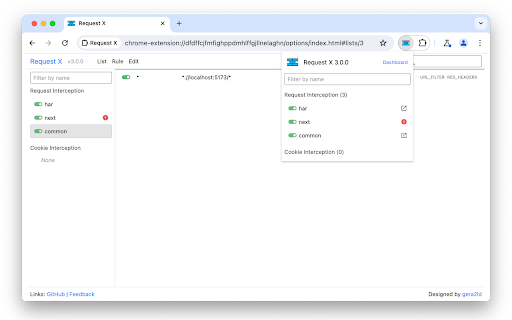
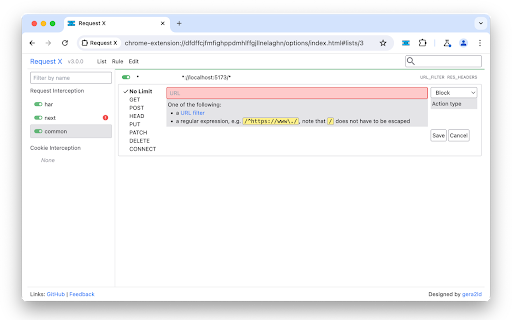
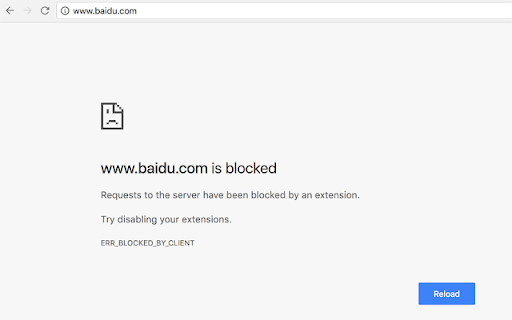
Request X is a browser extension that allows users to programmatically manage network traffic by creating custom rules for blocking, redirecting, or modifying HTTP headers and cookies. It provides a non-DevTools interface for managing browser request flows, aiding in debugging and content filtering.

Developer:gera2ld
Version:3.0.5
Size:260KiB
Last updated:

Overview

Installs

5K+

Rating

4.8

25 reviews

Languages

1 locales

Includes English

Market analysis

Review-backed positioning, friction, and market signals for this Chrome extension.

Backed by review samples

Macro category

Developer & Designer Tools

Pricing friction

Low review signal

Complaint intensity

Moderate review signal

Listing & review signals
Observed signals from store listing text and review samples.

Listing positioning

Request X positions itself as a versatile utility for developers and power users to intercept, block, and modify network requests and cookies. It emphasizes ease of use, maintainability, and the ability to share rule lists for complex browser-based tasks.

Inferred product pattern

Open-source developer utility focused on request manipulation without complex authentication requirements.

Review-backed pain points

Users struggle with managing large volumes of rules due to the lack of search or sorting features, and some report losing saved configurations.

Observed feature gaps

Absence of search bar, sorting mechanisms for rules, and a mechanism for password-protecting the extension settings.

Tags
Request InterceptionAPI DebuggingNetwork ProxyWeb Developer Tool
Target users

- Web Developers

- API Testers

- Power Users

Primary use cases

- API debugging

- Blocking unwanted content

- Modifying request headers and cookies

- Managing cross-site request settings (CORS)

Positive themes

- Approachable UI for non-experts

- Effective for API debugging and network testing

- Great alternative to keeping DevTools open constantly

- Reliable for filtering site distractions

Negative themes

- Lack of search functionality for rules

- No sorting feature for lists

- Difficulty managing large numbers of rules

- Occasional data persistence/import issues

Observed friction

- None; the extension is free to use with no reported payment barriers.

Evidence boundary: Evidence is drawn from 10 user reviews, covering both positive feedback on functionality and requested UI improvements regarding rule management. The sample size is small relative to the reported user base, focusing primarily on feature usability rather than long-term stability or edge cases.
Complaint summaries
Review-backed complaint signals grouped by operational area.

Support

Minimal; some users reported data loss, but no systemic support failures were identified.

Reliability

Occasional reports of loss of saved configurations or import failures.

Privacy

One user requested password protection for the settings, but there are no reports of privacy violations.

Access & pricing

- Free usage observed

- No account requirement observed

- Free plan or free usage claimed

Store listing facts

Listing assets

- Screenshots: 3

- Videos: 0

- Languages: 1

Trust signals

- Developer contact

- Support link

Store metadata

- Version: 3.0.5

- Size: 260KiB

- Last updated:

Listing SEO keywords

Search intent keywords
Keyword signals for evaluating how users may discover, compare, or search for this extension category.

Core discovery

request interceptormodify http headerschrome request blockerapi debug toolcors bypass extension

Comparison

Request X vs ModHeaderalternative to chrome devtools network

Problem

how to block requests chromemanage network cookiesmodify csp headers

Alternative

ModHeaderRequestly

Similar extensions

Jump to related discovery paths:

Screenshots

Request X screenshot

Links

Recommended Chrome extensions

Related listings from the same category, trending peers, and the same publisher portfolio.

Browse developer