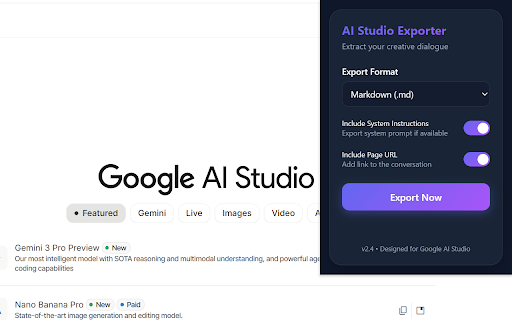
Google AI Studio Exporter Chrome Extension Analysis
AI & Writing AssistantsChrome extension ID: ccahfgoehbkchljcjpclmgbfohefmgnh
Google AI Studio Exporter is a Chrome extension designed to export entire chat conversations from aistudio.google.com. It allows users to save dialogues in Markdown, JSON, or plain text formats, ensuring all interactions are captured completely from top to bottom. The extension also maintains conversation order and operates with a privacy-first approach by processing all data locally within the user's browser.
Overview
Installs
5K+
Rating
★ 4.0
15 reviews
Languages
1 locales
Includes English
Market analysis
Review-backed positioning, friction, and market signals for this Chrome extension.
Macro category
AI & Writing Assistants
Pricing friction
Low review signal
Complaint intensity
Moderate review signal
Listing positioning
The extension is positioned as an effortless tool for users of Google AI Studio to export their complete chat histories. It highlights key features such as full conversation capture, multiple export formats (Markdown, JSON, TXT), clean dialogue output by filtering UI clutter, and strong privacy measures with local data processing.
Inferred product pattern
A free Chrome extension designed as a utility tool for users of Google AI Studio, enabling the local export of chat conversations into various text-based formats (Markdown, JSON, TXT) with an emphasis on privacy.
Review-backed pain points
Users frequently encounter issues where the extension fails to export the full conversation, instead only providing a URL or partial dialogue after a lengthy processing time. A significant pain point is the loss of formatting fidelity, with complaints about bold text, headings, ordered lists, code, and formulas not being preserved in the exported files.
Observed feature gaps
A notable feature gap is the inconsistent or incomplete preservation of rich text formatting, including headings, bold text, ordered lists, and specialized content like code and formulas. Some users also experience a functional gap where the export process occasionally yields only a page URL rather than the expected conversation content.
- Google AI Studio users needing to archive conversations
- Developers or researchers documenting AI interactions
- Individuals requiring AI-generated text for training or analysis
- Content creators managing AI-assisted content
- Archiving AI Studio chat conversations for personal records
- Documenting AI interactions for project development or research
- Exporting chat data in structured formats for further processing or AI training
- Creating clean, readable copies of AI dialogues without UI elements
- Successfully fulfills the need for conversation saving
- Effective for users who utilize specific settings like 'RAW mode' for better formatting
- Extension sometimes exports only a URL instead of the conversation content
- Long processing times leading to incomplete or useless output
- Failure to copy all questions, often only capturing the first question and AI answers
- Loss of text formatting (e.g., bold, headings, lists, code, formulas) during export
- Performance complaints detected
- No pricing details or associated friction points are mentioned in the store listing or user reviews, suggesting the product is offered for free.
Support
There are no complaints regarding customer support, account management, or refund processes in the provided review samples.
Reliability
Reliability complaints include instances where the extension fails to export full conversations (sometimes only providing a URL), takes an excessively long time to process, and loses original formatting like bolding, headings, and code blocks during the export.
Privacy
The listing explicitly states that all data processing occurs locally within the browser, and no privacy-related complaints are found in the user reviews.
- Free usage observed
- No account requirement observed
- Free plan or free usage claimed
Store listing facts
- Screenshots: 1
- Videos: 0
- Languages: 1
- Privacy policy
- Developer contact
- Version: 2.5.1
- Size: 36.25KiB
- Last updated:
Listing SEO keywords
Core discovery
Comparison
Problem
Alternative
Similar extensions
Jump to related discovery paths:
Screenshots