Full Page Screenshot & Annotate | SnapFit icon

Full Page Screenshot & Annotate Chrome Extension Analysis

Automation & Workflow Efficiency

Store listing title: Full Page Screenshot & Annotate | SnapFit

Chrome extension ID: cdcjmchldlcjdjfchpofehakbfldeihb

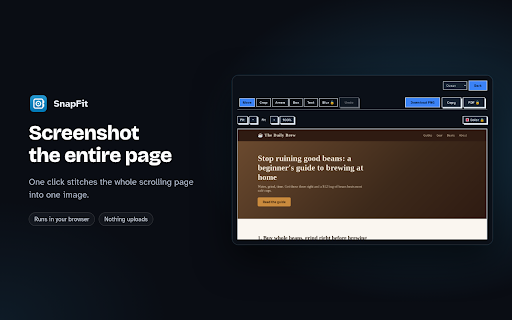
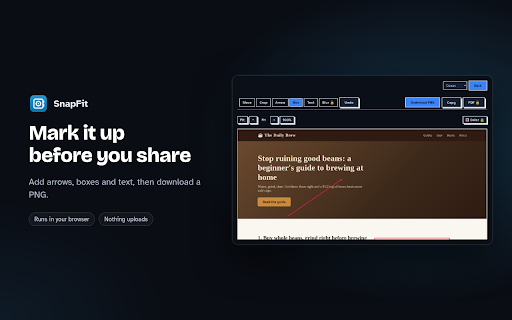
SnapFit is a Chrome extension designed to capture full scrolling web pages and allow users to annotate them with arrows, boxes, and text. It also includes a blur tool for sensitive information. The extension emphasizes 100% privacy by processing all data locally within the browser.

Developer:Mr.Rage
Version:1.4.0
Size:454KiB
Last updated:

Overview

Installs

4

Rating

★ —

0 reviews

Languages

1 locales

Includes English

Market analysis

Review-backed positioning, friction, and market signals for this Chrome extension.

No review samples found

Macro category

Automation & Workflow Efficiency

Pricing friction

Low review signal

Complaint intensity

Low review signal

Listing & review signals
Observed signals from store listing text and review samples.

Listing positioning

The listing positions SnapFit as a privacy-focused tool for capturing and annotating entire scrolling web pages directly on the user's device. It emphasizes its local processing capabilities and offers a free tier with limitations and a one-time purchase for advanced features.

Inferred product pattern

Local-first screenshot and annotation tool with a freemium model.

Review-backed pain points

No review-backed pain points are available as no reviews were found.

Observed feature gaps

No observed feature gaps from reviews or listing.

Tags
Screenshot ToolAnnotationProductivity
Target users

- Web content creators

- Researchers

- Students

- Anyone needing to capture and mark up web pages

Primary use cases

- Capturing entire scrolling web pages

- Annotating screenshots with text and shapes

- Redacting sensitive information

Positive themes

No positive theme data.

Negative themes

No negative theme data.

Observed friction

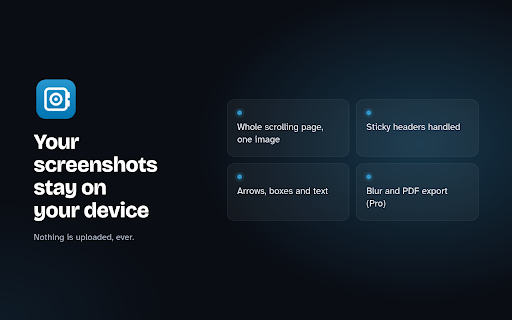
- The extension offers a free tier with a limit of 3 annotations per capture. A one-time purchase of $9 unlocks unlimited annotations, blur functionality, custom colors, and PDF export.

Evidence boundary: Data extracted from the Chrome Web Store listing, including title, short description, long description, developer name, and review fetch status. No user reviews were available for analysis, thus limiting the ability to provide review-backed themes, pain points, or sentiment analysis.
Complaint summaries
Review-backed complaint signals grouped by operational area.

Support

No review-backed support complaints are available as no reviews were found.

Reliability

No review-backed reliability complaints are available as no reviews were found.

Privacy

The listing explicitly states '100% private: capture and editing run locally in your browser. No uploads, no accounts, no tracking, no ads.'

Access & pricing

- Free entry with paid features

- No account requirement observed

- Limited free usage observed

Store listing facts

Listing assets

- Screenshots: 3

- Videos: 0

- Languages: 1

Trust signals

- Developer contact

- Official website

Store metadata

- Version: 1.4.0

- Size: 454KiB

- Last updated:

Listing SEO keywords

Search intent keywords
Keyword signals for evaluating how users may discover, compare, or search for this extension category.

Core discovery

full page screenshotscroll captureweb annotationscreenshot toolannotate webpage

Comparison

full page screenshot chrome extensionwebpage screenshot annotator

Problem

how to screenshot full pagecapture scrolling webpageannotate website screenshot

Alternative

screenshot and annotateweb capture tool

Similar extensions

Jump to related discovery paths:

Screenshots

Full Page Screenshot & Annotate | SnapFit screenshot

Links

Website: mr.rage

Recommended Chrome extensions

Related listings from the same category, trending peers, and the same publisher portfolio.

Browse tools
HEIC to JPG — Convert HEIC Photos | HEICFlip icon

HEIC to JPG — Convert HEIC Photos | HEICFlip

Mr.Rage

Convert HEIC/HEIF photos to JPG, PNG, or PDF right in your browser. No uploads, no watermark, no sign-up.

Installs

25

Rating

★ —

Compress Video — Trim, Crop & GIF | ClipFit icon

Compress Video — Trim, Crop & GIF | ClipFit

Mr.Rage

Compress, convert, trim, crop & GIF videos right in your browser. No uploads, no watermark, no sign-up.

Installs

20

Rating

★ —

HID Credential Management Extension icon

HID Credential Management Extension

hid-global-chrome-web-store

Browser extension for HID credential management solution.

Installs

2.0M+

Rating

★ 1.3

The QR Code Generator icon

The QR Code Generator

Uniqode

Create, scan, and edit QR codes instantly with one click.

Installs

2.0M+

Rating

★ 4.3

AI Chat for Search icon

AI Chat for Search

AI Chat for Search Team

Display AI Chat response alongside search engine results

Installs

2.0M+

Rating

★ 4.6

WPS浏览器助手:文档在线阅读编辑 icon

WPS浏览器助手:文档在线阅读编辑

金山PDF

PDF、Excel、Word、PPT等文档无需下载即可在线预览,还能对文档进行编辑、打印、转换等处理。

Installs

2.0M+

Rating

★ 3.0

Planet Search icon

Planet Search

Free VPN Planet

Enchanced default search engine.

Installs

2.0M+

Rating

★ 3.4

Lightshot (screenshot tool) icon

Lightshot (screenshot tool)

Skillbrains

Simple and convenient screenshot tool. Select an area, edit your screenshot and upload it to the server.

Installs

2.0M+

Rating

★ 4.4

Ecosia - The search engine that plants trees icon

Ecosia - The search engine that plants trees

Ecosia GmbH

This extension sets your search engine to Ecosia and customizes your new tab page so you can plant trees with every search.

Installs

1.0M+

Rating

★ 4.7

Chat with all AI models (Gemini, Claude, DeepSeek…) & AI Agents | AITOPIA icon

Chat with all AI models (Gemini, Claude, DeepSeek…) & AI Agents | AITOPIA

AITOPIA AI Sidebar

AI Agent Marketplace & AI Sidebar with all AI models (Gemini, Claude, DeepSeek & more) and hundreds of AI Agents

Installs

1.0M+

Rating

★ 4.9