Quick source viewer icon

Quick source viewer Chrome Extension Analysis

Developer & Designer Tools

Chrome extension ID: cfmcghennfbpmhemnnfjhkdmnbidpanb

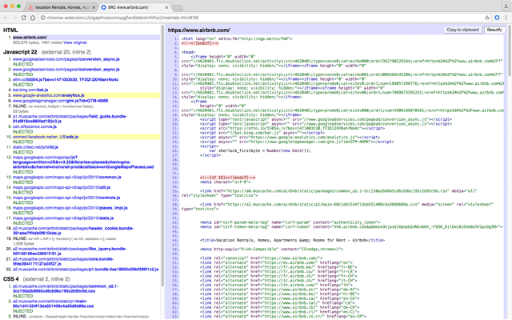
Quick source viewer is a developer utility that allows users to inspect a webpage's source code directly from the browser. It provides features such as line numbers, clipboard copying, and a toolbar badge showing JavaScript node counts.

Developer:Tomi Mickelsson
Version:1.5.1
Size:76.16KiB
Last updated:

Overview

Installs

20K+

Rating

3.6

115 reviews

Languages

1 locales

Includes English (United States)

Market analysis

Review-backed positioning, friction, and market signals for this Chrome extension.

Backed by review samples

Macro category

Developer & Designer Tools

Pricing friction

Low review signal

Complaint intensity

Moderate review signal

Listing & review signals
Observed signals from store listing text and review samples.

Listing positioning

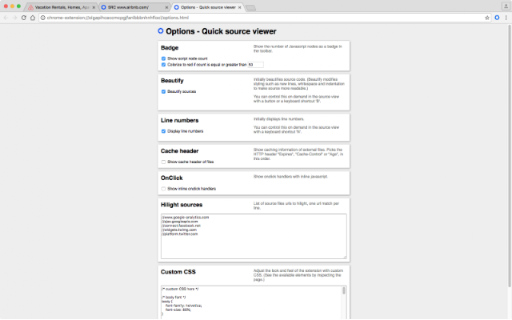
The product is positioned as a fast and compact tool for viewing HTML, JavaScript, and CSS sources. It emphasizes readability through syntax colorization, beautification, and the provision of technical metadata like file sizes and cache headers.

Inferred product pattern

Open-source lightweight utility for rapid front-end code inspection.

Review-backed pain points

Users frequently encounter 'error loading file' messages and 'Access is denied' errors when attempting to view chrome:// or Chrome Store pages. Some users find the tool unreliable, requiring multiple refreshes to work.

Observed feature gaps

Users have requested the ability to expand and collapse HTML sections, the ability to highlight meta tags, and a 'view selection source' feature similar to Firefox.

Tags
Source ViewerHTML ViewerDeveloper ToolCode BeautifierWeb Development
Target users

- Web Developers

- Front-end Engineers

- Students learning web development

Primary use cases

- Inspecting page source code

- Analyzing CSS and JS files

- Checking cache headers and file sizes

Positive themes

- Functional for viewing source code after refreshing the page

Negative themes

- Frequent loading errors

- Access denied errors on restricted pages

- Limited functionality for professional development needs

Observed friction

- Performance complaints detected

- No pricing friction observed; the tool is listed as open source.

Evidence boundary: Analysis based on the store listing and 10 helpful user reviews. Review sample size is small compared to total users; some feedback is in non-English languages.
Complaint summaries
Review-backed complaint signals grouped by operational area.

Support

No specific support interaction complaints, though users express frustration over unresolved bugs.

Reliability

Significant reliability issues reported, specifically 'error loading file' and access permission failures.

Privacy

No privacy or security complaints observed.

Access & pricing

- Free usage observed

- No account requirement observed

- Free plan or free usage claimed

Store listing facts

Listing assets

- Screenshots: 4

- Videos: 0

- Languages: 1

Trust signals

- Developer contact

Store metadata

- Version: 1.5.1

- Size: 76.16KiB

- Last updated:

Listing SEO keywords

Search intent keywords
Keyword signals for evaluating how users may discover, compare, or search for this extension category.

Core discovery

view page sourcehtml viewer extensioncss source viewerjavascript viewer chromebeautified source code

Comparison

chrome view source vs firefoxbest source viewer for chrome

Problem

how to view page source quicklyview javascript source code chrome

Alternative

view source extension alternativeschrome devtools alternatives

Similar extensions

Jump to related discovery paths:

Screenshots

Quick source viewer screenshot

Recommended Chrome extensions

Related listings from the same category, trending peers, and the same publisher portfolio.

Browse developer