Audio Editor for Google Chrome™ icon

Audio Editor for Google Chrome™ Chrome Extension Analysis

Developer & Designer Tools

Chrome extension ID: cilapnfooagkoenmeapclliipblhcjdm

A browser-based utility for basic audio manipulation. Users can import sound files to perform cut, copy, paste, and delete operations, as well as apply noise reduction and export to various formats like MP3 and WAV.

Developer:Cool Apps
Version:3.0.1
Size:938KiB
Last updated:

Overview

Installs

10K+

Rating

3.0

81 reviews

Languages

41 locales

Includes Deutsch, English, English (United States), Filipino...

Market analysis

Review-backed positioning, friction, and market signals for this Chrome extension.

Backed by review samples

Macro category

Developer & Designer Tools

Pricing friction

Low review signal

Complaint intensity

Moderate review signal

Listing & review signals
Observed signals from store listing text and review samples.

Listing positioning

The product is positioned as a free, online audio editor for Chrome users. It emphasizes the ability to remove noise, trim and combine clips, and supports a wide variety of import and export formats.

Inferred product pattern

Web-based audio utility wrapper that provides basic manipulation tools via a Chrome extension interface.

Review-backed pain points

Users report that the tool frequently crashes when loading files (especially large WAV files), fails to actually cut or edit the audio, and cannot export the edited results.

Observed feature gaps

Lack of functional system or microphone recording capabilities and unstable handling of large audio files.

Tags
Audio EditorSound EditingMP3 CutterNoise RemovalOnline Audio Tool
Target users

- Casual audio editors

- Content creators

- Students

- Users needing quick audio trimming

Primary use cases

- Trimming songs

- Removing background noise

- Combining audio clips

- Converting audio formats

Positive themes

No positive theme data.

Negative themes

- Frequent application crashes

- Non-functional core features

- Confusing user interface

- Export and download failures

Observed friction

- Performance complaints detected

- Privacy complaints detected

- No pricing friction observed as the tool is marketed as free.

Evidence boundary: Analysis based on the store listing for feature claims and 10 low-rating helpful review samples for performance and usability signals. The provided review samples are exclusively negative, which does not represent the full distribution of the 2.95 star rating.
Complaint summaries
Review-backed complaint signals grouped by operational area.

Support

No direct support contact complaints, but general frustration with the product being perceived as non-functional.

Reliability

Severe reliability issues including page hanging, crashes during file import, and failure of the export function.

Privacy

One user expressed suspicion regarding the tool reaping user data.

Access & pricing

- Free usage observed

- No account requirement observed

- Free plan or free usage claimed

Store listing facts

Listing assets

- Screenshots: 1

- Videos: 0

- Languages: 41

Trust signals

- Privacy policy

- Developer contact

- Official website

Store metadata

- Version: 3.0.1

- Size: 938KiB

- Last updated:

Listing SEO keywords

Search intent keywords
Keyword signals for evaluating how users may discover, compare, or search for this extension category.

Core discovery

free online audio editorchrome audio editorcut mp3 onlinenoise removal tool chrome

Comparison

WavePad alternativeonline sound editor vs audio editor chrome

Problem

how to trim audio in chromeremove background noise online freeedit wav file in browser

Alternative

free audio cutteronline sound trimmerbrowser based audio editor

Similar extensions

Jump to related discovery paths:

Screenshots

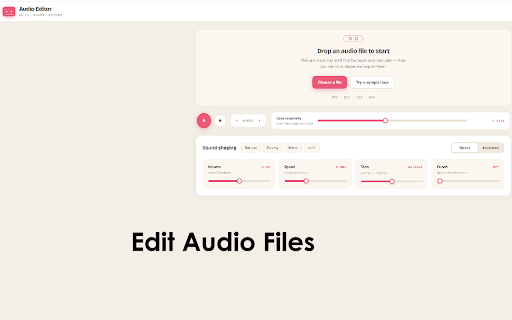
Audio Editor for Google Chrome™ screenshot

Links

Recommended Chrome extensions

Related listings from the same category, trending peers, and the same publisher portfolio.

Browse workflow
Save Image To Google Photos icon

Save Image To Google Photos

Cool Apps

Save Images to Google Photos with right click

Installs

50K+

Rating

4.1

Word Cloud Generator™ icon

Word Cloud Generator™

Cool Apps

Create a word cloud from pasted text or a local text file, with custom colors, fonts, shapes and high-resolution export.

Installs

30K+

Rating

3.7

Evernote Web Clipper icon

Evernote Web Clipper

Evernote

Use the Evernote extension to save things you see on the web into your Evernote account.

Installs

2.0M+

Rating

4.7

Keeper® Password Manager & Digital Vault icon

Keeper® Password Manager & Digital Vault

Keeper Security

Generate strong passwords, autofill and protect your confidential info with zero-knowledge encryption.

Installs

2.0M+

Rating

4.8

Snow Web Application Metering icon

Snow Web Application Metering

snow_chrome_extensions

This extension tracks web application use for the purpose of license compliance and cost optimization. www.snowsoftware.com/browser

Installs

2.0M+

Rating

1.3

Mendeley Web Importer icon

Mendeley Web Importer

Mendeley

Fast, convenient import of references and PDFs to your Mendeley Reference Manager library.

Installs

2.0M+

Rating

2.3

Enable local file links icon

Enable local file links

Takashi Sugimoto (tksugimoto)

Make it possible to open by click a link to a local file that is disabled by Chrome.

Installs

2.0M+

Rating

3.9

Microsoft Defender Browser Protection icon

Microsoft Defender Browser Protection

Microsoft Corporation

Protect yourself against online threats, like phishing and malicious websites, with real-time protection from Microsoft.

Installs

2.0M+

Rating

4.2

Визуальные закладки icon

Визуальные закладки

Yandex

Визуальные закладки – это страница, на которой собраны ваши любимые сайты

Installs

2.0M+

Rating

3.4

Web Signer icon

Web Signer

Softplan Websigner Developers

Extensão para assinatura digital no browser

Installs

2.0M+

Rating

2.9