Save Image To Google Photos icon

Save Image To Google Photos Chrome Extension Analysis

Automation & Workflow Efficiency

Chrome extension ID: djakijfdccnmmnknpmphdkkjbjfenkne

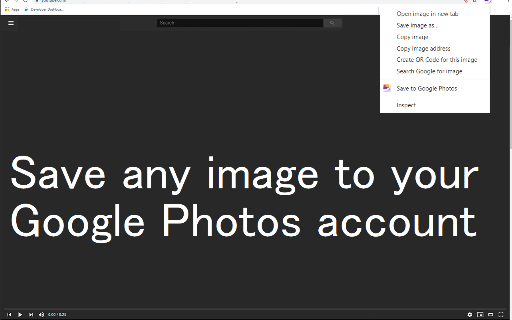
Save Image To Google Photos is a browser utility that allows users to send web images directly to their Google Photos albums via a context menu option. It eliminates the manual process of downloading images to a local drive and re-uploading them. The tool is designed to help users quickly archive and organize online media into specified cloud folders.

Developer:Cool Apps
Version:3.0.1
Size:133KiB
Last updated:

Overview

Installs

50K+

Rating

4.1

418 reviews

Languages

40 locales

Includes Deutsch, English, Filipino, Indonesia...

Market analysis

Review-backed positioning, friction, and market signals for this Chrome extension.

Backed by review samples

Macro category

Automation & Workflow Efficiency

Pricing friction

Low review signal

Complaint intensity

High review signal

Listing & review signals
Observed signals from store listing text and review samples.

Listing positioning

The extension positions itself as an effortless, one-click utility to save any image from the internet directly to Google Photos using the browser's right-click context menu. It highlights custom album management and automatic duplicate handling. The developer emphasizes convenience and ease of use, suggesting integration with Google's cloud storage.

Inferred product pattern

Cloud storage API connector triggered by browser context menus.

Review-backed pain points

The most severe pain point is that the app is blocked by Google's OAuth validation, displaying 'This app tried to access sensitive info' and preventing users from logging in. Additionally, users express immediate frustration with forced review prompts that block usage of the extension right after installation, and repetitive confirmation popups that interrupt their saving workflow.

Observed feature gaps

Based on user feedback, there is a clear demand for silent notifications (saving without requiring an 'OK' dialog click), a reliable auto-reconnect or persistent session mechanism to prevent unexpected sign-outs, and a better fallback or queue system for times when connection or system performance degrades.

Tags
Google PhotosImage SaverRight Click UtilityCloud BackupWorkflow Automation
Target users

- Google Photos users

- Digital archivists

- Web researchers

- Casual web surfers

Primary use cases

- Saving images from websites straight to Google Photos via right-click

- Organizing saved web images into specific pre-selected Google Photos albums

Positive themes

- Saves photos seamlessly when the connection works

- Extremely convenient workflow for cloud photo backups

Negative themes

- Google OAuth login blocked by Google security policies

- Aggressive prompts forcing users to review before use

- Saving failures and errors when system resources are low

- Annoying confirmation dialogs requiring manual clicks

- Frequent unexpected logouts

Observed friction

- Account blocking complaints detected

- Performance complaints detected

- Privacy complaints detected

- No payment or pricing model complaints were observed, although the forced 'Rate Us' prompts create a friction point before any utility is experienced.

Evidence boundary: Analyzed public store listing metadata and 10 user review samples across English, Russian, and Japanese languages focusing on functionality issues, OAuth blocks, and prompt frequency. The review sample size is small and leans heavily towards users who experienced Google security blocks or aggressive rating requests, which may skew the perceived stability of the extension.
Complaint summaries
Review-backed complaint signals grouped by operational area.

Support

No support channel interactions were detailed in the reviews, but users noted complete blockades on authorization with no way to bypass or authorize the developer's application.

Reliability

Users report that the extension intermittently stops saving and returns errors during lower computer performance or cache overload. The extension also suffers from frequent session logouts.

Privacy

Security warnings are triggered during login, where Google blocks access because the app is unverified or requests sensitive permissions that users feel are unnecessary for a simple image saver.

Access & pricing

- Free usage observed

- Account required for core usage

- Free plan or free usage claimed

Store listing facts

Listing assets

- Screenshots: 1

- Videos: 0

- Languages: 40

Trust signals

- Privacy policy

- Developer contact

- Official website

Store metadata

- Version: 3.0.1

- Size: 133KiB

- Last updated:

Listing SEO keywords

Search intent keywords
Keyword signals for evaluating how users may discover, compare, or search for this extension category.

Core discovery

save image to google photosright click save image to cloudupload to google photos extensionchrome extension google photos uploader

Comparison

save image to google photos alternativegoogle drive vs google photos extension

Problem

google photos extension blocked by googlesave image to google photos errorgoogle photos extension login not working

Alternative

save to google drive extensionimage downloader to cloud

Similar extensions

Jump to related discovery paths:

Screenshots

Save Image To Google Photos screenshot

Links

Recommended Chrome extensions

Related listings from the same category, trending peers, and the same publisher portfolio.

Browse workflow
Word Cloud Generator™ icon

Word Cloud Generator™

Cool Apps

Create a word cloud from pasted text or a local text file, with custom colors, fonts, shapes and high-resolution export.

Installs

30K+

Rating

3.7

Pop up blocker for Chrome™ - Poper Blocker icon

Pop up blocker for Chrome™ - Poper Blocker

dingosolutions

Block popups, ads, cookie requests, trackers, notifications, ads on social media & more. A clean browsing experience starts today.

Installs

2.0M+

Rating

4.8

Evernote Web Clipper icon

Evernote Web Clipper

Evernote

Use the Evernote extension to save things you see on the web into your Evernote account.

Installs

2.0M+

Rating

4.7

Keeper® Password Manager & Digital Vault icon

Keeper® Password Manager & Digital Vault

Keeper Security

Generate strong passwords, autofill and protect your confidential info with zero-knowledge encryption.

Installs

2.0M+

Rating

4.8

Snow Web Application Metering icon

Snow Web Application Metering

snow_chrome_extensions

This extension tracks web application use for the purpose of license compliance and cost optimization. www.snowsoftware.com/browser

Installs

2.0M+

Rating

1.3

Mendeley Web Importer icon

Mendeley Web Importer

Mendeley

Fast, convenient import of references and PDFs to your Mendeley Reference Manager library.

Installs

2.0M+

Rating

2.3

Enable local file links icon

Enable local file links

Takashi Sugimoto (tksugimoto)

Make it possible to open by click a link to a local file that is disabled by Chrome.

Installs

2.0M+

Rating

3.9

Microsoft Defender Browser Protection icon

Microsoft Defender Browser Protection

Microsoft Corporation

Protect yourself against online threats, like phishing and malicious websites, with real-time protection from Microsoft.

Installs

2.0M+

Rating

4.2

Визуальные закладки icon

Визуальные закладки

Yandex

Визуальные закладки – это страница, на которой собраны ваши любимые сайты

Installs

2.0M+

Rating

3.4

Web Signer icon

Web Signer

Softplan Websigner Developers

Extensão para assinatura digital no browser

Installs

2.0M+

Rating

2.9