Keyboard Launcher for MS Office Online™ icon

Keyboard Launcher for MS Office Online™ Chrome Extension Analysis

Automation & Workflow Efficiency

Chrome extension ID: dbackjeaclghjedlkfakllpojolgebcp

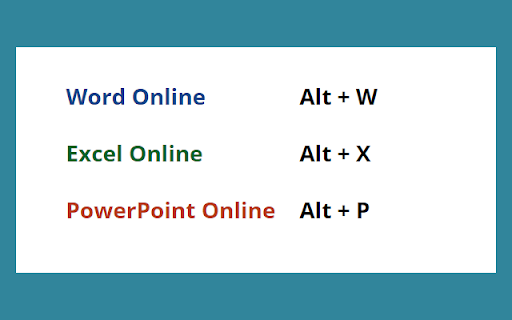
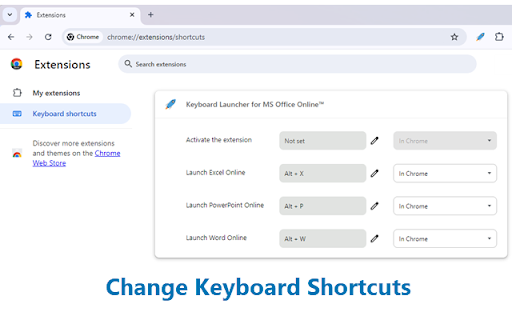
This is a simple utility that allows users to quickly open Microsoft Word, Excel, and PowerPoint Online using predefined or customizable keyboard shortcuts. It serves as a browser-based launcher to reduce navigation steps for users working within the Microsoft Office ecosystem.

Developer:BrowserNative
Version:0.0.6
Size:9.41KiB
Last updated:

Overview

Installs

4K+

Rating

4.8

49 reviews

Languages

1 locales

Includes English

Market analysis

Review-backed positioning, friction, and market signals for this Chrome extension.

Backed by review samples

Macro category

Automation & Workflow Efficiency

Pricing friction

Low review signal

Complaint intensity

Low review signal

Listing & review signals
Observed signals from store listing text and review samples.

Listing positioning

The extension positions itself as a streamlined productivity tool that provides custom keyboard shortcuts for launching Microsoft Office Online applications. It emphasizes ease of use, time-saving capabilities, and the ability for users to personalize their preferred key combinations.

Inferred product pattern

Single-function browser utility focused on workflow optimization.

Review-backed pain points

No significant negative review-backed pain points identified.

Observed feature gaps

No major feature gaps identified in public feedback.

Tags
Keyboard ShortcutsProductivityMicrosoft OfficeLauncher
Target users

- Microsoft Office Online users

- Office professionals

- Power users seeking efficiency

Primary use cases

- Launching web-based Office apps via keyboard shortcuts

- Customizing navigation hotkeys

Positive themes

- Intuitive design

- Time-saving efficiency

- Ease of configuration

- Reliable performance

Negative themes

No negative theme data.

Observed friction

- None identified; the tool is positioned as a free utility.

Evidence boundary: Evidence is based on high-rating user feedback and the extension's functional description, showing consistent positive sentiment regarding utility and simplicity. The evidence is constrained by a relatively small set of public reviews, though they are uniformly positive.
Complaint summaries
Review-backed complaint signals grouped by operational area.

Support

None identified.

Reliability

None identified.

Privacy

None identified.

Access & pricing

- Free usage observed

- No account requirement observed

- Free plan or free usage claimed

Store listing facts

Listing assets

- Screenshots: 2

- Videos: 0

- Languages: 1

Trust signals

- Privacy policy

- Developer contact

- Official website

Store metadata

- Version: 0.0.6

- Size: 9.41KiB

- Last updated:

Listing SEO keywords

Search intent keywords
Keyword signals for evaluating how users may discover, compare, or search for this extension category.

Core discovery

Microsoft Office shortcutsChrome extension for OfficeWeb shortcut launcherOffice Online hotkeys

Comparison

fastest way to open Office Onlinekeyboard shortcut manager

Problem

slow Office navigationtoo many clicks for Office

Alternative

productivity extensionsOffice web app launcher

Similar extensions

Jump to related discovery paths:

Screenshots

Keyboard Launcher for MS Office Online™ screenshot

Links

Recommended Chrome extensions

Related listings from the same category, trending peers, and the same publisher portfolio.

Browse workflow