Enable Backspace icon

Enable Backspace Chrome Extension Analysis

Tab & Bookmark Productivity

Chrome extension ID: ddijblnjiploanefjnbpimgbfjkpifia

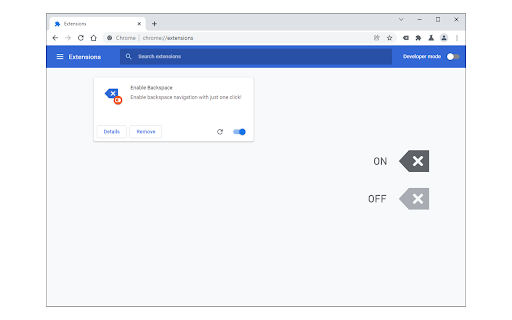
Enable Backspace is a utility that allows users to navigate to the previous page using the backspace key. It features a visual toggle icon to activate or deactivate the functionality without a separate settings menu.

Developer:loora
Version:0.1.4
Size:28.38KiB
Last updated:

Overview

Installs

4K+

Rating

3.0

7 reviews

Languages

1 locales

Includes English

Market analysis

Review-backed positioning, friction, and market signals for this Chrome extension.

Backed by review samples

Macro category

Tab & Bookmark Productivity

Pricing friction

Low review signal

Complaint intensity

Moderate review signal

Listing & review signals
Observed signals from store listing text and review samples.

Listing positioning

The extension positions itself as a simple, one-click solution to restore the 'go-back' functionality of the backspace key, which was removed from modern browsers. It emphasizes a zero-config experience with a basic toggle switch in the toolbar.

Inferred product pattern

Single-purpose utility restoring legacy browser behavior.

Review-backed pain points

Several users report the extension simply does not work. One user reported that a popup within the extension attempted to redirect them to Facebook.

Observed feature gaps

Lack of a settings or options page for customization; inconsistency in functionality across different browser versions.

Tags
Navigation UtilityKeyboard ShortcutsBrowser Productivity
Target users

- Users accustomed to legacy browser navigation

- Keyboard-centric web surfers

Primary use cases

- Navigating back to previous pages using the keyboard

- Restoring removed browser default shortcuts

Positive themes

- Successful restoration of functionality

- Ease of installation

Negative themes

- Failure to function

- Unexpected social media redirects

Observed friction

- Performance complaints detected

- Privacy complaints detected

- No pricing friction observed as the product appears to be free.

Evidence boundary: Analysis based on the store listing and 6 available user reviews. The review sample size is very small, which may not represent the experience of the total user base.
Complaint summaries
Review-backed complaint signals grouped by operational area.

Support

No direct support interaction complaints, though the listing provides a bug report form.

Reliability

Multiple reports of the extension failing to work entirely.

Privacy

One user expressed discomfort with a popup attempting to redirect them to Facebook during a review process.

Access & pricing

- Free usage observed

- No account requirement observed

- Free plan or free usage claimed

Store listing facts

Listing assets

- Screenshots: 1

- Videos: 0

- Languages: 1

Trust signals

- Developer contact

- Official website

Store metadata

- Version: 0.1.4

- Size: 28.38KiB

- Last updated:

Listing SEO keywords

Search intent keywords
Keyword signals for evaluating how users may discover, compare, or search for this extension category.

Core discovery

chrome backspace navigationrestore backspace go backenable backspace key chrome

Comparison

backspace vs alt left navigationbest backspace extension

Problem

chrome backspace not workinghow to use backspace to go back in chrome

Alternative

backspace navigation alternativechrome go back shortcut

Similar extensions

Jump to related discovery paths:

Screenshots

Enable Backspace screenshot

Links

Recommended Chrome extensions

Related listings from the same category, trending peers, and the same publisher portfolio.

Browse tools
Sound Meter (Noise & Decibel) icon

Sound Meter (Noise & Decibel)

loora

Measure the surrounding sound (dB) and noise with your computer's microphone!

Installs

20K+

Rating

3.0

Audio Converter icon

Audio Converter

loora

Convert any audio file to selected formats (i.e. mp3) inside your browser!

Installs

10K+

Rating

3.3

Immersive Translate: AI Web, PDF & Video Translator icon

Immersive Translate: AI Web, PDF & Video Translator

Immersive Translate

Free Translate Website, Translate PDF & Epub eBook, Translate Video Subtitles in Bilingual

Installs

3.0M+

Rating

3.9

Monica: All-In-One AI Assist & Smartest  AI Agent icon

Monica: All-In-One AI Assist & Smartest AI Agent

Monica Team

One stop AI Assistant with GPT, Claude, Gemini: Chat, Write, Translate, Search, Summarize, image generator, video generation

Installs

3.0M+

Rating

4.9

BetterTTV icon

BetterTTV

NightDev, LLC

BetterTTV enhances Twitch and YouTube with new features, emotes, and more.

Installs

3.0M+

Rating

4.6

Google Input Tools icon

Google Input Tools

cloud-input-team

Input Tools lets you type in the language of your choice.

Installs

3.0M+

Rating

4.0

Microsoft Bing Search with Rewards icon

Microsoft Bing Search with Rewards

Microsoft Corporation

Use the Microsoft Rewards extension to find new ways to earn every day, easily track your points and set your default search to Bing

Installs

3.0M+

Rating

4.3

Google Scholar Button icon

Google Scholar Button

scholar-chrome-extensions

Lookup scholarly articles as you browse the web.

Installs

3.0M+

Rating

4.6

ЮБуст - VPN для YouTube. Обход блокировки Ютуб без ВПН. VPN для браузера icon

ЮБуст - VPN для YouTube. Обход блокировки Ютуб без ВПН. VPN для браузера

Uboost

Ускоритель Ютуб без ВПН, VPN для браузера Яндекс, Chrome, Opera, Edge. Обход замедления Ютуба.

Installs

2.0M+

Rating

4.2

Smallpdf—Edit, Convert, Compress, & AI Summarize PDF icon

Smallpdf—Edit, Convert, Compress, & AI Summarize PDF

Smallpdf AG

Get instant access to dozens of PDF tools directly in your browser – no downloads, no switching tabs.

Installs

2.0M+

Rating

4.6