Code Formatter icon

Code Formatter Chrome Extension Analysis

Developer & Designer Tools

Chrome extension ID: deecjbhfakhcegonhediiniinjdgmfie

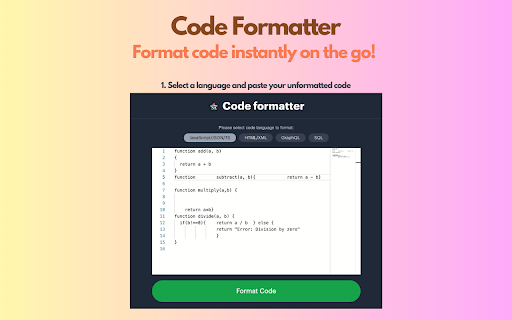
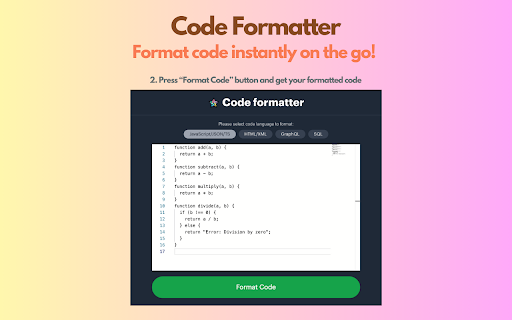
A browser extension designed to beautify and reformat code snippets. Users can paste code into the interface to transform unorganized text into a readable structure.

Developer:Yasser R Shaikh
Version:2.0
Size:5.9MiB
Last updated:

Overview

Installs

4K+

Rating

4.1

35 reviews

Languages

1 locales

Includes English

Market analysis

Review-backed positioning, friction, and market signals for this Chrome extension.

Backed by review samples

Macro category

Developer & Designer Tools

Pricing friction

Low review signal

Complaint intensity

Moderate review signal

Listing & review signals
Observed signals from store listing text and review samples.

Listing positioning

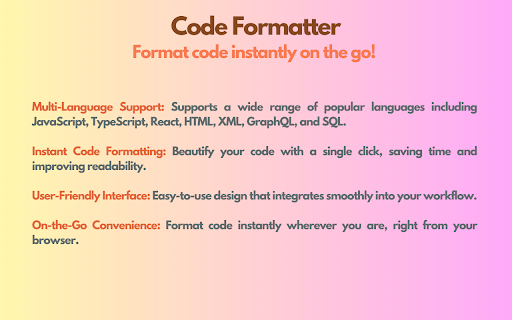
The extension is positioned as a tool for instant code formatting and beautification. It claims to improve readability for developers by supporting multiple languages such as JavaScript, TypeScript, HTML, XML, GraphQL, and SQL.

Inferred product pattern

A utility-based code beautification tool that relies on manual input rather than direct DOM manipulation.

Review-backed pain points

Users express frustration over the need to manually copy and paste code into a separate window, the lack of settings for tab/space configuration, and reports of the tool not working in newer Chrome versions.

Observed feature gaps

Missing context menu support for direct text formatting and lack of user-configurable indentation settings.

Tags
Code FormatterCode BeautifierDeveloper ToolHTML Formatter
Target users

- Web Developers

- Software Engineers

- Frontend Developers

Primary use cases

- Beautifying unformatted code snippets

- Improving code readability for web languages

- Formatting SQL and GraphQL queries

Positive themes

- Effective formatting of large HTML blocks

- Simple and useful for manual paste-to-format workflows

Negative themes

- Inability to format content directly from a browser tab

- Lack of customization for indentation and tab sizes

- Compatibility issues with modern Chrome versions

Observed friction

- No pricing information or friction observed in the provided data.

Evidence boundary: Analysis based on store listing claims and user reviews highlighting functional utility and specific feature requests. The total number of reviews is relatively low, which may not represent the full user base.
Complaint summaries
Review-backed complaint signals grouped by operational area.

Support

No specific support or account complaints observed.

Reliability

Some users reported that the tool fails to format specific content or has broken functionality in current versions of Chrome.

Privacy

No privacy or security complaints observed.

Access & pricing

- No clear monetization signal

- No account requirement observed

- No clear pricing signal

Store listing facts

Listing assets

- Screenshots: 3

- Videos: 0

- Languages: 1

Trust signals

- Privacy policy

- Developer contact

- Official website

Store metadata

- Version: 2.0

- Size: 5.9MiB

- Last updated:

Listing SEO keywords

Search intent keywords
Keyword signals for evaluating how users may discover, compare, or search for this extension category.

Core discovery

code formattercode beautifierformat HTMLbeautify JavaScriptSQL formatter

Comparison

View Source replacementPrettier extension

Problem

unreadable codemessy HTMLunformatted JSON

Alternative

Code BeautifierJSON FormatterHTML Formatter

Similar extensions

Jump to related discovery paths:

Screenshots

Code Formatter screenshot

Links

Recommended Chrome extensions

Related listings from the same category, trending peers, and the same publisher portfolio.

Browse developer
Which Font Is This? icon

Which Font Is This?

Yasser R Shaikh

A Chrome extension to identify fonts & stlyes used by a web page.

Installs

8K+

Rating

3.0

Color Picker for Chrome™ icon

Color Picker for Chrome™

colorpicker08

HEX, RGB Color picker, Advanched Eyedropper, Find color code on any page

Installs

700K+

Rating

4.0

Assinatura Digital no Navegador icon

Assinatura Digital no Navegador

bry-suporte-apps

Esta extensão é projetada para ser utilizada em conjunto com outras soluções e não funciona de forma isolada para a assinatura.

Installs

700K+

Rating

2.4

Postman Interceptor icon

Postman Interceptor

Postman

Capture requests from any website and send them to Postman Client.

Installs

700K+

Rating

4.3

Window Resizer icon

Window Resizer

Ionuț Botizan

Resize the browser window to emulate various screen resolutions.

Installs

700K+

Rating

4.3

Talend API Tester - Free Edition icon

Talend API Tester - Free Edition

Qlik

Visually interact with REST, SOAP and HTTP APIs.

Installs

600K+

Rating

4.8

Detailed SEO Extension icon

Detailed SEO Extension

ahrefsseotoolbar

Get SEO insights at the click of a button to any website you're currently on. Built by full-time SEO's for daily analysis.

Installs

600K+

Rating

4.9

TikTok Pixel Helper icon

TikTok Pixel Helper

TikTok For Business

The TikTok Pixel Helper is a plug-in that monitors whether your TikTok Pixel is functioning properly.

Installs

600K+

Rating

2.6

Google Analytics Debugger icon

Google Analytics Debugger

Google Analytics

Prints useful information to the JavaScript console by enabling the debug version of the Google Analytics Javascript.

Installs

600K+

Rating

4.2

Tag Assistant Companion icon

Tag Assistant Companion

Google

The Tag Assistant Companion extension works with Tag Assistant to help troubleshoot installation of gtag.js and Google Tag Manager.

Installs

500K+

Rating

3.1