DuoKeyboard icon

DuoKeyboard Chrome Extension Analysis

Automation & Workflow Efficiency

Chrome extension ID: dekooljcgfaiokofbciaflklkfniimfa

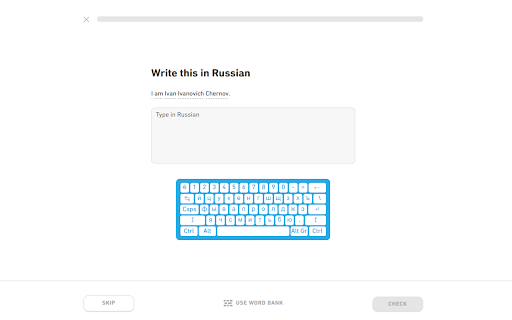
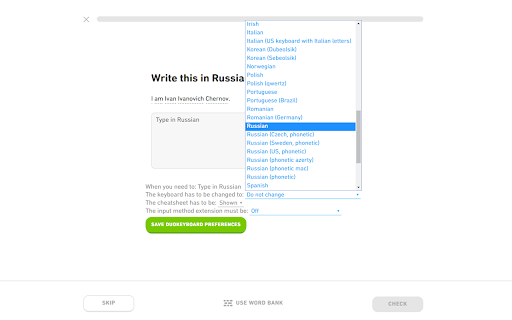
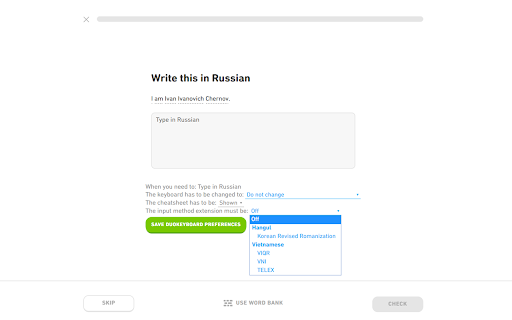
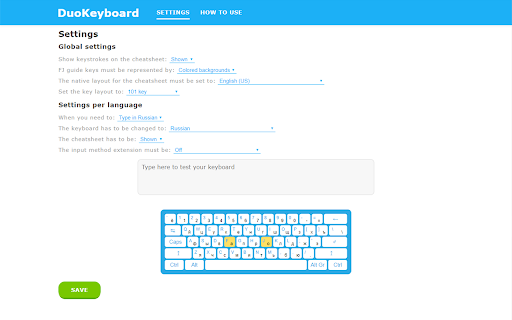
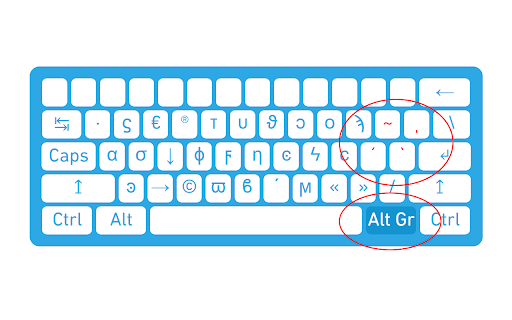
DuoKeyboard is a Chrome extension that automatically changes keyboard settings on Duolingo based on user preferences. It supports various languages and input methods, including Vietnamese TELEX and VNI, and features an on-screen cheat sheet for learners.

Developer:Nullbrains
Version:1.5.1
Size:224KiB
Last updated:

Overview

Installs

4K+

Rating

4.2

49 reviews

Languages

1 locales

Includes English

Market analysis

Review-backed positioning, friction, and market signals for this Chrome extension.

Backed by review samples

Macro category

Automation & Workflow Efficiency

Pricing friction

Low review signal

Complaint intensity

Moderate review signal

Listing & review signals
Observed signals from store listing text and review samples.

Listing positioning

The product positions itself as a specialized utility for Duolingo users to streamline language learning by automating keyboard layout switching. It emphasizes support for a wide range of international languages and provides on-screen visual aids to assist with new keyboard layouts.

Inferred product pattern

A highly specialized niche utility designed to bridge a functional gap in a specific third-party web platform's user experience.

Review-backed pain points

Users report significant input bugs including characters disappearing upon submission, 'double-typing' (e.g., Latin and Hebrew characters appearing simultaneously), and the extension breaking when the Duolingo website updates its interface.

Observed feature gaps

Users noted a lack of support for Alt Gr keys in certain layouts (like Polish) and a UI that can obstruct the screen or require excessive scrolling on certain devices.

Tags
Language LearningKeyboard SwitcherDuolingo Utility
Target users

- Duolingo learners

- Multilingual students

- Language hobbyists

Primary use cases

- Automating keyboard layout transitions during language exercises

- Visualizing keyboard layouts via cheat sheets

Positive themes

- Immensely helpful for language practice

- Practical utility for specific language learners

Negative themes

- Broken functionality after website updates

- Input errors such as disappearing or doubled characters

- UI scaling issues

Observed friction

- Performance complaints detected

- No pricing information or friction observed in the provided data.

Evidence boundary: Analysis based on the Chrome Web Store listing and user reviews highlighting specific input bugs and compatibility issues. The evidence is based on a small sample of 49 reviews, which may not represent the entire user base.
Complaint summaries
Review-backed complaint signals grouped by operational area.

Support

No support or account-related complaints found.

Reliability

Users report reliability issues where the extension fails following Duolingo website updates and suffers from character input errors.

Privacy

No privacy or security complaints observed.

Access & pricing

- No clear monetization signal

- No account requirement observed

- No clear pricing signal

Store listing facts

Listing assets

- Screenshots: 5

- Videos: 0

- Languages: 1

Trust signals

- Developer contact

Store metadata

- Version: 1.5.1

- Size: 224KiB

- Last updated:

Listing SEO keywords

Search intent keywords
Keyword signals for evaluating how users may discover, compare, or search for this extension category.

Core discovery

Duolingo keyboard switcherautomatic keyboard layout Duolingolanguage learning keyboard extension

Comparison

Duolingo keyboard toolautomatic keyboard switcher

Problem

Duolingo keyboard issuestyping Hebrew on Duolingokeyboard layout switching problems

Alternative

Keyboard layout managerLanguage learning assistant

Similar extensions

Jump to related discovery paths:

Screenshots

DuoKeyboard screenshot

Recommended Chrome extensions

Related listings from the same category, trending peers, and the same publisher portfolio.

Browse workflow
WebP / Avif image converter icon

WebP / Avif image converter

Nullbrains

Convert Webp, Avif and other types of image before saving.

Installs

100K+

Rating

3.8

Evernote Web Clipper icon

Evernote Web Clipper

Evernote

Use the Evernote extension to save things you see on the web into your Evernote account.

Installs

2.0M+

Rating

4.7

Keeper® Password Manager & Digital Vault icon

Keeper® Password Manager & Digital Vault

Keeper Security

Generate strong passwords, autofill and protect your confidential info with zero-knowledge encryption.

Installs

2.0M+

Rating

4.8

Snow Web Application Metering icon

Snow Web Application Metering

snow_chrome_extensions

This extension tracks web application use for the purpose of license compliance and cost optimization. www.snowsoftware.com/browser

Installs

2.0M+

Rating

1.3

Mendeley Web Importer icon

Mendeley Web Importer

Mendeley

Fast, convenient import of references and PDFs to your Mendeley Reference Manager library.

Installs

2.0M+

Rating

2.3

Enable local file links icon

Enable local file links

Takashi Sugimoto (tksugimoto)

Make it possible to open by click a link to a local file that is disabled by Chrome.

Installs

2.0M+

Rating

3.9

Microsoft Defender Browser Protection icon

Microsoft Defender Browser Protection

Microsoft Corporation

Protect yourself against online threats, like phishing and malicious websites, with real-time protection from Microsoft.

Installs

2.0M+

Rating

4.2

Визуальные закладки icon

Визуальные закладки

Yandex

Визуальные закладки – это страница, на которой собраны ваши любимые сайты

Installs

2.0M+

Rating

3.4

Web Signer icon

Web Signer

Softplan Websigner Developers

Extensão para assinatura digital no browser

Installs

2.0M+

Rating

2.9

Screen Recorder icon

Screen Recorder

Erich Behrens

Record a video from the camera or capture it from the screen (desktop, specific application window or browser tab)

Installs

2.0M+

Rating

3.8