WebP / Avif image converter icon

WebP / Avif image converter Chrome Extension Analysis

Developer & Designer Tools

Chrome extension ID: pbcfbdlbkdfobidmdoondbgdfpjolhci

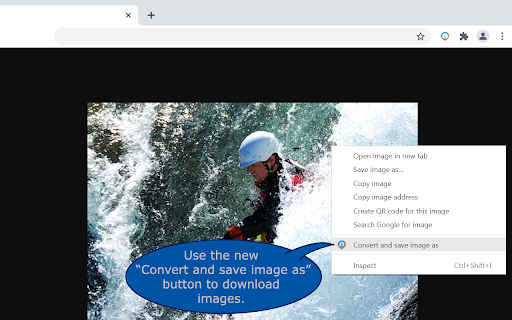
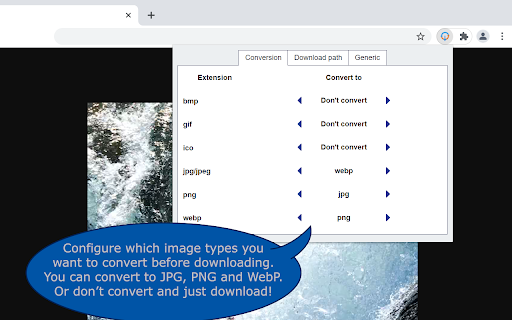
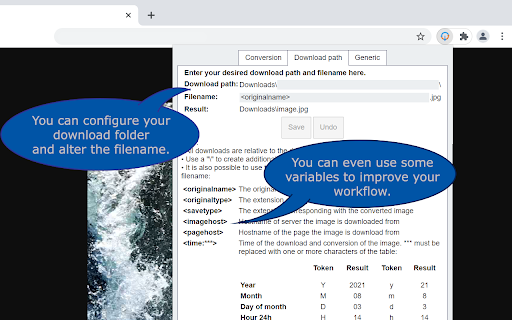
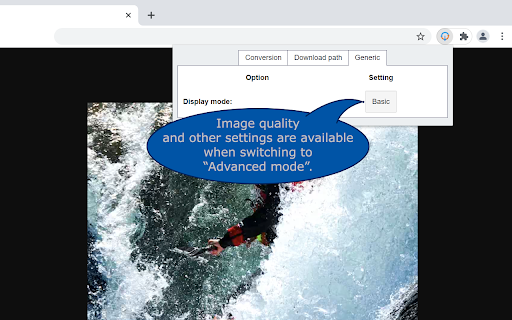
A Chrome extension that allows users to right-click images on the web and save them as JPG, PNG, or WebP. It features advanced configuration options for file naming and directory organization relative to the default downloads folder.

Developer:Nullbrains
Version:1.3.2
Size:42.75KiB
Last updated:

Overview

Installs

100K+

Rating

3.8

227 reviews

Languages

1 locales

Includes English

Market analysis

Review-backed positioning, friction, and market signals for this Chrome extension.

Backed by review samples

Macro category

Developer & Designer Tools

Pricing friction

Low review signal

Complaint intensity

Moderate review signal

Listing & review signals
Observed signals from store listing text and review samples.

Listing positioning

The product is positioned as a productivity utility that integrates into the browser's context menu to convert images like WebP and AVIF before saving. It emphasizes user control over conversion types and the ability to automate download locations and naming conventions.

Inferred product pattern

Context-menu based asset conversion utility with custom file-system routing.

Review-backed pain points

Users report that the extension has suddenly stopped working or becomes inconsistent following browser updates, with some experiencing browser crashes and others finding that images remain in their original format despite settings.

Observed feature gaps

Lack of compatibility updates for Manifest V3 and failure to remember the last used save path.

Tags
Image ConverterWebP to JPGAVIF ConverterBrowser Utility
Target users

- Web Designers

- Content Creators

- Digital Marketers

- General Web Users

Primary use cases

- Converting WebP/AVIF images to standard formats

- Organizing web image downloads via custom paths

- Saving images without manual external conversion

Positive themes

- Previously highly valued as an invaluable tool

- Historical reliability and utility

Negative themes

- Complete loss of functionality

- Browser crashes

- Incorrect file extensions (saving as .htm)

- Lack of developer updates

Observed friction

- Performance complaints detected

- No pricing friction observed; the tool appears to be free.

Evidence boundary: Analysis based on the official store listing and 17 sampled user reviews focusing on functionality and stability. The provided review sample is heavily weighted toward recent reports of failure, which may overrepresent current instability compared to the total user base.
Complaint summaries
Review-backed complaint signals grouped by operational area.

Support

Users express frustration over a lack of developer response and maintenance, specifically regarding recent breakages.

Reliability

Severe reliability issues reported recently, including intermittent failures, total loss of function, and browser crashes.

Privacy

No privacy or security complaints observed.

Access & pricing

- Free usage observed

- No account requirement observed

- Free plan or free usage claimed

Store listing facts

Listing assets

- Screenshots: 4

- Videos: 0

- Languages: 1

Trust signals

- Developer contact

Store metadata

- Version: 1.3.2

- Size: 42.75KiB

- Last updated:

Listing SEO keywords

Search intent keywords
Keyword signals for evaluating how users may discover, compare, or search for this extension category.

Core discovery

WebP converterAVIF to JPGSave image as PNGChrome image converter

Comparison

Save image as Type alternativeWebP to JPG extension

Problem

cannot save WebP as JPGhow to convert AVIF imagesWebP images saving as htm

Alternative

WebP converter extensionAVIF converter chrome

Similar extensions

Jump to related discovery paths:

Screenshots

WebP / Avif image converter screenshot

Recommended Chrome extensions

Related listings from the same category, trending peers, and the same publisher portfolio.

Browse workflow
DuoKeyboard icon

DuoKeyboard

Nullbrains

Adds automatic keyboard switching on duolingo.com based on the user preferences.

Installs

4K+

Rating

4.2

AI Grammar Checker & Paraphraser – LanguageTool icon

AI Grammar Checker & Paraphraser – LanguageTool

lt-extension-publisher

Instantly Enhance Your Texts with LanguageTool’s Grammar Checker and Paraphrasing Tool

Installs

2.0M+

Rating

4.7

Sound Booster - increase volume up icon

Sound Booster - increase volume up

Sound-ultimate.com

Volume Booster helps boost sound video or music on any tab! Increase volume and bass booster, equalizer. Volume control.

Installs

2.0M+

Rating

4.5

Momentum icon

Momentum

Momentum

Transform your browser into a beautifully designed tab that helps you feel calm, keep focus, and stay energized.

Installs

2.0M+

Rating

4.5

Pop up blocker for Chrome™ - Poper Blocker icon

Pop up blocker for Chrome™ - Poper Blocker

dingosolutions

Block popups, ads, cookie requests, trackers, notifications, ads on social media & more. A clean browsing experience starts today.

Installs

2.0M+

Rating

4.8

Evernote Web Clipper icon

Evernote Web Clipper

Evernote

Use the Evernote extension to save things you see on the web into your Evernote account.

Installs

2.0M+

Rating

4.7

Keeper® Password Manager & Digital Vault icon

Keeper® Password Manager & Digital Vault

Keeper Security

Generate strong passwords, autofill and protect your confidential info with zero-knowledge encryption.

Installs

2.0M+

Rating

4.8

Snow Web Application Metering icon

Snow Web Application Metering

snow_chrome_extensions

This extension tracks web application use for the purpose of license compliance and cost optimization. www.snowsoftware.com/browser

Installs

2.0M+

Rating

1.3

Mendeley Web Importer icon

Mendeley Web Importer

Mendeley

Fast, convenient import of references and PDFs to your Mendeley Reference Manager library.

Installs

2.0M+

Rating

2.3

Enable local file links icon

Enable local file links

Takashi Sugimoto (tksugimoto)

Make it possible to open by click a link to a local file that is disabled by Chrome.

Installs

2.0M+

Rating

3.9