Policy Access Control icon

Policy Access Control Chrome Extension Analysis

Privacy, Security & Ad Blockers

Chrome extension ID: dfphfmoodedkggmkgijombjgopdlngff

This extension provides a UI-based interface to modify and manage site-specific browser permissions and content policies. It allows users to override default browser settings for specific websites and reset them as needed.

Developer:fionapandora
Version:0.1
Size:58.06KiB
Last updated:

Overview

Installs

26

Rating

4.6

8 reviews

Languages

1 locales

Includes English

Market analysis

Review-backed positioning, friction, and market signals for this Chrome extension.

Backed by review samples

Macro category

Privacy, Security & Ad Blockers

Pricing friction

Low review signal

Complaint intensity

Low review signal

Listing & review signals
Observed signals from store listing text and review samples.

Listing positioning

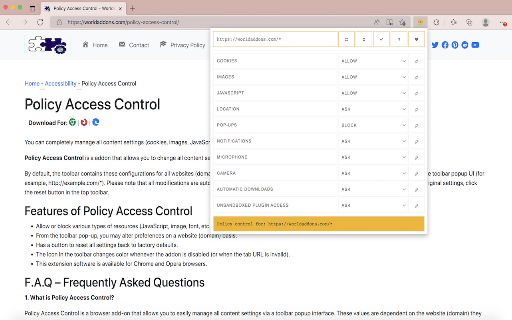
Policy Access Control is positioned as a utility for granular browser content management. It enables users to toggle settings like cookies, images, and JavaScript on a per-domain basis directly from the toolbar.

Inferred product pattern

Utility-based granular browser permission controller.

Review-backed pain points

Reviewers provided minimal feedback, noting only that the tool feels 'not quite perfect' without specifying technical issues.

Observed feature gaps

No specific missing features mentioned, though the lack of detailed UX feedback suggests the interface may be perceived as basic.

Tags
Content SettingsBrowser ControlCookie ManagerPrivacy Tool
Target users

- Privacy-conscious users

- Web developers

- Advanced browser users

Primary use cases

- Managing site-specific cookie permissions

- Disabling JavaScript for specific domains

- Blocking image loading per site

Positive themes

- Easy to use for managing browser utilities

- High satisfaction with the core functionality

- Addresses a specific need for site-level control

Negative themes

- Vague dissatisfaction with user experience

- Lack of perfection in current functionality

Observed friction

- No pricing friction observed; the extension is a simple utility.

Evidence boundary: Evidence is based on a small sample of user reviews and the developer-provided store description detailing the extension's function. Review sample size is small (8 total), which may not capture edge-case performance issues or long-term usability concerns.
Complaint summaries
Review-backed complaint signals grouped by operational area.

Support

No support or account-related complaints found.

Reliability

No reliability complaints identified; users appear satisfied with the core function.

Privacy

No privacy or security concerns identified in reviews.

Access & pricing

- Free usage observed

- No account requirement observed

- Free plan or free usage claimed

Store listing facts

Listing assets

- Screenshots: 1

- Videos: 0

- Languages: 1

Trust signals

- Privacy policy

- Developer contact

- Official website

- Support link

Store metadata

- Version: 0.1

- Size: 58.06KiB

- Last updated:

Listing SEO keywords

Search intent keywords
Keyword signals for evaluating how users may discover, compare, or search for this extension category.

Core discovery

browser content settingschrome permission managerblock cookies by domaindisable javascript chrome extension

Comparison

permission manager alternativebetter than default chrome settings

Problem

manage site permissionsbrowser policy control

Alternative

site-specific settings manager

Similar extensions

Jump to related discovery paths:

Screenshots

Policy Access Control screenshot

Links

Recommended Chrome extensions

Related listings from the same category, trending peers, and the same publisher portfolio.

Browse workflow