Code Medium icon

Code Medium Chrome Extension Analysis

Developer & Designer Tools

Chrome extension ID: dganoageikmadjocbmklfgaejpkdigbe

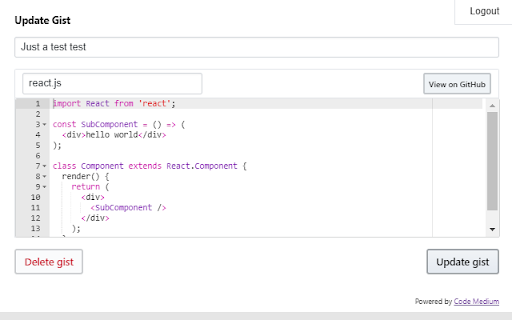
Code Medium is a browser extension that integrates GitHub Gist functionality into the Medium and Substack writing interfaces. It allows users to create and update syntax-highlighted code snippets without leaving their publishing platform.

Developer:Maluen
Version:0.8.0
Size:809KiB
Last updated:

Overview

Installs

1K+

Rating

4.6

22 reviews

Languages

1 locales

Includes English

Market analysis

Review-backed positioning, friction, and market signals for this Chrome extension.

Backed by review samples

Macro category

Developer & Designer Tools

Pricing friction

Low review signal

Complaint intensity

Moderate review signal

Listing & review signals
Observed signals from store listing text and review samples.

Listing positioning

The product positions itself as a productivity extension for technical writers on Medium and Substack. It aims to simplify the workflow of embedding, editing, and managing GitHub Gists directly within the article editor.

Inferred product pattern

A niche workflow utility bridging developer tools (GitHub Gists) with content publishing platforms.

Review-backed pain points

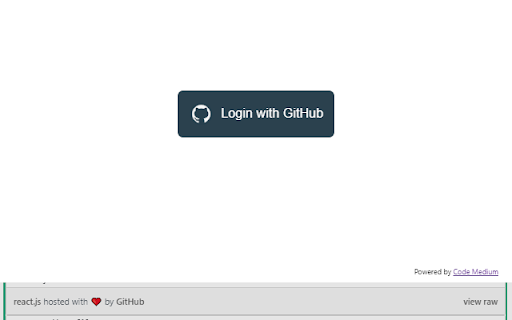
Users reported the extension hanging during the GitHub login process and an inability to embed .ipynb (Jupyter Notebook) files.

Observed feature gaps

The listing acknowledges limited support for multi-file Gists, and reviews indicate no support for Jupyter Notebook files.

Tags
Code EmbeddingGitHub GistMedium ExtensionSubstack UtilitySyntax Highlighting
Target users

- Technical writers

- Software developers

- Medium/Substack bloggers

Primary use cases

- Embedding code snippets in articles

- Managing GitHub Gists within writing platforms

- Adding syntax highlighting to blog posts

Positive themes

- Simplified Gist management

- Better alternative to default code blocks

- Seamless workflow for code posts

Negative themes

- Authentication failures

- Lack of Jupyter Notebook support

Observed friction

- Performance complaints detected

- No pricing information is available in the provided data.

Evidence boundary: Data extracted from the Chrome Web Store description, feature list, limitations, and user reviews. The review sample is relatively small with 22 total comments provided.
Complaint summaries
Review-backed complaint signals grouped by operational area.

Support

No support complaints were identified in the reviews.

Reliability

Some users experienced technical issues with the extension hanging during the GitHub OAuth login process.

Privacy

No privacy or security complaints were identified.

Access & pricing

- No clear monetization signal

- Login needed for core features

- No clear pricing signal

Store listing facts

Listing assets

- Screenshots: 2

- Videos: 1

- Languages: 1

Trust signals

- Developer contact

- Official website

- Support link

Store metadata

- Version: 0.8.0

- Size: 809KiB

- Last updated:

Listing SEO keywords

Search intent keywords
Keyword signals for evaluating how users may discover, compare, or search for this extension category.

Core discovery

Medium code blockSubstack GistGitHub Gist extensionEmbed code in MediumSyntax highlighting for Medium

Comparison

Medium default code blocksSubstack code editor

Problem

Medium code embedding issuesSubstack unicode warningGist height problem

Alternative

GitHub GistCode snippetsJupyter Notebooks

Similar extensions

Jump to related discovery paths:

Screenshots

Code Medium screenshot

Links

Recommended Chrome extensions

Related listings from the same category, trending peers, and the same publisher portfolio.

Browse communication
Backbone Debugger icon

Backbone Debugger

Maluen

Developer Tools extension for debugging Backbone.js applications.

Installs

3K+

Rating

4.5

Grammar Checker and AI tool - Correcto icon

Grammar Checker and AI tool - Correcto

product-development-correcto

Improve your writing with the AI-powered online grammar and spelling checker in Spanish and our paraphrasing tool.

Installs

70K+

Rating

4.6

Share link via email icon

Share link via email

Cobote

Adds a button and context menu item to send the page URL or a link URL via email

Installs

70K+

Rating

3.9

MerciApp - AI Writing Assistant icon

MerciApp - AI Writing Assistant

MerciApp

Write better, faster, wherever you work.

Installs

60K+

Rating

4.5

Mail Merge for Gmail - Mailmeteor icon

Mail Merge for Gmail - Mailmeteor

Mailmeteor

Free mail merge & mass email tool for Gmail, with email tracking and auto follow-ups

Installs

60K+

Rating

4.8

Cursorful - Screen Recorder with Auto Zoom icon

Cursorful - Screen Recorder with Auto Zoom

Cursorful

Cursorful creates beautiful screen recordings with automatic zooms and pans that keep the viewer engaged.

Installs

60K+

Rating

4.9

Amazon Q Business icon

Amazon Q Business

Amazon Q Business by Amazon Web Services

An enterprise AI assistant available to assist you when browsing the web.

Installs

50K+

Rating

5.0

CrankWheel Screen Sharing icon

CrankWheel Screen Sharing

CrankWheel

Easier screen sharing. No app needed for viewers, even on their mobile. Record your screen or webcam.

Installs

50K+

Rating

4.8

Reminders for Google Calendar™ icon

Reminders for Google Calendar™

SMS Reminder for Google Calendar™

Send reminders by SMS/Text from your Google Calendar™. Use it for your customers or your own appointments.

Installs

50K+

Rating

3.6

Auto BCC for Gmail™ by cloudHQ icon

Auto BCC for Gmail™ by cloudHQ

cloudHQ

Setup automatic blind copies to your CRM or any other email address

Installs

50K+

Rating

4.2