
Cursorful Chrome Extension Analysis
Automation & Workflow EfficiencyStore listing title: Cursorful - Screen Recorder with Auto Zoom
Chrome extension ID: eihpmapodnppeemkhkbhikmggfojdkjd
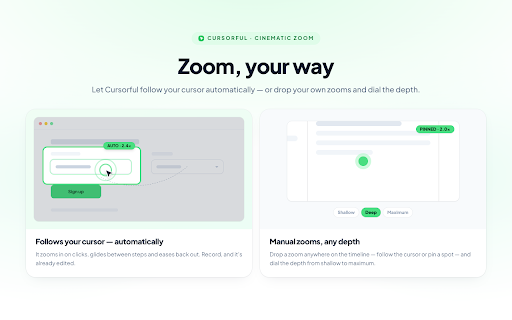
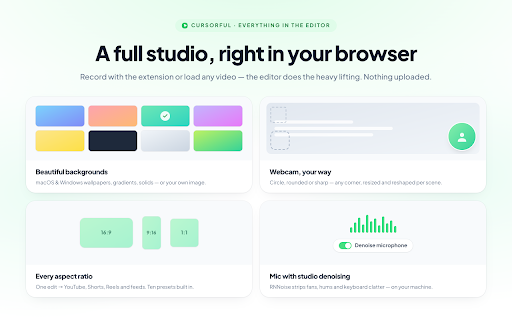
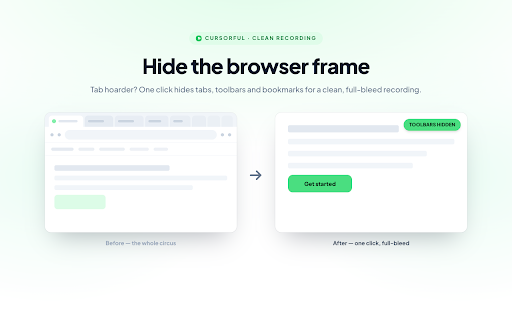
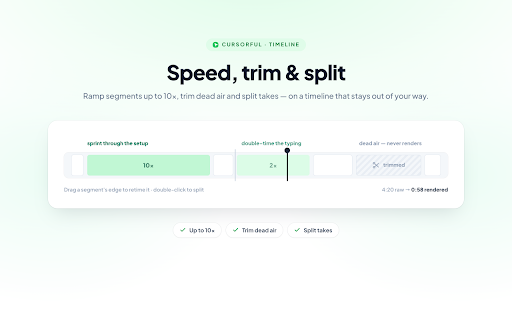
Cursorful is a Chrome extension that enables users to create screen recordings featuring automatic zoom and pan effects based on cursor movements and clicks. It includes an editor to adjust zoom details, allows custom backgrounds, and offers options to hide browser toolbars. Videos can be exported in multiple aspect ratios, with local offline rendering as a core feature.
Overview
Installs
60K+
Rating
★ 4.9
1,085 reviews
Languages
1 locales
Includes English
Market analysis
Review-backed positioning, friction, and market signals for this Chrome extension.
Macro category
Automation & Workflow Efficiency
Pricing friction
High review signal
Complaint intensity
High review signal
Listing positioning
Cursorful is positioned as a tool for creating beautiful screen recordings with automatic zooms and pans to enhance viewer engagement. It emphasizes guiding viewer focus, offering editing capabilities for zoom positions, and providing options to customize backgrounds and hide browser toolbars for a cleaner look. The extension also highlights local offline rendering and multi-platform availability for async video communication within teams.
Inferred product pattern
A browser-based screen recorder with advanced visual enhancements like automatic zoom and pan, aimed at creating polished video content for professional use (e.g., demos, tutorials). It operates on a freemium model with a one-time purchase option for full features, but users report critical functionality and export paywall issues.
Review-backed pain points
Users experience critical issues with core functionality, including excessively long rendering times, corrupted video files, and fundamental features like auto-zoom and trimming failing to work or producing inaccurate results compared to previews. There are also notable complaints about the basic ability to export or save recorded videos being restricted behind a paywall.
Observed feature gaps
The product listing indicates that Cursorful Cloud (for uploading), offline audio transcription, project saving, and shareable links are features currently on the roadmap and not yet available. Reviews primarily highlight existing feature breakage rather than specific missing capabilities.
- SaaS startups creating product walkthroughs
- Solo and indie founders creating instructional content
- Teams engaged in asynchronous video communication
- Users creating tutorials or presentations requiring polished screen recordings
- Creating engaging product demonstrations and walkthroughs
- Producing professional-looking tutorials and how-to guides
- Enhancing async video communication with polished screen recordings
- Recording presentations with automatic visual emphasis
- Ease of use for creating high-production screen shares and walkthroughs
- Effectiveness of auto-zoom and editing features for a premium look
- Generous free tier and availability of a one-time payment option
- Simple screen recording with useful features like background customization and editing
- Significant issues with video rendering, including long processing times and corrupted/0MB file downloads
- Inaccuracies where previewed zooms and animations do not match the final downloaded video, making it unusable
- Core features like zoom-on-click and trimming not working as expected or at all
- Complaints about basic video export/saving being paywalled, despite claims of free use/export
- Payment required for meaningful usage
- Free-tier complaints detected
- Performance complaints detected
- There is significant pricing friction observed, with multiple low-rating reviews complaining that basic video saving/export is paywalled. This directly contradicts positive reviews stating the product is 'free to use/export' or has a 'generous' free tier, indicating potential changes in policy or unclear communication regarding free usage limitations.
Support
Review-backed data on support, account blocking, or refund complaints is not available.
Reliability
Severe reliability complaints include excessively long video rendering times, corrupted or zero-byte file downloads, and critical functionality failures where recorded zooms and animations do not accurately appear in the final output, rendering videos unusable. Users also report issues with the trim option and the main zoom-on-click feature not functioning.
Privacy
Review-backed data on privacy or security complaints is not available. The listing highlights local offline rendering as a privacy-positive feature.
- Free entry with paid features
- No account requirement observed
- Limited free usage observed
Store listing facts
- Screenshots: 5
- Videos: 0
- Languages: 1
- Privacy policy
- Developer contact
- Official website
- Version: 3.0.0
- Size: 8.21MiB
- Last updated:
Listing SEO keywords
Core discovery
Comparison
Problem
Alternative
Similar extensions
Jump to related discovery paths:
Screenshots

Links
Website: cursorful.com
Privacy policy: https://cursorful.com/privacy-policy