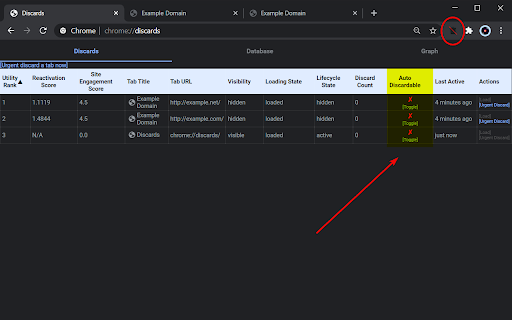
Disable automatic tab discarding icon

Disable automatic tab discarding Chrome Extension Analysis

Tab & Bookmark Productivity

Chrome extension ID: dnhngfnfolbmhgealdpolmhimnoliiok

This tool attempts to override Chrome's native memory-saving feature that suspends inactive tabs. It marks pages to prevent automatic reloading when switching between tabs, providing users with a way to keep content active in low-memory environments.

Developer:World_Languages
Version:1.0.5
Size:29.92KiB
Last updated:

Overview

Installs

100K+

Rating

3.8

384 reviews

Languages

2 locales

Includes English, español

Market analysis

Review-backed positioning, friction, and market signals for this Chrome extension.

Backed by review samples

Macro category

Tab & Bookmark Productivity

Pricing friction

Low review signal

Complaint intensity

Moderate review signal

Listing & review signals
Observed signals from store listing text and review samples.

Listing positioning

The extension is positioned as a zero-configuration utility that flags open tabs as 'not auto discardable' to prevent Chrome from unloading them. It emphasizes simplicity, noting that it acts as a soft signal to the browser rather than a guaranteed fix for memory-related tab discarding.

Inferred product pattern

Single-purpose browser utility that has reached end-of-life efficacy due to changes in the underlying host browser platform.

Review-backed pain points

The core pain point is that the extension has become largely ineffective due to changes in Chrome's internal tab handling, leading to recurring page refreshes and loss of work.

Observed feature gaps

The extension lacks active maintenance or updates to adapt to newer Chrome/Chromium versions, resulting in total failure for many users.

Tags
Tab ManagerPerformance OptimizationChrome ProductivityMemory Management
Target users

- Power users with many open tabs

- Users on low-RAM devices (Chromebooks)

- Users frustrated by page reloads

Primary use cases

- Preventing automatic tab discarding

- Maintaining tab state during inactivity

- Reducing page refresh occurrences

Positive themes

- Formerly reliable for managing tab persistence

- Simple zero-config interface

Negative themes

- Complete loss of functionality over time

- Inconsistency across different browsers and Chrome versions

- Persistent page reloading despite installation

Observed friction

- Performance complaints detected

- None; the extension is free.

Evidence boundary: Extensive user feedback indicates the extension is currently non-functional for a significant majority of the user base, suggesting widespread obsolescence. Review data spans several years and reflects users across various browsers, which may conflate current functionality with legacy performance.
Complaint summaries
Review-backed complaint signals grouped by operational area.

Support

Users express frustration that the developer has not provided updates to address functionality loss over the years.

Reliability

Extensive reports that the tool does not stop tab reloading or discarding, with some users reporting browser instability or crashes.

Privacy

No privacy complaints identified.

Access & pricing

- Free usage observed

- No account requirement observed

- Free plan or free usage claimed

Store listing facts

Listing assets

- Screenshots: 1

- Videos: 0

- Languages: 2

Trust signals

- Developer contact

Store metadata

- Version: 1.0.5

- Size: 29.92KiB

- Last updated:

Listing SEO keywords

Search intent keywords
Keyword signals for evaluating how users may discover, compare, or search for this extension category.

Core discovery

stop chrome tab discardprevent auto refreshkeep chrome tabs opendisable tab discarding

Comparison

chrome tab suspender alternativeskeep tabs active extension

Problem

tabs keep reloadingchrome memory issuesextension not working

Alternative

auto tab discard settingschrome flags

Similar extensions

Jump to related discovery paths:

Screenshots

Disable automatic tab discarding screenshot

Recommended Chrome extensions

Related listings from the same category, trending peers, and the same publisher portfolio.

Browse workflow