Bookmarks Finder icon

Bookmarks Finder Chrome Extension Analysis

Tab & Bookmark Productivity

Chrome extension ID: dpcapcallelmiimpnjadhnkckakjaklk

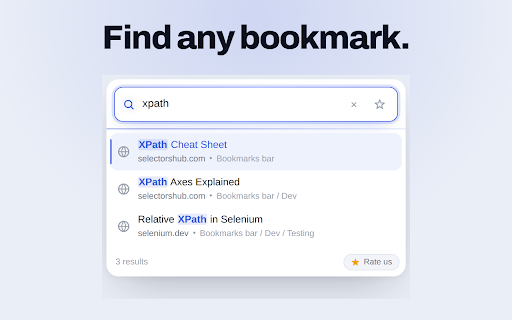
Bookmarks Finder is a browser extension designed to quickly locate saved bookmarks. Users can type any part of a bookmark's name, title, or domain into a search box, and click a result to open the corresponding page. The extension emphasizes that all processing occurs locally within the browser for user privacy.

Developer:SelectorsHub
Version:1.0.8
Size:43.18KiB
Last updated:

Overview

Installs

247

Rating

★ 5.0

6 reviews

Languages

1 locales

Includes English

Market analysis

Review-backed positioning, friction, and market signals for this Chrome extension.

Backed by review samples

Macro category

Tab & Bookmark Productivity

Pricing friction

Low review signal

Complaint intensity

Low review signal

Listing & review signals
Observed signals from store listing text and review samples.

Listing positioning

This extension positions itself as a direct replacement for traditional bookmark folder management, offering a single search box to instantly locate saved bookmarks by name, title, or domain. It emphasizes ease of use, privacy, and no external data handling.

Inferred product pattern

Local bookmark search utility

Review-backed pain points

No specific pain points were identified in the provided reviews, as they were overwhelmingly positive and focused on the tool's utility.

Observed feature gaps

No specific feature gaps were identified in the provided reviews or listing data.

Tags
Bookmark ManagerSearch ToolProductivity
Target users

- Users with many saved bookmarks

- Individuals seeking efficient bookmark management

- Privacy-conscious browser users

Primary use cases

- Quickly finding a specific saved bookmark

- Reducing time spent navigating bookmark folders

- Efficiently managing a large bookmark collection

Positive themes

- Very helpful tool to quickly find saved bookmarks

- Reduces the burden of scrolling and looking for required bookmarks

- Super handy for finding bookmarks quickly

Negative themes

No negative theme data.

Observed friction

- The extension appears to be free to use, with no mention of pricing or paid tiers in the provided data, suggesting no pricing friction.

Evidence boundary: Evidence is based on the product listing description and two user reviews. The review data is limited, consisting of only two samples, which may not represent the full user experience or sentiment.
Complaint summaries
Review-backed complaint signals grouped by operational area.

Support

No support or account-related complaints were found in the provided reviews.

Reliability

No reliability or performance complaints were found in the provided reviews.

Privacy

The listing explicitly states that data stays with the user, no account is needed, and there is no tracking or network requests, indicating a strong privacy focus with no related complaints observed.

Access & pricing

- Free usage observed

- No account requirement observed

- Free plan or free usage claimed

Store listing facts

Listing assets

- Screenshots: 4

- Videos: 1

- Languages: 1

Trust signals

- Developer contact

- Official website

- Support link

Store metadata

- Version: 1.0.8

- Size: 43.18KiB

- Last updated:

Listing SEO keywords

Search intent keywords
Keyword signals for evaluating how users may discover, compare, or search for this extension category.

Core discovery

bookmark finderfind bookmarkssearch bookmarksbookmark managerquick bookmark search

Comparison

bookmark folder alternativebetter than bookmark manager

Problem

can't find bookmarkbookmark overloadslow bookmark access

Alternative

chrome bookmark searchbookmark extension

Similar extensions

Jump to related discovery paths:

Screenshots

Bookmarks Finder screenshot

Links

Recommended Chrome extensions

Related listings from the same category, trending peers, and the same publisher portfolio.

Browse developer
Check My Links icon

Check My Links

SelectorsHub

Check My Links is a link checker that crawls through your webpage and looks for broken links.

Installs

90K+

Rating

★ 4.5

Screenshot with URL - Full Page Screenshot icon

Screenshot with URL - Full Page Screenshot

SelectorsHub

Capture full page, visible & selected area screenshots with URL bar & hidden Bookmarks, record screen with inbuilt editor.

Installs

10K+

Rating

★ 4.8

GoFullPage - Full Page Screen Capture icon

GoFullPage - Full Page Screen Capture

GoFullPage

Capture a screenshot of your current page in entirety and reliably—without requesting any extra permissions!

Installs

11.0M+

Rating

★ 4.9

touchenex 확장 icon

touchenex 확장

라온시큐어

touchenex 확장 프로그램

Installs

8.0M+

Rating

★ 1.3

React Developer Tools icon

React Developer Tools

Meta

Adds React debugging tools to the Chrome Developer Tools. Created from revision 1d34f91dfd.

Installs

5.0M+

Rating

★ 3.9

ColorZilla icon

ColorZilla

colorzilla.com

Advanced Eyedropper, Color Picker, Gradient Generator and other colorful goodies

Installs

4.0M+

Rating

★ 4.6

Wappalyzer - Technology profiler icon

Wappalyzer - Technology profiler

Wappalyzer

Identify web technologies

Installs

3.0M+

Rating

★ 4.6

Meta Ads Data Advisor icon

Meta Ads Data Advisor

Meta

Meta Ads Data Advisor automates connecting your website and marketing data to Meta for better ad performance. No developers needed.

Installs

3.0M+

Rating

★ 3.9

Tag Assistant icon

Tag Assistant

Google

The Tag Assistant extension works with Tag Assistant to help troubleshoot installation of gtag.js and Google Tag Manager.

Installs

3.0M+

Rating

★ 3.9

Take Webpage Screenshots Entirely - FireShot icon

Take Webpage Screenshots Entirely - FireShot

Evgeny Vokilsus

Take FULL webpage screenshots. Capture, edit and save them to PDF/JPEG/GIF/PNG, upload, print, send to OneNote, clipboard or email.

Installs

3.0M+

Rating

★ 4.8