CSS Viewer for Google Chrome™ icon

CSS Viewer for Google Chrome™ Chrome Extension Analysis

Developer & Designer Tools

Chrome extension ID: eedfldkdghfkhdcanjnfiklpeehbfoag

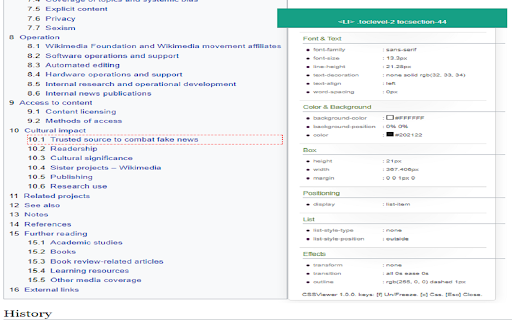
CSS Viewer for Google Chrome™ is a browser extension designed to help users identify the CSS code used for elements on a website. Users activate the tool to view styling details for specific page components.

Version:3.0.0
Size:346KiB
Last updated:

Overview

Installs

60K+

Rating

4.1

500 reviews

Languages

39 locales

Includes Deutsch, English, Filipino, Indonesia...

Market analysis

Review-backed positioning, friction, and market signals for this Chrome extension.

Backed by review samples

Macro category

Developer & Designer Tools

Pricing friction

Low review signal

Complaint intensity

High review signal

Listing & review signals
Observed signals from store listing text and review samples.

Listing positioning

The store listing positions this extension as a simple, free utility for developers and designers to inspect CSS properties of specific web elements. It emphasizes quick and easy access to styling code by allowing users to click directly on buttons, images, or text.

Inferred product pattern

Simple utility extension that appears to be currently suffering from significant breaking bugs.

Review-backed pain points

The primary pain point is that the extension fails to initialize when the user clicks the 'start' button, rendering the tool completely unusable.

Observed feature gaps

The core functionality of the tool—viewing CSS—is reported as non-functional across a wide range of user reports.

Tags
CSS ViewerWeb DevelopmentFrontend ToolUI Inspector
Target users

- Web Developers

- Web Designers

- Frontend Engineers

Primary use cases

- Inspecting element CSS properties

- Debugging frontend styling

- Quick layout analysis

Positive themes

- No specific recent positive themes available in the provided sample set as all samples were critical.

Negative themes

- Total functional failure

- Start button unresponsiveness

- Installation and reinstallation does not fix the issue

Observed friction

- Performance complaints detected

- None identified; the tool claims to be free, but users are frustrated by its lack of functionality.

Evidence boundary: Evidence is based on a collection of user reviews consistently reporting the tool's failure to initialize upon clicking the start button. The sample set is heavily skewed toward recent negative reports, which may not reflect the experiences of long-term users who are not currently posting feedback.
Complaint summaries
Review-backed complaint signals grouped by operational area.

Support

Users report that despite multiple attempts to click the start button or reinstall the extension, the tool fails to trigger.

Reliability

High; persistent reports indicate the extension has stopped working and fails to activate via the user interface.

Privacy

None observed.

Access & pricing

- Free usage observed

- No account requirement observed

- Free plan or free usage claimed

Store listing facts

Listing assets

- Screenshots: 1

- Videos: 0

- Languages: 39

Trust signals

- Developer contact

- Official website

Store metadata

- Version: 3.0.0

- Size: 346KiB

- Last updated:

Listing SEO keywords

Search intent keywords
Keyword signals for evaluating how users may discover, compare, or search for this extension category.

Core discovery

css viewer chrome extensionview css codechrome inspector toolweb development utilities

Comparison

css inspector alternativebest chrome extensions for developers

Problem

css viewer not workingextension start button brokenchrome extension unresponsive

Alternative

css viewer chrome extension alternatives

Similar extensions

Jump to related discovery paths:

Screenshots

CSS Viewer for Google Chrome™ screenshot

Links

Recommended Chrome extensions

Related listings from the same category, trending peers, and the same publisher portfolio.

Browse workflow
Enable Right Click for Google Chrome™ icon

Enable Right Click for Google Chrome™

Free Software Utilities

Re-enable Right Click for Google Chrome™

Installs

500K+

Rating

3.5

Settings icon

Settings

Free Software Utilities

This extension allows you to go to the settings of Google Chrome with just one click.

Installs

100K+

Rating

4.5

Pop up blocker for Chrome™ - Poper Blocker icon

Pop up blocker for Chrome™ - Poper Blocker

dingosolutions

Block popups, ads, cookie requests, trackers, notifications, ads on social media & more. A clean browsing experience starts today.

Installs

2.0M+

Rating

4.8

AI Grammar Checker & Paraphraser – LanguageTool icon

AI Grammar Checker & Paraphraser – LanguageTool

lt-extension-publisher

Instantly Enhance Your Texts with LanguageTool’s Grammar Checker and Paraphrasing Tool

Installs

2.0M+

Rating

4.7

Sound Booster - increase volume up icon

Sound Booster - increase volume up

Sound-ultimate.com

Volume Booster helps boost sound video or music on any tab! Increase volume and bass booster, equalizer. Volume control.

Installs

2.0M+

Rating

4.5

Momentum icon

Momentum

Momentum

Transform your browser into a beautifully designed tab that helps you feel calm, keep focus, and stay energized.

Installs

2.0M+

Rating

4.5

Evernote Web Clipper icon

Evernote Web Clipper

Evernote

Use the Evernote extension to save things you see on the web into your Evernote account.

Installs

2.0M+

Rating

4.7

Keeper® Password Manager & Digital Vault icon

Keeper® Password Manager & Digital Vault

Keeper Security

Generate strong passwords, autofill and protect your confidential info with zero-knowledge encryption.

Installs

2.0M+

Rating

4.8

Snow Web Application Metering icon

Snow Web Application Metering

snow_chrome_extensions

This extension tracks web application use for the purpose of license compliance and cost optimization. www.snowsoftware.com/browser

Installs

2.0M+

Rating

1.3

Mendeley Web Importer icon

Mendeley Web Importer

Mendeley

Fast, convenient import of references and PDFs to your Mendeley Reference Manager library.

Installs

2.0M+

Rating

2.3