Chess.com & Lichess Stockfish Evaluator icon

Chess.com & Lichess Stockfish Evaluator Chrome Extension Analysis

Niche Lifestyle & Gaming Hacks

Chrome extension ID: eemehageiohafhboigcddicphlijmakh

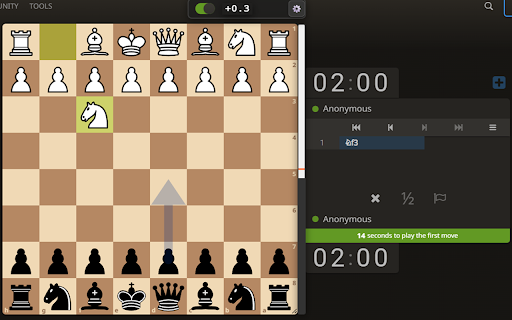
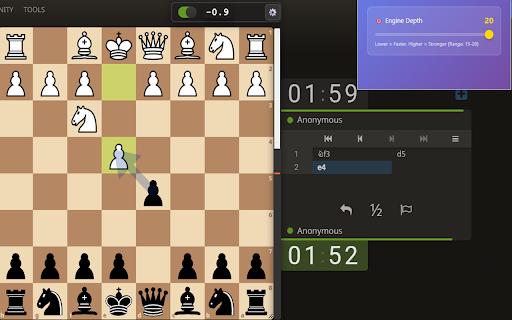
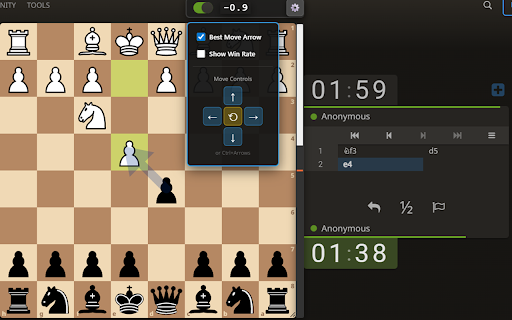
A browser extension that integrates a Stockfish 18 evaluation bar directly into the interface of Chess.com and Lichess.org. It allows users to track the value of their chess positions in real-time during or after games.

Developer:Ankor0
Version:4.0
Size:5.45MiB
Last updated:

Overview

Installs

1K+

Rating

3.5

8 reviews

Languages

1 locales

Includes English

Market analysis

Review-backed positioning, friction, and market signals for this Chrome extension.

Backed by review samples

Macro category

Niche Lifestyle & Gaming Hacks

Pricing friction

Low review signal

Complaint intensity

Low review signal

Listing & review signals
Observed signals from store listing text and review samples.

Listing positioning

The product positions itself as a 'Next-Gen' analysis tool utilizing Stockfish 18 to provide real-time professional engine insights. It emphasizes cross-platform compatibility with Chess.com and Lichess.org and claims ultra-fast, optimized performance.

Inferred product pattern

A free utility overlay that provides advanced engine data for third-party gaming websites.

Review-backed pain points

Users report the extension occasionally fails to work entirely, crashes or stops updating during pawn promotion, and has issues rendering arrows.

Observed feature gaps

Users have requested the ability to adjust engine depth (specifically requesting a range of 5-15 instead of the fixed 15-20).

Tags
Chess AnalysisStockfish EvaluatorChess.com ToolLichess UtilityChess Engine
Target users

- Competitive chess players

- Chess students

- Online chess enthusiasts

Primary use cases

- Real-time game evaluation

- Position value tracking

- Engine-assisted game analysis

Positive themes

- Lack of paywalls

- Useful eval-tracking functionality

- General utility

Negative themes

- Intermittent reliability

- Bugs during specific game states

- UI glitches

Observed friction

- Performance complaints detected

- No pricing friction observed; users explicitly praised the fact that the tool is not behind a paywall.

Evidence boundary: Analysis based on store listing and 6 available user reviews. Small review sample size limits the ability to determine the frequency of reported bugs.
Complaint summaries
Review-backed complaint signals grouped by operational area.

Support

No specific support or account-related complaints observed in the samples.

Reliability

Some users report total failure of the extension ('doesnt work') and specific bugs during piece promotion.

Privacy

No privacy or security complaints observed.

Access & pricing

- Free usage observed

- No account requirement observed

- Free plan or free usage claimed

Store listing facts

Listing assets

- Screenshots: 3

- Videos: 1

- Languages: 1

Trust signals

- Privacy policy

- Developer contact

Store metadata

- Version: 4.0

- Size: 5.45MiB

- Last updated:

Listing SEO keywords

Search intent keywords
Keyword signals for evaluating how users may discover, compare, or search for this extension category.

Core discovery

Stockfish 18 evaluation barChess.com real-time analysisLichess engine evaluator

Comparison

best Stockfish extension for ChromeChess.com vs Lichess evaluator

Problem

how to see chess evaluation in real timefree chess engine for browser

Alternative

Chess.com analysis alternativesStockfish browser extension

Similar extensions

Jump to related discovery paths:

Screenshots

Chess.com & Lichess Stockfish Evaluator screenshot

Links

Recommended Chrome extensions

Related listings from the same category, trending peers, and the same publisher portfolio.

Browse education
Brisk Teaching - AI that Works Where Teachers Work icon

Brisk Teaching - AI that Works Where Teachers Work

Brisk Teaching

AI for teachers, right inside Google Docs, Classroom, YouTube, and more. Tell Brisk what you need and save 10+ hours a week.

Installs

1.0M+

Rating

4.7

BetterCampus (prev. BetterCanvas) icon

BetterCampus (prev. BetterCanvas)

BetterCampus

Feature packed extension for Canvas.

Installs

1.0M+

Rating

4.7

LibKey Nomad icon

LibKey Nomad

Third Iron LLC

One-click access to millions of scholarly articles.

Installs

1.0M+

Rating

4.5

Promethean® Screen Share icon

Promethean® Screen Share

classflow

Promethean® Screen Share

Installs

1.0M+

Rating

3.0

MyBib: Free Citation Generator icon

MyBib: Free Citation Generator

MyBib

Automatically create APA style, MLA format, and Harvard referencing style citations with our citation generator add-on for Chrome.

Installs

1.0M+

Rating

4.8

Equatio - Math made digital icon

Equatio - Math made digital

Texthelp

Easily create mathematical equations, formulas and quizzes. Intuitively type or handwrite, with no tricky math code to learn.

Installs

1.0M+

Rating

3.9

Scribbr Citation Generator icon

Scribbr Citation Generator

Scribbr

Instantly get accurate citations for any webpage in APA, MLA, Chicago, Harvard and any other style with our Citation Generator.

Installs

1.0M+

Rating

3.9

Speechify — Text to Speech icon

Speechify — Text to Speech

Speechify

Read aloud any Google Doc, PDF, webpage, or book with text to speech (TTS). Natural sounding voices in 60+ languages & 1,000 voices.

Installs

900K+

Rating

4.6

Tasks for Canvas – now supporting Blackboard, D2L Brightspace icon

Tasks for Canvas – now supporting Blackboard, D2L Brightspace

BetterCampus

A better to-do list sidebar for Canvas, Blackboard, and D2L Brightspace.

Installs

800K+

Rating

4.7

ImTranslator: Translator, Dictionary, TTS icon

ImTranslator: Translator, Dictionary, TTS

smartlink

Translator, Dictionary, Voice

Installs

800K+

Rating

4.4