Dictation for Gmail icon

Dictation for Gmail Chrome Extension Analysis

Automation & Workflow Efficiency

Chrome extension ID: eggdmhdpffgikgakkfojgiledkekfdce

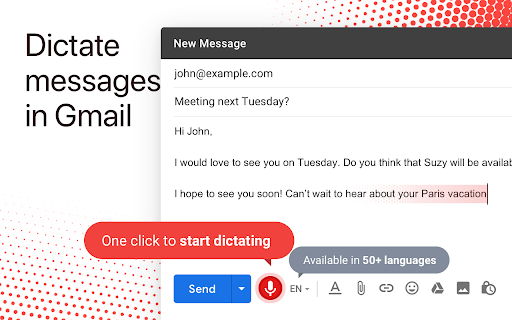
Dictation for Gmail is a Chrome extension that enables users to dictate email messages directly within the Gmail interface. Users can activate the dictation by clicking a microphone icon next to the 'Send' button in a new or reply email. The extension supports dictation in 60 languages and is designed to offer a hands-free alternative to typing.

Developer:Greg Sadetsky
Version:1.0.14
Size:107KiB
Last updated:

Overview

Installs

100K+

Rating

3.5

275 reviews

Languages

54 locales

Includes Deutsch, English, English (Australia), English (United Kingdom)...

Market analysis

Review-backed positioning, friction, and market signals for this Chrome extension.

Backed by review samples

Macro category

Automation & Workflow Efficiency

Pricing friction

Low review signal

Complaint intensity

High review signal

Listing & review signals
Observed signals from store listing text and review samples.

Listing positioning

This Chrome extension positions itself as a solution to the inconvenience of typing emails in Gmail. It highlights the ability to dictate messages in 60 languages, offering a "speak instead of type" alternative directly within the Gmail compose window. The listing emphasizes its new and improved version and provides a direct contact for feedback.

Inferred product pattern

A free Chrome extension attempting to add speech-to-text functionality to Gmail, facing significant technical challenges and reliability issues based on user feedback.

Review-backed pain points

Users experience significant frustration due to the extension's unreliability. Common complaints include slow performance, frequent crashes, inaccurate transcription leading to gibberish, and failure to recognize basic dictation commands or punctuation. Issues with cursor placement and the microphone icon becoming unresponsive further hinder usability.

Observed feature gaps

The extension does not consistently recognize punctuation or capitalize sentences. It also struggles with accurately placing dictated text at the cursor's position, often adding text to the previous paragraph. Dictation commands like 'new paragraph' are not reliably processed, and the extension sometimes stops transcribing after a few words.

Tags
DictationSpeech To TextGmail ExtensionProductivity Tool
Target users

- Gmail users

- Users seeking hands-free communication

- Multilingual Gmail users

Primary use cases

- Dictating emails in Gmail

- Hands-free email composition

- Composing emails in various languages

Positive themes

No positive theme data.

Negative themes

- Extension runs slowly and crashes

- Inconsistent transcription quality, including gibberish and missed words

- Failure to correctly handle punctuation and capitalization

- Issues with cursor placement and insertion point

- Microphone icon changes appearance or stops responding

- Extension stops working after a period or fails to install correctly

- Lack of support for common dictation commands like 'new paragraph'

Observed friction

- Performance complaints detected

- The extension is offered for free, with no immediate friction reported regarding payment.

Evidence boundary: Analysis is based on user reviews from the Chrome Web Store, including helpful and low-rating samples. No high-rating reviews were available to identify positive themes. The review sample may not represent the full user experience.
Complaint summaries
Review-backed complaint signals grouped by operational area.

Support

Users report the extension stopping working and seek assistance, with some indicating a lack of response or resolution. One review mentions the extension is unsupported and has not been updated for a significant period.

Reliability

Reviews frequently cite reliability issues, including the extension running slowly, crashing, inaccurately transcribing speech, and failing to consistently handle punctuation or cursor placement. Many users report it simply stops working.

Privacy

No privacy complaints were observed in the provided reviews.

Access & pricing

- Free usage observed

- No clear access signal

- Free plan or free usage claimed

Store listing facts

Listing assets

- Screenshots: 1

- Videos: 0

- Languages: 54

Trust signals

- Privacy policy

- Developer contact

- Official website

Store metadata

- Version: 1.0.14

- Size: 107KiB

- Last updated:

Listing SEO keywords

Search intent keywords
Keyword signals for evaluating how users may discover, compare, or search for this extension category.

Core discovery

dictation for gmailgmail voice typingspeak to text gmailchrome extension dictationemail dictation tool

Comparison

gmail dictation alternativechrome dictation softwarevoice to text email

Problem

typing emails slowhands free emailgmail accessibilitydictation errors

Alternative

google docs dictationchromeos dictationdragon dictation

Similar extensions

Jump to related discovery paths:

Screenshots

Dictation for Gmail screenshot

Links

Recommended Chrome extensions

Related listings from the same category, trending peers, and the same publisher portfolio.

Browse workflow
Don't add custom search engines icon

Don't add custom search engines

Greg Sadetsky

Prevent Google Chrome from auto-adding custom search engines

Installs

10K+

Rating

3.6

Snow Web Application Metering icon

Snow Web Application Metering

snow_chrome_extensions

This extension tracks web application use for the purpose of license compliance and cost optimization. www.snowsoftware.com/browser

Installs

2.0M+

Rating

1.3

Mendeley Web Importer icon

Mendeley Web Importer

Mendeley

Fast, convenient import of references and PDFs to your Mendeley Reference Manager library.

Installs

2.0M+

Rating

2.3

Enable local file links icon

Enable local file links

Takashi Sugimoto (tksugimoto)

Make it possible to open by click a link to a local file that is disabled by Chrome.

Installs

2.0M+

Rating

3.9

Microsoft Defender Browser Protection icon

Microsoft Defender Browser Protection

Microsoft Corporation

Protect yourself against online threats, like phishing and malicious websites, with real-time protection from Microsoft.

Installs

2.0M+

Rating

4.2

Визуальные закладки icon

Визуальные закладки

Yandex

Визуальные закладки – это страница, на которой собраны ваши любимые сайты

Installs

2.0M+

Rating

3.4

Web Signer icon

Web Signer

Softplan Websigner Developers

Extensão para assinatura digital no browser

Installs

2.0M+

Rating

2.9

Screen Recorder icon

Screen Recorder

Erich Behrens

Record a video from the camera or capture it from the screen (desktop, specific application window or browser tab)

Installs

2.0M+

Rating

3.8

Адаптер Рутокен Плагин icon

Адаптер Рутокен Плагин

АО "Актив-Софт"

Позволяет использовать Рутокен Плагин

Installs

2.0M+

Rating

2.5

Content Server Browser Web Extension icon

Content Server Browser Web Extension

OpenText Corporation

Content Server Browser Web Extension for Chrome

Installs

2.0M+

Rating

2.8