Translate icon

Translate Chrome Extension Analysis

AI & Writing Assistants

Chrome extension ID: ejjohjoianmepamafhpdbbaghdjkfeoe

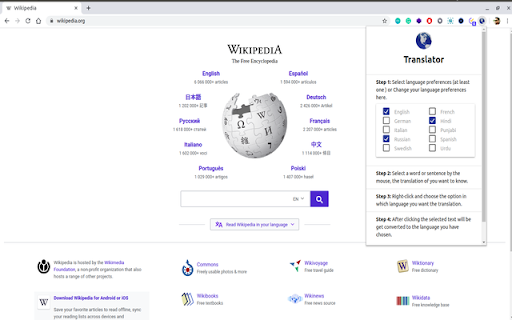
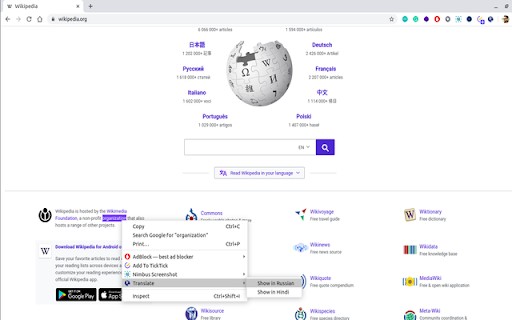
A Chrome extension that provides instant translation of selected words and sentences on any webpage. It integrates into the browser's right-click menu and supports 249 languages.

Developer:Sparsh
Version:3.0.0
Size:733KiB
Last updated:

Overview

Installs

9K+

Rating

★ 4.2

44 reviews

Languages

1 locales

Includes English

Market analysis

Review-backed positioning, friction, and market signals for this Chrome extension.

Backed by review samples

Macro category

AI & Writing Assistants

Pricing friction

Low review signal

Complaint intensity

Moderate review signal

Listing & review signals
Observed signals from store listing text and review samples.

Listing positioning

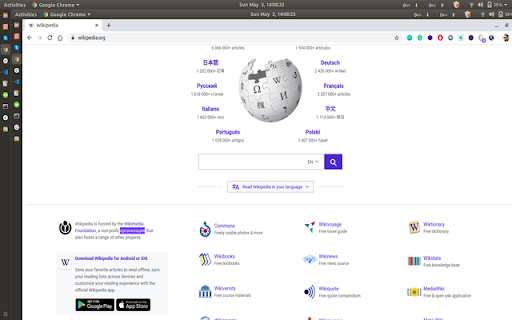
The product is positioned as a lightweight, free, and privacy-first translation tool powered by Google Translate. It emphasizes a seamless user experience by allowing translations of 249 languages directly on the page without requiring an account or tab switching.

Inferred product pattern

Lightweight wrapper for Google Translate providing context-menu based on-page translation.

Review-backed pain points

Users report the extension occasionally stops working entirely and that the translation process for longer paragraphs can be slow and disruptive to the page layout.

Observed feature gaps

Lack of adjustable font size for translated text, absence of a simple 'revert to original' function without refreshing, and reported bugs in the settings menu.

Tags
TranslationLanguage LearningGoogle TranslateProductivityMulti-language
Target users

- Language learners

- International web browsers

- Students

- Multilingual researchers

Primary use cases

- Translating foreign language text on the fly

- Quickly understanding words without leaving a webpage

- Browsing multilingual content

Positive themes

- Effortless translation

- Convenience of on-page results

- Lack of required login

Negative themes

- Intermittent functionality

- Slow performance for paragraphs

- Poor developer support

- UI/UX bugs in settings

Observed friction

- Performance complaints detected

- No pricing friction observed as the tool is claimed to be free.

Evidence boundary: Based on store listing claims and a sample of 10 user reviews. Small review sample size compared to the total user base.
Complaint summaries
Review-backed complaint signals grouped by operational area.

Support

At least one user reported that the developer did not provide help when the tool stopped working.

Reliability

Multiple reviews mention the tool stopped working after initial use or failed to function as expected.

Privacy

No privacy complaints found; listing claims zero background data collection.

Access & pricing

- Free usage observed

- No account requirement observed

- Free plan or free usage claimed

Store listing facts

Listing assets

- Screenshots: 3

- Videos: 1

- Languages: 1

Trust signals

- Developer contact

- Official website

Store metadata

- Version: 3.0.0

- Size: 733KiB

- Last updated:

Listing SEO keywords

Search intent keywords
Keyword signals for evaluating how users may discover, compare, or search for this extension category.

Core discovery

on-page translationweb page translator249 languages translatorfree translate extension

Comparison

best free web translatorGoogle Translate vs Translate extension

Problem

translate text without switching tabstranslate words on webpagebrowser translation tool

Alternative

Google Translate alternativesfree translation chrome extension

Similar extensions

Jump to related discovery paths:

Screenshots

Translate screenshot

Links

Website: linkedin.com

Videos: Watch

Recommended Chrome extensions

Related listings from the same category, trending peers, and the same publisher portfolio.

Browse education
Tasks for Canvas – now supporting Blackboard, D2L Brightspace icon

Tasks for Canvas – now supporting Blackboard, D2L Brightspace

BetterCampus

A better to-do list sidebar for Canvas, Blackboard, and D2L Brightspace.

Installs

1.0M+

Rating

★ 3.2

Scribbr Citation Generator icon

Scribbr Citation Generator

Scribbr

Instantly get accurate citations for any webpage in APA, MLA, Chicago, Harvard and any other style with our Citation Generator.

Installs

1.0M+

Rating

★ 3.8

ImTranslator: Translator, Dictionary, TTS icon

ImTranslator: Translator, Dictionary, TTS

smartlink

Translator, Dictionary, Voice

Installs

900K+

Rating

★ 4.0

ProctorExam Activity Sharing icon

ProctorExam Activity Sharing

ProctorExam BV

Lets you share your browsing activity when taking an online exam on ProctorExam - https://www.proctorexam.com

Installs

900K+

Rating

★ 1.2

OpenDyslexic for Chrome icon

OpenDyslexic for Chrome

OpenDyslexic

Format pages using the OpenDyslexic font and low contrast help

Installs

800K+

Rating

★ 4.3

Voice In - Voice Typing & Speech-to-Text Dictation icon

Voice In - Voice Typing & Speech-to-Text Dictation

Dictanote

Voice typing in ChatGPT, Gmail, Google Docs & 10,000+ sites. Dictate emails, notes & AI prompts in 50+ languages.

Installs

700K+

Rating

★ 4.2

eJOY AI Dictionary icon

eJOY AI Dictionary

ejoy-english.com

Your ultimate knowledge and English learning tool to discover the world and upskill yourself. Translate video, websites and PDF.

Installs

700K+

Rating

★ 4.1

You Shall Not Pass by TeacherMagic.org icon

You Shall Not Pass by TeacherMagic.org

JamesTyler

Blocks proxy sites, filter evasion exploits, tab spam, and Google Sites abuse on student Chromebooks. Free forever.

Installs

700K+

Rating

★ 1.9

edpuzzle icon

edpuzzle

Edpuzzle

Import your favorite educational YouTube video into Edpuzzle with a click!

Installs

600K+

Rating

★ 4.1

Cite This For Me: Web Citer icon

Cite This For Me: Web Citer

Chegg Writing Tools

Automatically create website citations in the APA, MLA, Chicago, or Harvard referencing styles at the click of a button.

Installs

600K+

Rating

★ 3.5