Gmail app badge notification icon

Gmail app badge notification Chrome Extension Analysis

Automation & Workflow Efficiency

Chrome extension ID: fbaolhbfbmniffcokakochjjeccpcpkh

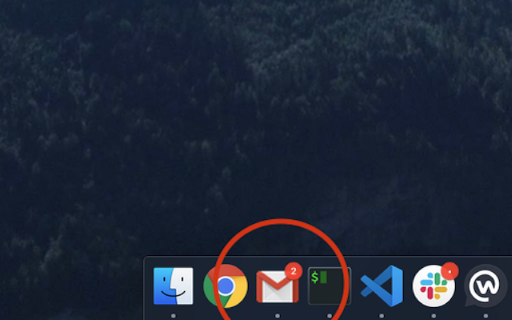
This tool adds unread email count badges to the taskbar icon for Gmail when opened as a dedicated window. It is designed to emulate the notification experience of traditional desktop mail clients.

Developer:Domenico Gemoli
Version:1.2.3
Size:35.74KiB
Last updated:

Overview

Installs

9K+

Rating

4.5

22 reviews

Languages

1 locales

Includes English

Market analysis

Review-backed positioning, friction, and market signals for this Chrome extension.

Backed by review samples

Macro category

Automation & Workflow Efficiency

Pricing friction

Low review signal

Complaint intensity

Moderate review signal

Listing & review signals
Observed signals from store listing text and review samples.

Listing positioning

The extension is positioned as a utility to restore native-like notification badges for users running Gmail as a Progressive Web App (PWA). It provides a specific bridge between Chrome/Brave PWA functionality and OS taskbar notifications.

Inferred product pattern

Utility extension for PWA enhancement with an open-source development model.

Review-backed pain points

Users are frustrated by the lack of granular notification control (e.g., counting all tabs vs. Primary inbox) and high resource usage from polling.

Observed feature gaps

The extension lacks a configuration UI to filter notifications by Gmail category (Primary, Social, Promotions) and suffers from inefficient polling intervals.

Tags
GmailNotificationPWATaskbarBadge
Target users

- Gmail users

- PWA enthusiasts

- Remote workers

- Outlook migrants

Primary use cases

- Displaying unread email count on taskbar

- Managing Gmail as a standalone desktop app

Positive themes

- Successful PWA integration

- Functional on Windows 11 and macOS Sonoma

- Reliable alternative to other extensions

Negative themes

- Inability to filter by 'Primary' tab only

- Performance concerns due to frequent RSS polling

- OS-specific compatibility issues

Observed friction

- Performance complaints detected

- None; the product is free.

Evidence boundary: Evidence is derived from Chrome Web Store user reviews detailing functionality across different operating systems and performance observations regarding data polling. Review sample size is small; performance claims regarding polling are based on user reporting rather than technical benchmarking.
Complaint summaries
Review-backed complaint signals grouped by operational area.

Support

No specific support channel complaints, though technical issues are reported via GitHub.

Reliability

Some users report performance overhead due to high-frequency polling and compatibility failures on specific OS versions like Ventura.

Privacy

No privacy complaints observed.

Access & pricing

- Free usage observed

- No account requirement observed

- Free plan or free usage claimed

Store listing facts

Listing assets

- Screenshots: 1

- Videos: 0

- Languages: 1

Trust signals

- Developer contact

- Official website

Store metadata

- Version: 1.2.3

- Size: 35.74KiB

- Last updated:

Listing SEO keywords

Search intent keywords
Keyword signals for evaluating how users may discover, compare, or search for this extension category.

Core discovery

Gmail badge notificationGmail PWA taskbarGmail unread count extensionChrome Gmail app notification

Comparison

Gmail notification extension alternativePWA email badge

Problem

Gmail no badge in taskbarGmail PWA missing notifications

Alternative

Gmail desktop appGmail alert extension

Similar extensions

Jump to related discovery paths:

Screenshots

Gmail app badge notification screenshot

Links

Website: github.com

Recommended Chrome extensions

Related listings from the same category, trending peers, and the same publisher portfolio.

Browse workflow