Translate Selected Text icon

Translate Selected Text Chrome Extension Analysis

Automation & Workflow Efficiency

Chrome extension ID: fbimffnjoeobhjhochngikepgfejjmgj

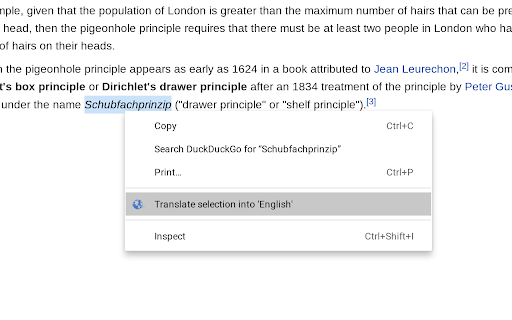
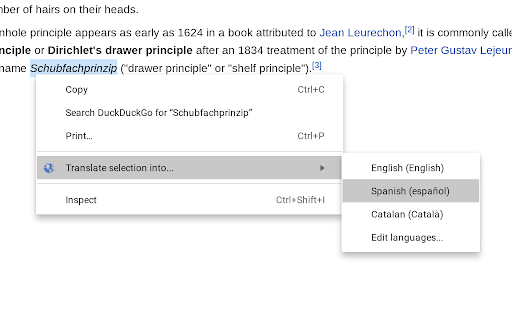
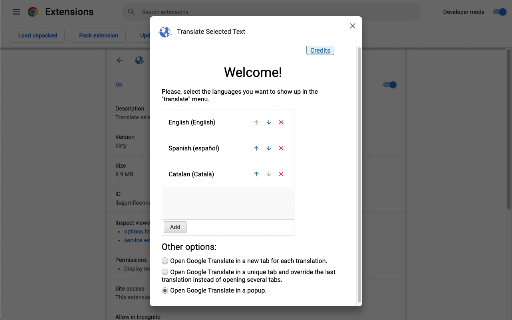
Translate Selected Text allows users to highlight text on a webpage and initiate a translation through the browser's context menu. The tool is designed to minimize permission requirements by redirecting the user to the Google Translate website to perform the actual translation.

Version:3.0.0-stable
Size:1.24MiB
Last updated:

Overview

Installs

100K+

Rating

★ 3.8

772 reviews

Languages

31 locales

Includes Deutsch, English, Filipino, Indonesia...

Market analysis

Review-backed positioning, friction, and market signals for this Chrome extension.

Backed by review samples

Macro category

Automation & Workflow Efficiency

Pricing friction

Low review signal

Complaint intensity

Moderate review signal

Listing & review signals
Observed signals from store listing text and review samples.

Listing positioning

The extension positions itself as a privacy-focused, lightweight utility that translates selected text via Google Translate. It highlights its permission-conscious design, emphasizing that it does not monitor web activity or inject code into every page.

Inferred product pattern

Minimalist utility that prioritizes privacy over feature-rich UI by acting as a browser-side shortcut to an existing web service.

Review-backed pain points

The primary pain point is the user experience of being redirected to a new tab instead of having the translation appear as an in-page tooltip or overlay.

Observed feature gaps

Missing in-page translation overlay, lack of dedicated keyboard shortcuts for trigger, and absence of an intuitive hover-trigger mechanism.

Tags
TranslationText SelectionProductivityOpen SourceGoogle Translate
Target users

- Privacy-conscious users

- Frequent web researchers

Primary use cases

- Translating specific text snippets

- Looking up foreign language vocabulary

Positive themes

- Functional as a simple redirect tool

- Appreciated privacy/no-permission approach

Negative themes

- Forced tab-switching/redirects

- Lack of in-page popup/modal translation

- Cumbersome interaction flow (right-click menu)

Observed friction

- None; the extension is free.

Evidence boundary: Extracted from Chrome Web Store metadata and public user reviews regarding feature preference and UX friction. Reviews capture a strong preference for in-page UI, which the developer explicitly excludes to maintain low permissions; this creates a persistent gap between user expectation and developer design philosophy.
Complaint summaries
Review-backed complaint signals grouped by operational area.

Support

No specific support complaints; users express product design frustrations rather than service issues.

Reliability

Users report dissatisfaction with the redirect-based performance model, but not with technical downtime.

Privacy

No privacy complaints; the extension is actually praised for its low-permission footprint.

Access & pricing

- Free usage observed

- No account requirement observed

- Free plan or free usage claimed

Store listing facts

Listing assets

- Screenshots: 3

- Videos: 0

- Languages: 31

Trust signals

- Privacy policy

- Developer contact

- Official website

Store metadata

- Version: 3.0.0-stable

- Size: 1.24MiB

- Last updated:

Listing SEO keywords

Search intent keywords
Keyword signals for evaluating how users may discover, compare, or search for this extension category.

Core discovery

translate selected textgoogle translate chrome extensionquick translation tool

Comparison

in-page translatorbrowser translation sidebar

Problem

too many tabsright click translation slow

Alternative

deepl extensiongoogle translate hover

Similar extensions

Jump to related discovery paths:

Screenshots

Translate Selected Text screenshot

Links

Recommended Chrome extensions

Related listings from the same category, trending peers, and the same publisher portfolio.

Browse education
Report Webpages icon

Report Webpages

Adrià Vilanova Martínez (avm99963)

Quickly report webpages clicking in the extension icon in the Omnibox

Installs

406

Rating

★ 4.2

Revision History: Writing Process Visibility for Google Docs & Slides icon

Revision History: Writing Process Visibility for Google Docs & Slides

Revision History

Built for teachers: See how students write, not just what they wrote. View the writing process in Google Docs & Slides.

Installs

300K+

Rating

★ 3.7

Paperpile Extension icon

Paperpile Extension

Paperpile

Collect, organize, annotate and cite your research papers in Chrome.

Installs

300K+

Rating

★ 4.6

Trancy - AI Translator & Dual Subtitles icon

Trancy - AI Translator & Dual Subtitles

Trancy

Trancy provides bilingual subtitle for platforms like YouTube, Disney+, as well as AI translator for websites.

Installs

300K+

Rating

★ 4.7

Reverso – Translation, dictionary icon

Reverso – Translation, dictionary

Reverso Technologies Inc.

Translate and learn languages while reading or watching movies online. It's free.

Installs

300K+

Rating

★ 4.6

Add to Google Classroom icon

Add to Google Classroom

Canopy

This extension adds the current site to Google Classroom

Installs

300K+

Rating

★ 4.2

rikaikun icon

rikaikun

Erek Speed

rikaikun shows the reading and English definition of Japanese words when you hover over Japanese text in the browser.

Installs

200K+

Rating

★ 4.7

Talk & Comment: Voice Notes & Audio Feedback icon

Talk & Comment: Voice Notes & Audio Feedback

TalkandComment.com

Record a voice note on any page and share one link. Students and teammates hear your tone, not just your text.

Installs

200K+

Rating

★ 4.1

Knowt: Quizlet Import, AI Notes & Flashcards icon

Knowt: Quizlet Import, AI Notes & Flashcards

Knowt

Automatically import flashcards and notes from any video, PDF, article, or flashcard site. Knowt is the fastest way to study.

Installs

200K+

Rating

★ 4.9

Mouse Tooltip Translator - PDF & Netflix YouTube dual subs icon

Mouse Tooltip Translator - PDF & Netflix YouTube dual subs

ttop324

Mouse Tooltip Translator translate mouseover text using google translate. Support OCR, TTS, manga translator & pdf translator.

Installs

200K+

Rating

★ 4.6