Web Conferencing icon

Web Conferencing Chrome Extension Analysis

Automation & Workflow Efficiency

Chrome extension ID: fhkobjnjacoagijjflgogcheokeijiag

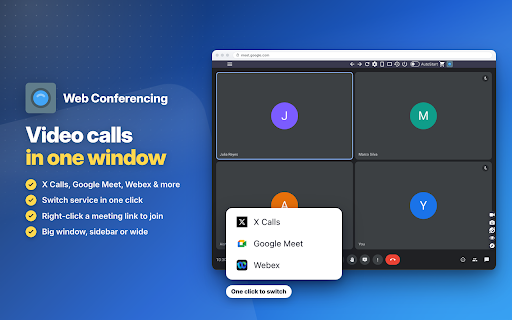
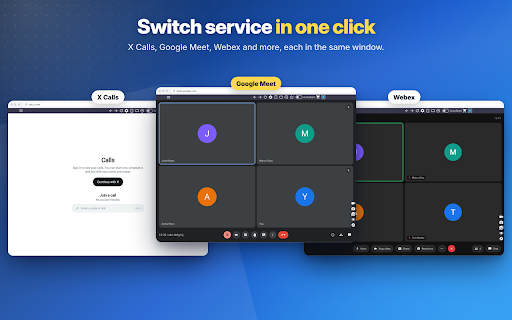
Web Conferencing is a browser extension that enables users to run various meeting platforms like Google Meet, Webex, and X within a single, dedicated sidebar or floating window. It aims to reduce tab clutter and improve multitasking by allowing users to keep meeting interfaces visible alongside their primary workspace.

Developer:WWEvents
Version:6.2
Size:4.34MiB
Last updated:

Overview

Installs

248

Rating

★ 5.0

5 reviews

Languages

54 locales

Includes Deutsch, English, English (United Kingdom), English (United States)...

Market analysis

Review-backed positioning, friction, and market signals for this Chrome extension.

Backed by review samples

Macro category

Automation & Workflow Efficiency

Pricing friction

Low review signal

Complaint intensity

Low review signal

Listing & review signals
Observed signals from store listing text and review samples.

Listing positioning

The product positions itself as a lightweight 'desktop-like' interface for web conferencing tools. It emphasizes resource efficiency and the ability to manage multiple meeting services in a single window.

Inferred product pattern

Browser-based application wrapper for web-based communication platforms.

Review-backed pain points

Review-backed data does not indicate specific pain points; all samples provided were positive.

Observed feature gaps

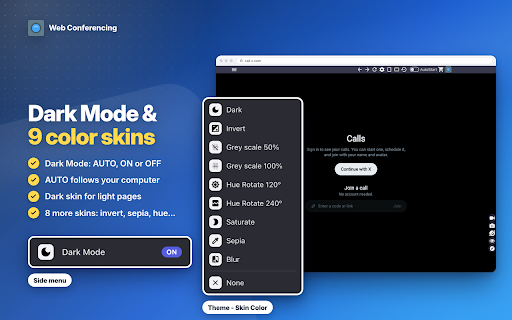
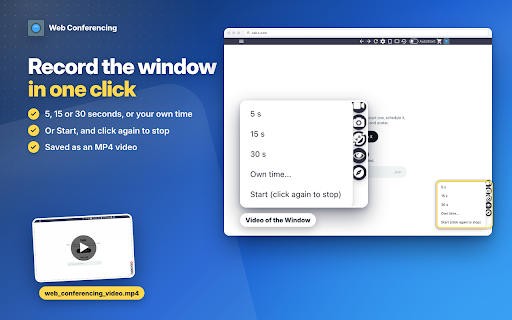
No major feature gaps observed; listing includes comprehensive utility features like recording and screenshotting.

Tags
Video ConferencingBrowser SidebarMultitaskingWeb Apps
Target users

- Remote workers

- Multitaskers

- Power users managing multiple meeting accounts

Primary use cases

- Running two meeting accounts simultaneously

- Managing video calls without switching tabs

- Screen recording of specific meeting windows

Positive themes

- Easy to use

- Functional and updated

- Reduces tab clutter

Negative themes

- No negative themes identified in the provided sample set

Observed friction

- No pricing friction identified; listing states extensions are free to use.

Evidence boundary: The analysis is based on public store listing descriptions, technical permission requirements, and a set of five user reviews. The sample size is small and exclusively positive, which may not represent the experience of all users or edge-case performance issues.
Complaint summaries
Review-backed complaint signals grouped by operational area.

Support

No support complaints found.

Reliability

No reliability complaints found; users specifically noted the extension is one of the few that is 'working and updated'.

Privacy

No privacy complaints found.

Access & pricing

- Free usage observed

- No account requirement observed

- Free plan or free usage claimed

Store listing facts

Listing assets

- Screenshots: 4

- Videos: 1

- Languages: 54

Trust signals

- Privacy policy

- Developer contact

- Official website

Store metadata

- Version: 6.2

- Size: 4.34MiB

- Last updated:

Listing SEO keywords

Search intent keywords
Keyword signals for evaluating how users may discover, compare, or search for this extension category.

Core discovery

browser sidebar meeting appGoogle Meet sidebarWebex sidebar extension

Comparison

alternative to desktop conferencing appsbrowser multitasking tools

Problem

manage too many tabsslow video conferencingvideo call multitasking

Alternative

side panel web appsbrowser productivity extension

Similar extensions

Jump to related discovery paths:

Screenshots

Web Conferencing screenshot

Links

Recommended Chrome extensions

Related listings from the same category, trending peers, and the same publisher portfolio.

Browse communication
Web for Telegram icon

Web for Telegram

WWEvents

Easy access to Telegram for Chrome. Notifications for incoming messages. Share and Save Telegram. Messenger

Installs

50K+

Rating

★ 3.3

Web for Social icon

Web for Social

WWEvents

Browse X, LinkedIn, Reddit, YouTube and many more in one window, like a desktop app. Switch between them in one click.

Installs

10K+

Rating

★ 3.7

HTML Editor for Gmail by cloudHQ icon

HTML Editor for Gmail by cloudHQ

cloudHQ

HTML Editor for Gmail™ - code HTML email directly from Gmail

Installs

50K+

Rating

★ 4.1

Fax.Plus - HIPAA Fax Online icon

Fax.Plus - HIPAA Fax Online

Alohi SA

Secure HIPAA fax service to send fax online and receive online fax on local, toll-free, and International fax numbers.

Installs

50K+

Rating

★ 3.6

Rytr — AI Writing & Relationship Assistant icon

Rytr — AI Writing & Relationship Assistant

Rytr

Remember every client, conversation, and commitment. Follow up on time with AI that writes in your voice.

Installs

40K+

Rating

★ 3.8

VisualSP icon

VisualSP

visualsp-app-administrators

VisualSP is the enterprise help assistant that delivers answers and guidance for any web site when and where customers need them.

Installs

40K+

Rating

★ 4.6

CXone Agent Noise Cancellation icon

CXone Agent Noise Cancellation

agentupdates

CXone Agent Noise Cancellation

Installs

40K+

Rating

★ 5.0

Conversation Thread Reversal for Gmail™ by cloudHQ icon

Conversation Thread Reversal for Gmail™ by cloudHQ

cloudHQ

How to reverse your Gmail conversation threads to show in chronological order

Installs

40K+

Rating

★ 3.6

Podepisovací komponenta Signer icon

Podepisovací komponenta Signer

Asseco Central Europe, a.s.

Podepisovací komponenta Signer pro Chrome

Installs

40K+

Rating

★ 1.0

Insert and Send HTML with Gmail icon

Insert and Send HTML with Gmail

Designmodo

Easily insert custom HTML into your Gmail emails with this handy extension. Create and preview your custom emails directly in Gmail.

Installs

40K+

Rating

★ 3.6