TestMu AI (formerly LambdaTest) icon

TestMu AI (formerly LambdaTest) Chrome Extension Analysis

Developer & Designer Tools

Chrome extension ID: fjcjehbiabkhkdbpkenkhaahhopildlh

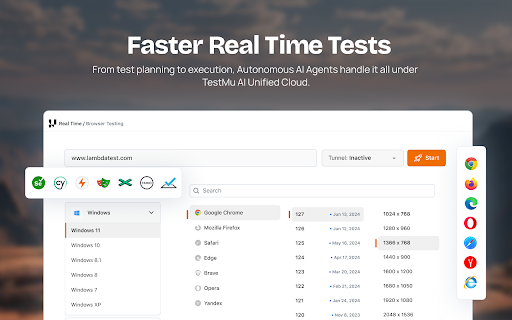
A browser extension that integrates with a cloud-based testing platform to allow developers and QA engineers to run tests and capture screenshots across various browser and OS configurations directly from their browser tab. It aims to simplify the process of selecting configurations and launching real-time tests.

Developer:TestMu AI
Version:3.1.5
Size:628KiB
Last updated:

Overview

Installs

5K+

Rating

4.3

21 reviews

Languages

1 locales

Includes English

Market analysis

Review-backed positioning, friction, and market signals for this Chrome extension.

Backed by review samples

Macro category

Developer & Designer Tools

Pricing friction

Moderate review signal

Complaint intensity

Moderate review signal

Listing & review signals
Observed signals from store listing text and review samples.

Listing positioning

The product positions itself as an Agentic AI Quality Engineering platform that enables fast, automated, and interactive cross-browser testing. It emphasizes scale, offering access to over 3,000 browsers and 10,000 real devices to accelerate the software development lifecycle.

Inferred product pattern

A professional-grade testing utility that acts as a frontend bridge to a massive cloud-based cross-browser infrastructure.

Review-backed pain points

Users expressed frustration over the requirement of a phone number for sign-up and technical failures where the screenshot feature stopped working after initial use.

Observed feature gaps

Reviews indicate that the extension can feel clunky and that certain features, like screenshots, may lack the reliability required for consistent use.

Tags
Cross Browser TestingAutomated QAWeb AutomationAI Testing
Target users

- QA Engineers

- Web Developers

- Software Testers

- DevOps Teams

Primary use cases

- Cross-browser website testing

- Automated UI testing

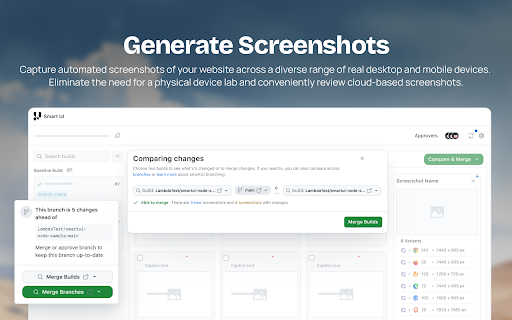
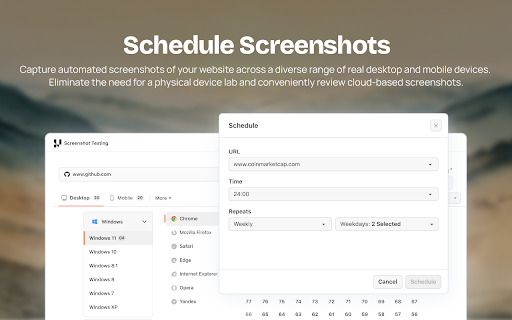
- Multi-browser screenshot capture

- Debugging CSS rendering issues on real devices

Positive themes

- Automatic URL population for testing

- Efficient multi-browser screenshot capture

- Valuable free trial period

- Seamless Jira integration

Negative themes

- Intrusive data collection (phone number requirements)

- Feature unreliability (screenshot failures)

- Clunky user interface

- Limited value in the free tier

Observed friction

- Free-tier complaints detected

- Performance complaints detected

- Privacy complaints detected

- Users feel the free version is unencouraging compared to free alternatives and that the trial/free tier limits utility.

Evidence boundary: Data extracted from the Chrome Web Store listing and a sample of 10 user reviews covering features, pricing, and technical reliability. The review sample size is small (21 total reviews), which may not represent the full user sentiment.
Complaint summaries
Review-backed complaint signals grouped by operational area.

Support

No support or refund complaints were observed in the provided reviews.

Reliability

Users reported that the screenshot feature failed to work after the first few successful attempts.

Privacy

Users expressed significant dissatisfaction regarding the requirement to provide a phone number during the sign-up process.

Access & pricing

- Free entry with paid features

- Login needed for core features

- Limited free usage observed

Store listing facts

Listing assets

- Screenshots: 4

- Videos: 1

- Languages: 1

Trust signals

- Privacy policy

- Developer contact

- Official website

- Support link

Store metadata

- Version: 3.1.5

- Size: 628KiB

- Last updated:

Listing SEO keywords

Search intent keywords
Keyword signals for evaluating how users may discover, compare, or search for this extension category.

Core discovery

cross browser testingautomated web testingAI quality engineeringbrowser screenshot extensionreal device testing

Comparison

LambdaTest vs BrowserStackfree cross browser testing tools

Problem

cross browser compatibilityCSS rendering issuesautomated testing failures

Alternative

SeleniumPlaywrightCypressBrowserStack

Similar extensions

Jump to related discovery paths:

Screenshots

TestMu AI (formerly LambdaTest) screenshot

Links

Recommended Chrome extensions

Related listings from the same category, trending peers, and the same publisher portfolio.

Browse developer