Auto Clicker icon

Auto Clicker Chrome Extension Analysis

Automation & Workflow Efficiency

Chrome extension ID: fjolhbhdkbcdhgbnalafekpldbbplakf

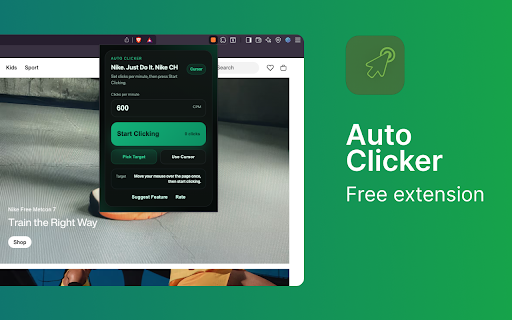
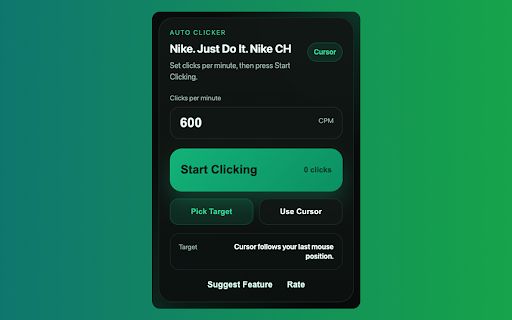
Auto Clicker is a browser-based utility that automates mouse clicking at configurable speeds. It supports two modes: following the cursor or targeting specific HTML elements, and includes keyboard shortcuts for quick toggling.

Version:1.0.6
Size:41.79KiB
Last updated:

Overview

Installs

520

Rating

★ 5.0

5 reviews

Languages

1 locales

Includes English

Market analysis

Review-backed positioning, friction, and market signals for this Chrome extension.

Backed by review samples

Macro category

Automation & Workflow Efficiency

Pricing friction

Low review signal

Complaint intensity

Low review signal

Listing & review signals
Observed signals from store listing text and review samples.

Listing positioning

The extension is positioned as a lightweight, privacy-focused automation tool for repetitive clicking tasks. It emphasizes local-only storage and a lack of data tracking to appeal to security-conscious users.

Inferred product pattern

Single-purpose, privacy-centric browser utility requiring no backend infrastructure.

Review-backed pain points

No negative review-backed pain points available.

Observed feature gaps

No specific feature gaps identified in available data.

Tags
Auto ClickerAutomationMouse Clicker
Target users

- Gamers

- Web testers

- Users filling repetitive forms

Primary use cases

- Automating repetitive mouse clicks

- Testing web application form submissions

- Gaming interactions

Positive themes

- Simple and functional user experience

Negative themes

- None identified

Observed friction

- No pricing friction observed; the extension is presented as a free, standalone utility.

Evidence boundary: Evidence is based on the store listing description and limited user review data confirming core functionality. Review sample size is extremely small (1 review), limiting deep sentiment analysis.
Complaint summaries
Review-backed complaint signals grouped by operational area.

Support

No support or account complaints found.

Reliability

No reliability or performance complaints found.

Privacy

No privacy complaints found; the listing explicitly claims no data collection.

Access & pricing

- Free usage observed

- No account requirement observed

- Free plan or free usage claimed

Store listing facts

Listing assets

- Screenshots: 2

- Videos: 0

- Languages: 1

Trust signals

- Privacy policy

- Developer contact

- Official website

- Support link

Store metadata

- Version: 1.0.6

- Size: 41.79KiB

- Last updated:

Listing SEO keywords

Search intent keywords
Keyword signals for evaluating how users may discover, compare, or search for this extension category.

Core discovery

auto clicker chrome extensionbrowser mouse clickerauto clicker for games

Comparison

best chrome auto clickerfastest auto clicker

Problem

repetitive clickingautomate mouse clicks

Alternative

auto clicker tool

Similar extensions

Jump to related discovery paths:

Screenshots

Auto Clicker screenshot

Links

Recommended Chrome extensions

Related listings from the same category, trending peers, and the same publisher portfolio.

Browse tools
Bass Booster icon

Bass Booster

Alanas Kalinauskas

Add deep, clean bass to any tab. Presets for Soft, Deep, and Max. No data collected.

Installs

472

Rating

★ 5.0

WPS PDF - Read, Edit, Fill, Convert, and AI Chat PDF with Ease icon

WPS PDF - Read, Edit, Fill, Convert, and AI Chat PDF with Ease

www.wps.com

Easy-to-use PDF tools to view, edit, convert, fill, e-sign PDF files, and more in your browser.

Installs

6.0M+

Rating

★ 4.5

Sider: Chat with all AI: GPT-5, Claude, DeepSeek, Gemini, Grok icon

Sider: Chat with all AI: GPT-5, Claude, DeepSeek, Gemini, Grok

ChatGPT Sidebar

ChatGPT, DeepSeek, Gemini, Claude, Grok all in one AI sidebar, for AI search, read, and write.

Installs

5.0M+

Rating

★ 4.9

Norton Safe Search icon

Norton Safe Search

NortonLifeLock Inc

Search safely online by enabling Norton Safe Search as your default search provider for maximum protection on Chrome.

Installs

5.0M+

Rating

★ 2.7

Shazam: Find song names from your browser icon

Shazam: Find song names from your browser

Shazam

Identify music, search lyrics & more

Installs

5.0M+

Rating

★ 4.7

Google Input Tools icon

Google Input Tools

cloud-input-team

Input Tools lets you type in the language of your choice.

Installs

4.0M+

Rating

★ 3.7

IE Tab icon

IE Tab

Blackfish Software

Display web pages using IE within Chrome. Use Java, Silverlight, ActiveX, Sharepoint, and more.

Installs

4.0M+

Rating

★ 4.0

Ad Blocker: Stands AdBlocker icon

Ad Blocker: Stands AdBlocker

Stands

Stands AdBlocker – it's a free ad blocker for YouTube, Twitch, Pop-Ups, Video Ads, and websites. Block ads everywhere with Stands!

Installs

4.0M+

Rating

★ 4.8

Google Dictionary (by Google) icon

Google Dictionary (by Google)

dictionary-extension-dev

View definitions easily as you browse the web.

Installs

4.0M+

Rating

★ 3.8

Microsoft Bing Search with Rewards icon

Microsoft Bing Search with Rewards

Microsoft Corporation

Use the Microsoft Rewards extension to find new ways to earn every day, easily track your points and set your default search to Bing

Installs

4.0M+

Rating

★ 4.4