Full Page Screenshot — Capture & Annotate icon

Full Page Screenshot Chrome Extension Analysis

Automation & Workflow Efficiency

Store listing title: Full Page Screenshot — Capture & Annotate

Chrome extension ID: fknopaaneooekhedmmogkciacfikkeil

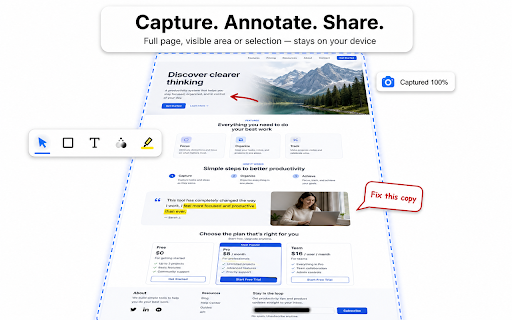
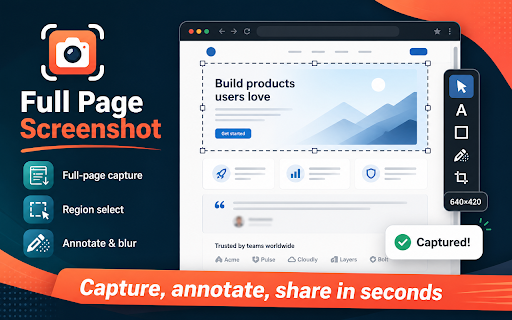
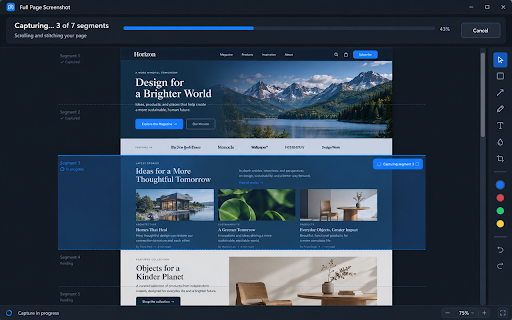
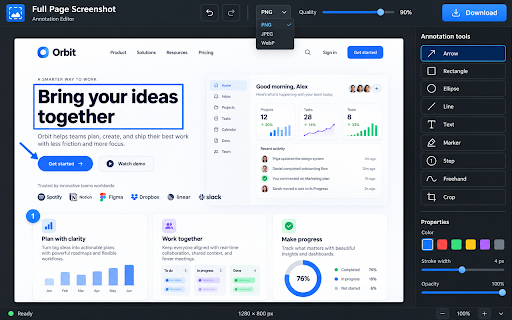
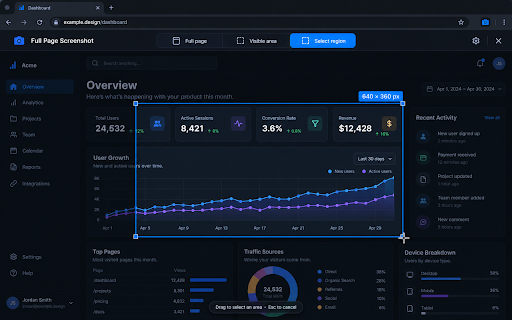
A Chrome extension designed to capture web pages in various modes including full-page, viewport, or selected regions. It includes an editor for adding shapes, text, and blurs, saving images locally in PNG, JPEG, or WEBP formats.

Developer:dracsharp
Version:1.0.0
Size:160KiB
Last updated:

Overview

Installs

4

Rating

★ —

0 reviews

Languages

1 locales

Includes English

Market analysis

Review-backed positioning, friction, and market signals for this Chrome extension.

No review samples found

Macro category

Automation & Workflow Efficiency

Pricing friction

Low review signal

Complaint intensity

Low review signal

Listing & review signals
Observed signals from store listing text and review samples.

Listing positioning

The product positions itself as a comprehensive screenshot utility that allows for full-page, visible, or area captures. It emphasizes a built-in annotation suite and a strict 'local only' privacy policy where no data is uploaded to servers.

Inferred product pattern

Privacy-centric local-first utility tool for web capture and annotation.

Review-backed pain points

Review-backed data is not available.

Observed feature gaps

Review-backed data is not available.

Tags
Full Page ScreenshotWeb AnnotationScreen CapturePrivacy FocusedProductivity Tool
Target users

- Web designers

- QA testers

- Content creators

- Students

- Remote workers

Primary use cases

- Capturing full-page web layouts

- Annotating bugs or feedback

- Redacting sensitive information via blur tool

- Quickly copying screen grabs to clipboard

Positive themes

No positive theme data.

Negative themes

No negative theme data.

Observed friction

- Review-backed data is not available.

Evidence boundary: Data extracted solely from the Chrome Web Store listing. No user reviews available to validate claims or identify real-world pain points.
Complaint summaries
Review-backed complaint signals grouped by operational area.

Support

Review-backed data is not available.

Reliability

Review-backed data is not available.

Privacy

Review-backed data is not available.

Access & pricing

- No clear monetization signal

- No account requirement observed

- No clear pricing signal

Store listing facts

Listing assets

- Screenshots: 5

- Videos: 0

- Languages: 1

Trust signals

- Privacy policy

- Developer contact

- Official website

Store metadata

- Version: 1.0.0

- Size: 160KiB

- Last updated:

Listing SEO keywords

Search intent keywords
Keyword signals for evaluating how users may discover, compare, or search for this extension category.

Core discovery

full page screenshot chrome extensionwebpage capture and annotatelocal screenshot toolcapture visible area chrome

Comparison

full page screenshot vs gofullpagebest chrome extension for web capture

Problem

how to capture whole webpagehow to blur sensitive info in screenshotscreenshot annotation tool chrome

Alternative

full page screenshot alternativewebpage capture tool alternative

Similar extensions

Jump to related discovery paths:

Screenshots

Full Page Screenshot — Capture & Annotate screenshot

Links

Recommended Chrome extensions

Related listings from the same category, trending peers, and the same publisher portfolio.

Browse tools
Auto Fullscreen - Fullscreen Any Page icon

Auto Fullscreen - Fullscreen Any Page

dracsharp

Auto fullscreen any page on load, navigation, or click-and-hold. Works everywhere - not just videos.

Installs

656

Rating

★ 3.9

Volume & Video Master 1000% — Sound Booster & Enhancer icon

Volume & Video Master 1000% — Sound Booster & Enhancer

dracsharp

Boost volume to 1000% with a 12-band EQ, control speed, bass, voice and skip silence on any site.

Installs

494

Rating

★ 3.0

Pie Adblock - A Powerful Free Ad Blocker icon

Pie Adblock - A Powerful Free Ad Blocker

Pie Extensions

Pie Adblock blocks ads & pop-ups, plus YouTube & Twitch video ads. You can customize your ad experience with Pie!

Installs

2.0M+

Rating

★ 4.9

HID Credential Management Extension icon

HID Credential Management Extension

hid-global-chrome-web-store

Browser extension for HID credential management solution.

Installs

2.0M+

Rating

★ 1.3

The QR Code Generator icon

The QR Code Generator

Uniqode

Create, scan, and edit QR codes instantly with one click.

Installs

2.0M+

Rating

★ 4.5

AI Chat for Search icon

AI Chat for Search

AI Chat for Search Team

Display AI Chat response alongside search engine results

Installs

2.0M+

Rating

★ 4.6

Planet Search icon

Planet Search

Free VPN Planet

Enchanced default search engine.

Installs

2.0M+

Rating

★ 3.1

Lightshot (screenshot tool) icon

Lightshot (screenshot tool)

Skillbrains

Simple and convenient screenshot tool. Select an area, edit your screenshot and upload it to the server.

Installs

2.0M+

Rating

★ 3.4

NaturalReader - AI Text to Speech icon

NaturalReader - AI Text to Speech

NaturalSoft Limited

NaturalReader reads text aloud on the pages you browse, including emails, online documents, PDFs and ebooks.

Installs

1.0M+

Rating

★ 4.1

Keywords Everywhere - Keyword Tool icon

Keywords Everywhere - Keyword Tool

Axeman Technology Solutions LLP

Keyword search volume, cpc and competition for 15+ websites like Google™ Search Console, YouTube™, Amazon™ & more

Installs

1.0M+

Rating

★ 3.3