Auto Fullscreen - Fullscreen Any Page icon

Auto Fullscreen Chrome Extension Analysis

Tab & Bookmark Productivity

Store listing title: Auto Fullscreen - Fullscreen Any Page

Chrome extension ID: liddomimembhlpgehhkhefijckmhkkjn

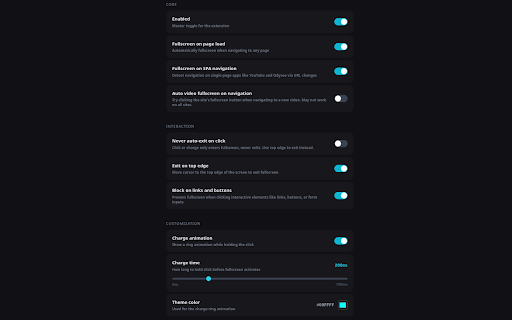
Auto Fullscreen is a Chrome extension designed to automatically toggle a web page into fullscreen mode based on user-defined triggers. It allows users to set pages to fullscreen on load, during navigation, or via a customizable click-and-hold action, working across various websites and restoring window size upon exit.

Developer:dracsharp
Version:2.0.0
Size:93.88KiB
Last updated:

Overview

Installs

556

Rating

★ 3.8

8 reviews

Languages

1 locales

Includes English

Market analysis

Review-backed positioning, friction, and market signals for this Chrome extension.

Backed by review samples

Macro category

Tab & Bookmark Productivity

Pricing friction

Low review signal

Complaint intensity

Moderate review signal

Listing & review signals
Observed signals from store listing text and review samples.

Listing positioning

This extension positions itself as a solution to automatically enter fullscreen mode on any web page, emphasizing its versatility beyond just video content. It highlights features like auto-fullscreen on page load, a click-and-hold toggle, and compatibility with Single-Page Applications (SPAs).

Inferred product pattern

A utility extension that modifies browser display behavior, specifically automating and simplifying fullscreen mode for enhanced productivity and immersive browsing.

Review-backed pain points

Review-backed pain points include the extension not working at all for some users, perceived over-sensitivity leading to unwanted fullscreen toggles, and specific issues with how it handles YouTube videos (absolute fullscreen). There's also a desire for more advanced controls like modifier keys and a persistent fullscreen option across new page loads.

Observed feature gaps

Observed feature gaps include the absence of modifier key integration (e.g., Ctrl+click) for more flexible fullscreen toggling, and a missing option to maintain fullscreen across *all* new page loads, not just initial page load or SPA navigation.

Tags
Auto FullscreenBrowser ProductivityPage DisplayUI Customization
Target users

- Users seeking an automated fullscreen browsing experience

- Individuals frustrated with Chrome's default fullscreen keybind (F11)

- Users who prefer an immersive, distraction-free view for web content

Primary use cases

- Automatically entering fullscreen upon loading any web page

- Toggling fullscreen mode with a customizable click-and-hold gesture

- Maintaining fullscreen across single-page application navigations (e.g., YouTube)

Positive themes

- Provides a much-needed alternative to Chrome's default F11 fullscreen keybind

- Works nearly flawlessly for its intended purpose

- Effectively delivers automatic fullscreen functionality

Negative themes

- Extension does not function for some users

- Sensitivity issues leading to unintended toggling in and out of fullscreen

- Activates 'absolute fullscreen' on YouTube videos, which is not always desired

- Lack of an option to consistently stay in fullscreen when loading new pages

Observed friction

- Performance complaints detected

- Product appears to be free; no pricing friction observed in the listing or available reviews.

Evidence boundary: Analysis based on the Chrome Web Store listing, including the title, short and long descriptions, and 4 available user reviews. The limited number of user reviews (4 total) may not fully represent the overall user experience or a comprehensive range of issues.
Complaint summaries
Review-backed complaint signals grouped by operational area.

Support

No support, account, or refund complaints were found in the available reviews.

Reliability

One review indicates the extension 'does not do anything,' suggesting functional reliability issues. Another mentions it is 'too sensitive' and moves 'back fwd from full mode,' indicating potential operational reliability concerns.

Privacy

The listing explicitly states 'No data collection, no external requests,' and no privacy complaints were found in the reviews.

Access & pricing

- Free usage observed

- No account requirement observed

- Free plan or free usage claimed

Store listing facts

Listing assets

- Screenshots: 1

- Videos: 0

- Languages: 1

Trust signals

- Privacy policy

- Developer contact

- Official website

Store metadata

- Version: 2.0.0

- Size: 93.88KiB

- Last updated:

Listing SEO keywords

Search intent keywords
Keyword signals for evaluating how users may discover, compare, or search for this extension category.

Core discovery

auto fullscreen chromefullscreen browser extensionautomatic page fullscreenfull screen any websitebrowser productivity tool

Comparison

auto fullscreen vs always fullscreenfullscreen browser extension alternative

Problem

chrome f11 fullscreen alternativeyoutube auto fullscreen not workingbrowser fullscreen too sensitive

Alternative

alternative to default chrome fullscreenbrowser display utility

Similar extensions

Jump to related discovery paths:

Screenshots

Auto Fullscreen - Fullscreen Any Page screenshot

Links

Recommended Chrome extensions

Related listings from the same category, trending peers, and the same publisher portfolio.

Browse tools
Volume & Video Master 1000% — Sound Booster & Enhancer icon

Volume & Video Master 1000% — Sound Booster & Enhancer

dracsharp

Boost volume up to 1000%, amplify bass, clarify voice, and control video speed from 0x to 10x on any website.

Installs

365

Rating

★ 3.0

Transpose: pitch ▸ speed ▸ loop icon

Transpose: pitch ▸ speed ▸ loop

Transpose

Change pitch and speed, loop sections and practice music directly on YouTube, Spotify and other supported sites.

Installs

1.0M+

Rating

★ 4.5

Keywords Everywhere - Keyword Tool icon

Keywords Everywhere - Keyword Tool

Axeman Technology Solutions LLP

Keyword search volume, cpc and competition for 15+ websites like Google™ Search Console, YouTube™, Amazon™ & more

Installs

1.0M+

Rating

★ 4.5

Ruffle - Flash Emulator icon

Ruffle - Flash Emulator

ruffle

Puts Flash back on the web where it belongs.

Installs

1.0M+

Rating

★ 4.3

AIPRM for ChatGPT icon

AIPRM for ChatGPT

AIPRM

AIPRM is your cheat code for ChatGPT. Adds a list of curated prompt templates and advanced features. Try today.

Installs

1.0M+

Rating

★ 3.9

Screen Recorder & Screenshot App for Chrome | Scrnli icon

Screen Recorder & Screenshot App for Chrome | Scrnli

scrnli

Screen recorder for Chrome: capture, edit, share screenshots and videos instantly

Installs

1.0M+

Rating

★ 4.7

BlockSite Block Websites & Stay Focused icon

BlockSite Block Websites & Stay Focused

BlockSite

Stay focused and boost productivity: Custom blocklist, Scheduled site blocking, and Password protection.

Installs

1.0M+

Rating

★ 4.5

Enhancer for YouTube™ icon

Enhancer for YouTube™

Max RF

Take control of YouTube and boost your user experience!

Installs

1.0M+

Rating

★ 4.7

WebChatGPT: Prompt library with web access icon

WebChatGPT: Prompt library with web access

WebChatGPT

Augment your ChatGPT prompts with relevant web search results through web browsing.

Installs

1.0M+

Rating

★ 4.2

Video Downloader Plus icon

Video Downloader Plus

Video Downloader Plus

Download and save videos from any website instantly. A fast, simple video downloader that just works.

Installs

1.0M+

Rating

★ 4.5