Inspect Element icon

Inspect Element Chrome Extension Analysis

Developer & Designer Tools

Chrome extension ID: flgcpmeleoikcibkiaiindbcjeldcogp

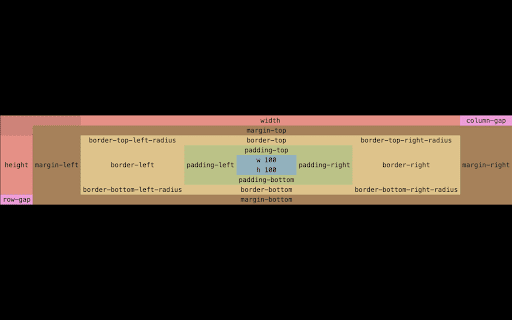
An extension that allows users to inspect HTML elements to visualize content, padding, border, and margin. It provides X and Y axis coordinates and allows for custom color-coding of different spacing areas.

Developer:Ernest
Version:2.12.2
Size:156KiB
Last updated:

Overview

Installs

20K+

Rating

2.9

36 reviews

Languages

1 locales

Includes English

Market analysis

Review-backed positioning, friction, and market signals for this Chrome extension.

Backed by review samples

Macro category

Developer & Designer Tools

Pricing friction

High review signal

Complaint intensity

High review signal

Listing & review signals
Observed signals from store listing text and review samples.

Listing positioning

The product is positioned as a productivity tool for frontend engineers to adjust CSS more effectively. It emphasizes a specialized 'margin' inspection mode and visual indicators for the CSS box model.

Inferred product pattern

A developer utility that shifted from a free tool to a paid model, currently experiencing severe user backlash due to technical bugs and monetization friction.

Review-backed pain points

Users report being forced into a paid model with no clear upgrade path, combined with critical technical failures where the extension creates log files occupying 60GB to 300GB of disk space.

Observed feature gaps

Lack of a functional free tier, missing trial period, and absence of log management to prevent disk overflow.

Tags
CSS InspectorFrontend DevelopmentWeb DesignMargin InspectorDeveloper Utility
Target users

- Frontend Engineers

- Web Developers

- UI/UX Designers

Primary use cases

- Visualizing CSS box model spacing

- Adjusting margins and padding in real-time

- Measuring element coordinates on a page

Positive themes

- Review-backed positive themes are not available.

Negative themes

- Aggressive monetization and paywalls

- Severe system performance degradation due to massive log files

- Loss of previously free functionality

- Broken core features

Observed friction

- Payment required for meaningful usage

- Free-tier complaints detected

- Performance complaints detected

- Privacy complaints detected

- Users express extreme frustration over mandatory logins for previously free features and reports of paid memberships ceasing to function after two months.

Evidence boundary: Extracted from the Chrome Web Store listing and 10 review samples. Limited review sample size; the provided reviews are exclusively negative, providing no insight into successful user experiences.
Complaint summaries
Review-backed complaint signals grouped by operational area.

Support

Complaints indicate a lack of available options to purchase the pro version and general unavailability of support.

Reliability

Critical reliability issues including the extension not functioning on laptops and causing massive storage consumption via bloated log files.

Privacy

Users describe the extension as 'suspicious' due to the creation of enormous, unexplained log files on their local systems.

Access & pricing

- Subscription model observed

- Account required for core usage

- Limited free usage observed

Store listing facts

Listing assets

- Screenshots: 1

- Videos: 1

- Languages: 1

Trust signals

- Developer contact

Store metadata

- Version: 2.12.2

- Size: 156KiB

- Last updated:

Listing SEO keywords

Search intent keywords
Keyword signals for evaluating how users may discover, compare, or search for this extension category.

Core discovery

Inspect element extensionCSS margin inspectorFrontend CSS toolVisual box model inspector

Comparison

Inspect Element vs Chrome DevToolsbest CSS margin inspector

Problem

how to inspect element marginCSS spacing toolvisualize padding and margin

Alternative

Chrome DevTools alternativesCSS layout inspector

Similar extensions

Jump to related discovery paths:

Screenshots

Inspect Element screenshot

Links

Videos: Watch

Recommended Chrome extensions

Related listings from the same category, trending peers, and the same publisher portfolio.

Browse developer
gRPC Devtools icon

gRPC Devtools

Ernest

Browser DevTools extension for debugging gRPC-Web and Connect-ES network requests.

Installs

1K+

Rating

3.3

Postman Interceptor icon

Postman Interceptor

Postman

Capture requests from any website and send them to Postman Client.

Installs

700K+

Rating

4.3

Window Resizer icon

Window Resizer

Ionuț Botizan

Resize the browser window to emulate various screen resolutions.

Installs

700K+

Rating

4.3

Talend API Tester - Free Edition icon

Talend API Tester - Free Edition

Qlik

Visually interact with REST, SOAP and HTTP APIs.

Installs

600K+

Rating

4.8

Detailed SEO Extension icon

Detailed SEO Extension

ahrefsseotoolbar

Get SEO insights at the click of a button to any website you're currently on. Built by full-time SEO's for daily analysis.

Installs

600K+

Rating

4.9

TikTok Pixel Helper icon

TikTok Pixel Helper

TikTok For Business

The TikTok Pixel Helper is a plug-in that monitors whether your TikTok Pixel is functioning properly.

Installs

600K+

Rating

2.6

Google Analytics Debugger icon

Google Analytics Debugger

Google Analytics

Prints useful information to the JavaScript console by enabling the debug version of the Google Analytics Javascript.

Installs

600K+

Rating

4.2

Salesforce Inspector Reloaded icon

Salesforce Inspector Reloaded

Thomas Prouvot

Productivity tools for Salesforce administrators and developers to inspect data and metadata directly from the Salesforce UI.

Installs

500K+

Rating

4.8

Tag Assistant Companion icon

Tag Assistant Companion

Google

The Tag Assistant Companion extension works with Tag Assistant to help troubleshoot installation of gtag.js and Google Tag Manager.

Installs

500K+

Rating

3.1

Axure RP Extension for Chrome icon

Axure RP Extension for Chrome

Axure Software Solutions, Inc.

An extension that allows viewing of locally published Axure RP prototypes (HTML files) from Google Chrome.

Installs

500K+

Rating

3.3