YouTube Ad Controller icon

YouTube Ad Controller Chrome Extension Analysis

Privacy, Security & Ad Blockers

Chrome extension ID: fmklhcikkdkambjpmmpdiaihncopfhlg

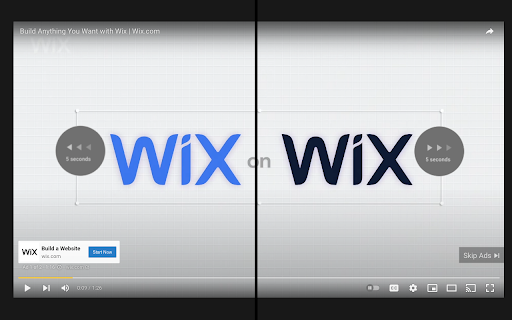
This browser extension adds keyboard-based scrubbing functionality to video advertisements on YouTube. It allows users to use their left and right arrow keys to skip forward or rewind during ads, bypassing standard player restrictions on promotional content.

Developer:Brian Walczak
Version:1.0
Size:10.76KiB
Last updated:

Overview

Installs

233

Rating

3.8

4 reviews

Languages

1 locales

Includes English

Market analysis

Review-backed positioning, friction, and market signals for this Chrome extension.

Backed by review samples

Macro category

Privacy, Security & Ad Blockers

Pricing friction

Low review signal

Complaint intensity

Low review signal

Listing & review signals
Observed signals from store listing text and review samples.

Listing positioning

YouTube Ad Controller positions itself as a utility that gives users control over YouTube advertisements. By enabling arrow key navigation on ads, it allows users to fast forward, rewind, or skip them as they would with any standard video. It targets users who want a manual alternative to ad blocking or the ability to re-watch specific ads.

Inferred product pattern

A lightweight content script injector that listens for keyboard events on the YouTube video player elements during active ad states.

Review-backed pain points

Some users point out that the extension's utility is easily replaced by standard ad blockers. There is also a desire for more granular control keys.

Observed feature gaps

Users have requested the addition of frame-by-frame seeking capabilities using the '<' and '>' keys, which are not currently supported.

Tags
YouTube Ad ControllerVideo Playback ControlAd SkipperKeyboard Shortcuts
Target users

- YouTube viewers who do not use full ad blockers

- Users who want manual control over ad playback

- Keyboard-centric browser users

Primary use cases

- Fast forwarding through long or repetitive non-skippable video ads

- Rewinding to re-watch specific parts of interesting video advertisements

Positive themes

- Effective at avoiding having to watch long ads

- Successfully enables keyboard navigation on ad content

Negative themes

- Perceived redundancy for users who could alternatively use an ad blocker

- Lack of frame-by-frame fine-tuning controls

Observed friction

- No pricing friction was identified; the extension appears to be fully free to use.

Evidence boundary: Analysis is based on the official Chrome Web Store listing descriptions and a sample of 3 user reviews detailing functionality preferences and feature requests. The analysis is constrained by a very small sample size of reviews (4 in total, with 3 analyzed), meaning edge-case bugs or wider user sentiments may not be fully represented.
Complaint summaries
Review-backed complaint signals grouped by operational area.

Support

There are no reported complaints regarding support, account lockouts, or payment issues.

Reliability

No major performance degradation, crashes, or extension failures were highlighted by reviewers.

Privacy

No privacy or security concerns were raised in the public reviews.

Access & pricing

- Free usage observed

- No account requirement observed

- Free plan or free usage claimed

Store listing facts

Listing assets

- Screenshots: 1

- Videos: 0

- Languages: 1

Trust signals

- Developer contact

Store metadata

- Version: 1.0

- Size: 10.76KiB

- Last updated:

Listing SEO keywords

Search intent keywords
Keyword signals for evaluating how users may discover, compare, or search for this extension category.

Core discovery

how to fast forward youtube adsskip youtube ads with keyboardrewind youtube adsyoutube ad controller extension

Comparison

youtube ad controller vs adblockermanual ad skip vs automatic ad block

Problem

cannot skip youtube ads with keyboardhow to control youtube ad playback

Alternative

adblockerublock originyoutube speed controller

Similar extensions

Jump to related discovery paths:

Screenshots

YouTube Ad Controller screenshot

Recommended Chrome extensions

Related listings from the same category, trending peers, and the same publisher portfolio.

Browse developer