PixelZoomer icon

PixelZoomer Chrome Extension Analysis

Developer & Designer Tools

Chrome extension ID: fogkjckfkdcnmnnfmbieljpkmmihhpao

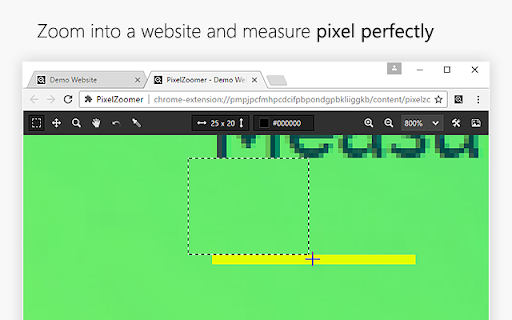
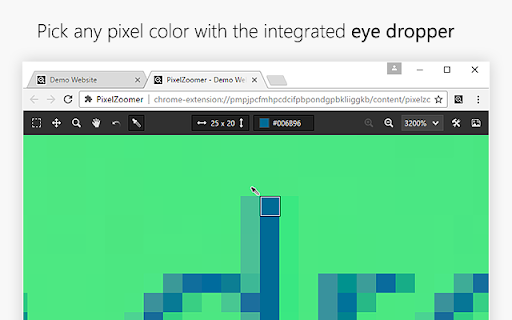
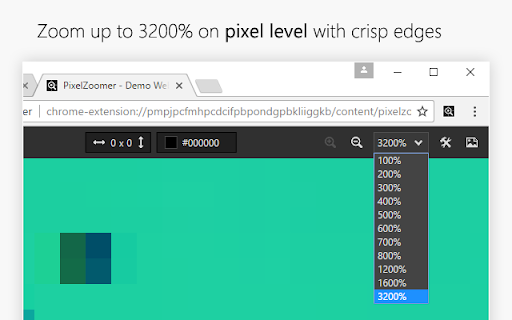
This tool enables users to take a screenshot of a webpage and perform precise visual inspection. It provides features such as zoom up to 3200%, a pixel ruler, and an eye-dropper tool for HEX and RGB values.

Version:1.0.4
Size:60.89KiB
Last updated:

Overview

Installs

30K+

Rating

4.5

51 reviews

Languages

2 locales

Includes Deutsch, English

Market analysis

Review-backed positioning, friction, and market signals for this Chrome extension.

Backed by review samples

Macro category

Developer & Designer Tools

Pricing friction

Low review signal

Complaint intensity

Moderate review signal

Listing & review signals
Observed signals from store listing text and review samples.

Listing positioning

PixelZoomer is positioned as a comprehensive design inspection utility that allows users to capture screenshots for detailed pixel-perfect analysis. It emphasizes its core features of high-magnification zoom, distance measurement, and color picking to aid web developers and designers.

Inferred product pattern

Single-purpose utility extension focused on visual design inspection.

Review-backed pain points

Users have reported inaccuracies in measurement tools and functional issues when using high-resolution (4K) monitors. Some users have also expressed concerns regarding broad browser permissions.

Observed feature gaps

The tool lacks support for diagonal measurement, and users have noted performance issues where the capture function stops working after repeated, rapid use.

Tags
Pixel MeasurementColor PickerDesign InspectionScreenshot Tool
Target users

- Web Developers

- UI/UX Designers

- Front-end Engineers

Primary use cases

- Measuring pixel distances on web layouts

- Extracting color codes from website elements

- Inspecting UI components at high magnification

Positive themes

- Ease of use

- Useful color picker utility

- Clear zooming without blurring

- Efficiency for interface development

Negative themes

- Measurement inaccuracy

- Incompatibility with 4K/high-resolution displays

- Permission concerns

- Occasional snapshot capture glitches

Observed friction

- Performance complaints detected

- Privacy complaints detected

- No pricing friction observed as the tool appears to be free.

Evidence boundary: Evidence is drawn from 10 user reviews, highlighting both the tool's utility for design tasks and specific limitations regarding display resolution and measurement precision. Review sample size is relatively small and covers a long timeframe (2017-2025), which may include feedback on legacy versions.
Complaint summaries
Review-backed complaint signals grouped by operational area.

Support

No formal support complaints found, though performance bugs are noted.

Reliability

Reports exist regarding snapshot glitches during continuous use and display issues on 4K monitors.

Privacy

A user flagged concerns regarding the 'read and change all information on all sites' permission scope.

Access & pricing

- Free usage observed

- No account requirement observed

- Free plan or free usage claimed

Store listing facts

Listing assets

- Screenshots: 3

- Videos: 1

- Languages: 2

Trust signals

- Developer contact

Store metadata

- Version: 1.0.4

- Size: 60.89KiB

- Last updated:

Listing SEO keywords

Search intent keywords
Keyword signals for evaluating how users may discover, compare, or search for this extension category.

Core discovery

pixel ruler chrome extensionweb design measuring toolchrome color picker extensionscreenshot design tool

Comparison

PixelZoomer vs Page Rulerbest design inspection extension

Problem

inaccurate pixel measurement4k display issueschrome extension permission concerns

Alternative

Page Ruler ReduxColorZillaWindow Resizer

Similar extensions

Jump to related discovery paths:

Screenshots

PixelZoomer screenshot

Links

Videos: Watch

Recommended Chrome extensions

Related listings from the same category, trending peers, and the same publisher portfolio.

Browse developer