Visual Enhancements for Google Meet™ icon

Visual Enhancements for Google Meet™ Chrome Extension Analysis

Automation & Workflow Efficiency

Chrome extension ID: fondjoepdngpdimiojnpikbajiakobhb

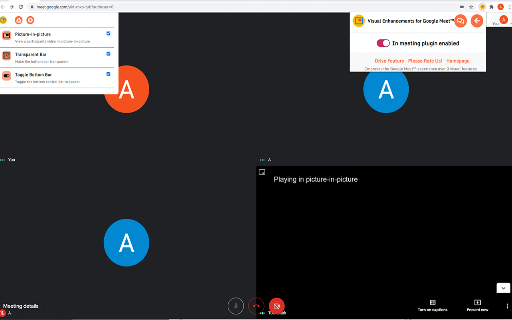
A browser extension that modifies the user interface of Google Meet. It allows users to customize their viewing experience by manipulating the control bar and enabling a picture-in-picture mode for participants.

Developer:Free Apps
Version:3.0.0
Size:526KiB
Last updated:

Overview

Installs

5K+

Rating

4.2

71 reviews

Languages

41 locales

Includes Deutsch, English, English (United States), Filipino...

Market analysis

Review-backed positioning, friction, and market signals for this Chrome extension.

Backed by review samples

Macro category

Automation & Workflow Efficiency

Pricing friction

Low review signal

Complaint intensity

Moderate review signal

Listing & review signals
Observed signals from store listing text and review samples.

Listing positioning

The product is positioned as a free utility designed to improve the Google Meet experience. It focuses on providing three specific visual enhancements: Picture-in-Picture mode, a transparent bottom bar, and the ability to toggle the bottom bar visibility.

Inferred product pattern

A niche UI enhancement utility for video conferencing platforms to optimize screen real estate.

Review-backed pain points

Users report that hiding the bottom bar does not actually reclaim the screen space for the video or presentation, leaving an awkward empty or black gap at the bottom.

Observed feature gaps

The extension lacks the ability to automatically expand the video/presentation content to fill the space left by a hidden bar; users also requested the ability to hide meeting notifications.

Tags
Google MeetUI CustomizationVideo ConferencingProductivity
Target users

- Remote workers

- Online students

- Google Meet users

Primary use cases

- Maximizing presentation screen space

- Viewing participants in picture-in-picture mode

- Customizing meeting UI layout

Positive themes

- Useful for hiding the bottom bar

- Convenient picture-in-picture functionality

Negative themes

- UI leaves empty or black space instead of expanding content

- Picture-in-picture failing on certain browsers

- Settings interface overlapping presenter names

Observed friction

- Performance complaints detected

- No pricing friction observed as the product is claimed to be free.

Evidence boundary: Evidence is drawn from the official store listing and user reviews provided in Spanish, Italian, and English. Analysis is based on a limited sample of 71 reviews and does not represent the entire user base.
Complaint summaries
Review-backed complaint signals grouped by operational area.

Support

No support complaints were identified in the provided samples.

Reliability

Users reported that the Picture-in-Picture feature may not function correctly on all browsers or devices.

Privacy

No privacy or security complaints were observed.

Access & pricing

- Free usage observed

- No account requirement observed

- Free plan or free usage claimed

Store listing facts

Listing assets

- Screenshots: 1

- Videos: 0

- Languages: 41

Trust signals

- Developer contact

- Official website

Store metadata

- Version: 3.0.0

- Size: 526KiB

- Last updated:

Listing SEO keywords

Search intent keywords
Keyword signals for evaluating how users may discover, compare, or search for this extension category.

Core discovery

Google Meet visual enhancementsGoogle Meet UI customizationGoogle Meet picture in picturehide Google Meet bottom bar

Comparison

Google MeetZoomMicrosoft Teams

Problem

Google Meet empty spaceGoogle Meet black barGoogle Meet full screen issue

Alternative

Google Meet productivity toolsGoogle Meet layout changer

Similar extensions

Jump to related discovery paths:

Screenshots

Visual Enhancements for Google Meet™ screenshot

Links

Recommended Chrome extensions

Related listings from the same category, trending peers, and the same publisher portfolio.

Browse workflow